Surface Pro 11 5G stopped working on T-Mobile - No Service

Anonymous
2024-12-30T16:05:24+00:00

I have had the Surface Pro 11 for several months now and was on my second road trip with it during the Christmas week when during the middle of work, my 5G connection dropped.
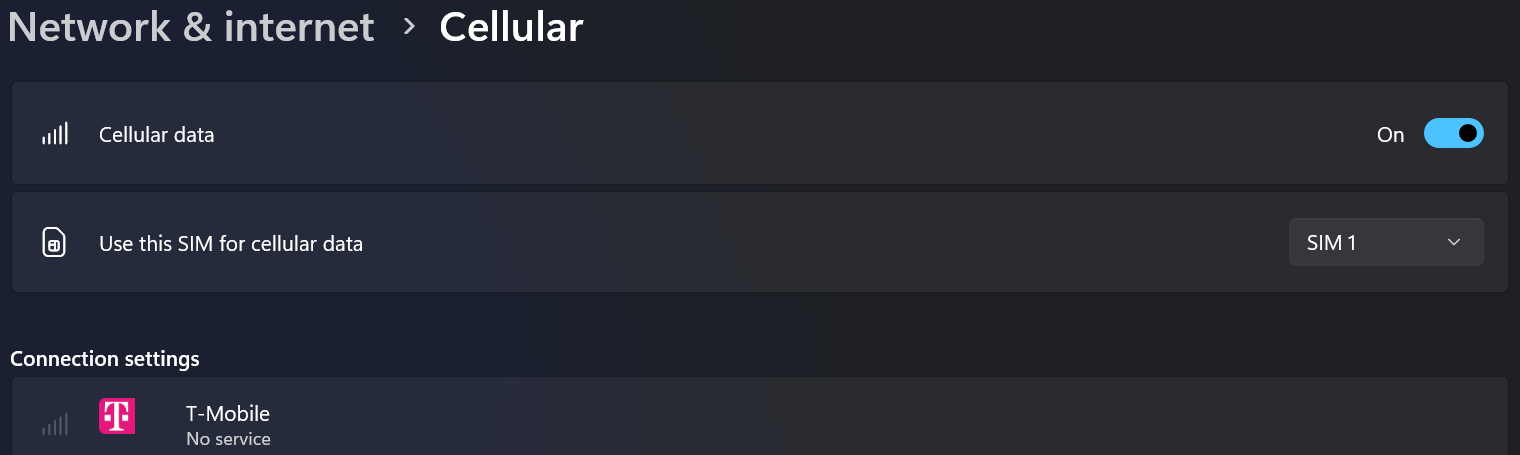
It recognizes the sim as T-Mobile but always shows no service. Rebooting, reseating the sim and reinstalling the "Surface 5G Mobile Broadband" driver has not resulted in any connection. I have checked with T-Mobile and my account and line are fine. I was only at 11GB of a 75GB plan.

In the System Event Logs, I do see a lot of Smart Card Service errors, event id 610 with different descriptions:

1.

Log Name: System

Source: Microsoft-Windows-Smartcard-Server

Date: 12/30/2024 10:47:12 AM

Event ID: 610

Task Category: None

Level: Error

Keywords: Classic

User: N/A

Computer: OneThree-SP11

Description:

Smart Card Reader 'Microsoft UICC ISO Reader c793387e 0' rejected IOCTL POWER: The data area passed to a system call is too small. If this error persists, your smart card or reader may not be functioning correctly.

Command Header: 00 00 00 00

Event Xml:

610

0

2

0

0

0x80000000000000

454132

The data area passed to a system call is too small.

Microsoft UICC ISO Reader c793387e 0

POWER

00 00 00 00

2.

Log Name: System

Source: Microsoft-Windows-Smartcard-Server

Date: 12/30/2024 10:47:02 AM

Event ID: 610

Task Category: None

Level: Error

Keywords: Classic

User: N/A

Computer: OneThree-SP11

Description:

Smart Card Reader 'Microsoft UICC ISO Reader c793387e 0' rejected IOCTL TRANSMIT: Access is denied. If this error persists, your smart card or reader may not be functioning correctly.

Command Header: 00 a4 04 00

Event Xml:

610

0

2

0

0

0x80000000000000

454129

Access is denied.

Microsoft UICC ISO Reader c793387e 0

TRANSMIT

00 a4 04 00

3.

Log Name: System

Source: Microsoft-Windows-Smartcard-Server

Date: 12/30/2024 10:47:02 AM

Event ID: 610

Task Category: None

Level: Error

Keywords: Classic

User: N/A

Computer: OneThree-SP11

Description:

Smart Card Reader 'Microsoft UICC ISO Reader c793387e 0' rejected IOCTL TRANSMIT: The parameter is incorrect. If this error persists, your smart card or reader may not be functioning correctly.

Command Header: 00 ca 7f 68

Event Xml:

610

0

2

0

0

0x80000000000000

454128

The parameter is incorrect.

Microsoft UICC ISO Reader c793387e 0

TRANSMIT

00 ca 7f 68

Removing the card and disabling cellular stops the generation of the errors. I thought about switching to an eSim, but T-Mobile said the Surface Pro 11 was not compatible. I have yet to order a physical SIM as I would like to see if it is a software issue. I don't want to pay for a replacement only to have the same issue.

Surface | Surface Pro | Network

Locked Question. This question was migrated from the Microsoft Support Community. You can vote on whether it's helpful, but you can't add comments or replies or follow the question.

0 comments No comments

31 answers

Sort by: Most helpful
  1. Anonymous
    2025-06-20T19:19:07+00:00

    Some good news for anyone that comes across this!

    I work for a municipality, and we utilize Surface Pro X's that have had this same issue of T-Mobile Cellular dropping to "no service" randomly. I have been working with a T-Mobile Resolution Manager who has been working with T-Mobile Engineers, who have been working on this issue with Microsoft Engineers.

    They finally have a fix!

    Go to Windows Update and click to join the Windows Insider Updates. Join the Release Preview channel. Run Windows Update and restart your computer, rinse and repeat several times until all updates are installed. The latest update on the Release Preview channel releases the issue.

    More specifically, it is the MR3 update that addresses it. Here are the changes in the update:

    • QZSS GPS signals are being scanned in the U.S.
    • In certain networks, cellular connection shows the registered provider, but the device reports “No Service.”
    • Modem crash: sys_m_smsm_mpss.c:291 – APPS force stops due to "IPA: unrecoverable error has occurred, asserting."
    • Resolved condition where packets from MHI put the IPA in an unresponsive state. Updated the IPA driver.
    • Updated SVN to meet PTCRB requirements.

    I can confirm this fixed the issue on all devices we experienced the issue on!

    Was this answer helpful?

    0 comments No comments
  2. Anonymous
    2025-06-10T18:38:53+00:00

    Ive been having the same issue. got a new SP11 in march. The only reason I bought this laptop was because of built in sim feature. I have a phone I could hotspot from but I pay extra for another data plan so I dont need to hotspot. Sim worked fine for a few weeks. I flew across the country and started getting no service, but my phone was 5g full bars. On phone with t mobile support for hours of troubleshooting. They ended up doing a last ditch effort and resetting something on their end. It worked, for a day. Once it happened again, i gave up and used hotspot for a while. I noticed every couple weeks it would get no service for a few days, then it would start working again. Got new physical sim card and it fixed it, for a couple weeks. Switched to ESIM. Worked great, for a couple weeks, off for a few days, then working again. Rinse and repeat. Tried microsoft support. Factory reset didnt do it. Ended up returning laptop for a full refund within the 60 day window. Got a new one, same model, this time with the no-questions replacement plan where they send you a new laptop. Esim has been working great, and its probably been 3 weeks and its done it again. Super frustrating.

    One thing ive noticed, every time it happens, the first thing I do is go to cellular settings, and look at the network. It will say tmobile, and start flickering no service extremely fast for a few seconds.. Then its stuck on no service, until something resets internally after a few days. I hope this gets fixed. The main reason I bought it is broken, and Im stuck paying a data plan that I cant use when it counts. With them releasing the intel model and now the 12" screen it seems like the sp11 is old news already.

    Was this answer helpful?

    0 comments No comments
  3. Anonymous
    2025-06-04T16:10:19+00:00

    I ran into the same problems after installing the KB5058411 update. Nothing could make the sim card reader work again. Fortunately Google-Fi has recently enabled eSim, so I was able to restore connectivity that way. Super frustrating! https://support.google.com/fi/answer/6330195?hl=en

    Was this answer helpful?

    0 comments No comments
  4. Anonymous
    2025-06-04T16:09:21+00:00

    I ran into the same problems after installing the KB5058411 update. Nothing could make the sim card reader work again. Fortunately Google-Fi has recently enabled eSim, so I was able to restore connectivity that way. Super frustrating! https://support.google.com/fi/answer/6330195?hl=en

    Was this answer helpful?

    0 comments No comments
  5. Anonymous
    2025-04-13T07:33:08+00:00

    Many people are having the same problem, and I also came to this feed and saw a comment saying that it worked after replacing the SIM card with another SIM card and then replace original one, and another person said that it worked after changing to eSIM mode and then back to SIM mode without replacing the SIM card. I also repeated rebooting, removing and inserting the SIM card repeatedly, cleaning the contact area, and turning cellular communication on and off, and as above, I just changed it to eSIM mode (without actually activating the eSIM) and then back to SIM mode, and it was resolved. It is still working well.

    When changing to eSIM mode, don't just wait a little while, but more than 5 minutes? I think you should wait until the eSIM mode tries to catch a signal and then return, so that it has the same effect as replacing it with a physical SIM card from another carrier and then returning.

    As a user who doesn't know much about computers, I just hope this helps.

    Was this answer helpful?

    0 comments No comments