Share via

Surface pro 7 with i5 16 GB ram and 256 GB ssd can run Fusion 360 easily or it is better the i7?

Anonymous
2020-04-26T13:31:47+00:00

I would like to buy a Surface Pro 7 to use it with softwares like Fusion 360, Cura, Adobe Photoshop and Illustrator. Is it enough the i5 8 GB ram 256 GB ssd or it's better to buy the i7 16 GB ram and 256 GB ssd?

Thank you.

Surface | Surface Pro | Power and battery

Locked Question. This question was migrated from the Microsoft Support Community. You can vote on whether it's helpful, but you can't add comments or replies or follow the question.

0 comments No comments

6 answers

Sort by: Most helpful
  1. Anonymous
    2020-04-29T07:27:48+00:00

    Dear Marrion,

    Surface Book 2 is older with less perfomance processors and rams, less portable and more expensive than surface pro 7. I don't think that, only because it has a dedicated GPU it is better than surface pro 7.

    I will follow the suggestions of other users on the web that already use Fusion 360 on Surface Pro 7 without problems.

    But I don't think that suggesting an older computer only because you earn more if I buy it is a good solution.

    Was this answer helpful?

    4 people found this answer helpful.
    0 comments No comments
  2. Anonymous
    2020-04-29T04:47:04+00:00

    Hi Smichael86,

    Thank you for reaching out to Microsoft Community.

    Integrated graphics are built into the CPU of the device, they can't be as powerful as dedicated graphics cards. Dedicated graphics are more powerful as these comes from a graphics card added to the system. Yes, Intel® Iris™ Plus (i5, i7)chip has a small amount of RAM Integrated GPU. All the other specifications of the Surface Pro 7 i5/i7 met the System Requirement for the Fusion 360. When it comes to the Graphics card though, Recommended specs for complex modelling and processing requires Dedicated GPU with 4GB which the Surface Pro 7 doesn't have. I suggest that you check our Surface Book 2 also which has the NVIDIA Graphics card.

    If this answer your question, we highly encourage you to inform our Community by clicking on Yes or marking my post as an answer. This will help other members who may have the same issue as you. Otherwise, don't hesitate to update us so we can further assist you.

    Kind Regards,

    Marrion Y.

    Was this answer helpful?

    3 people found this answer helpful.
    0 comments No comments
  3. Anonymous
    2020-04-26T22:58:04+00:00

    Hi Smichael86,

    Thank you for reaching out Microsoft Community. 

    You basically need to check the system requirements of  Fusion 360 if this will work just fine on a Surface Pro 7 with lower configuration.  If this requires GPU, it's best to purchase a device that has GPU on it.  To make sure that you'll not going to encounter any issues, please check the recommended system requirements of a software before making a decision to purchase a Surface device.

    If this addresses your concern,feel free to mark this post as an answer. Otherwise, don't hesitate to respond to this thread for further assistance.

    Kind Regards,

    Crest_Z

    Was this answer helpful?

    3 people found this answer helpful.
    0 comments No comments
  4. Anonymous
    2020-04-27T19:37:26+00:00

    Hi Smichael86,

    Thank you for sharing the system requirements.

    The Surface Pro 7 doesn't have GPU and since this software requires a dedicated GPU, this may not work well on a Surface  Pro 7. But if in case you're interested in purchasing a Surface device with GPU, you may want to purchase aSurface Book 2. On the other hand, I have this concern of yours raised and I got a confirmation that the software won't work ideally on a Surface device without GPU so it's best to purchase a device that meets the software's system requirements for you not encounter issues.

    If this answers your question, feel free to mark this post as an answer. Otherwise, don't hesitate to respond to this thread if you still need assistance.

    Kind Regards,

    Crest_Z

    Was this answer helpful?

    2 people found this answer helpful.
    0 comments No comments
  5. Anonymous
    2020-04-27T07:42:07+00:00

    Hi Smichael86,

    Thank you for reaching out Microsoft Community. 

    You basically need to check the system requirements of  Fusion 360 if this will work just fine on a Surface Pro 7 with lower configuration.  If this requires GPU, it's best to purchase a device that has GPU on it.  To make sure that you'll not going to encounter any issues, please check the recommended system requirements of a software before making a decision to purchase a Surface device.

    If this addresses your concern,feel free to mark this post as an answer. Otherwise, don't hesitate to respond to this thread for further assistance.

    Kind Regards,

    Crest_Z

    Hi Crest,

    I have already checked the system requirements of Fusion 360, but I'm not able to understand if the Surface Pro 7 is enough. If I was able to compare I didn't post a question here.

    These are the system requirements fo Fusion 360:
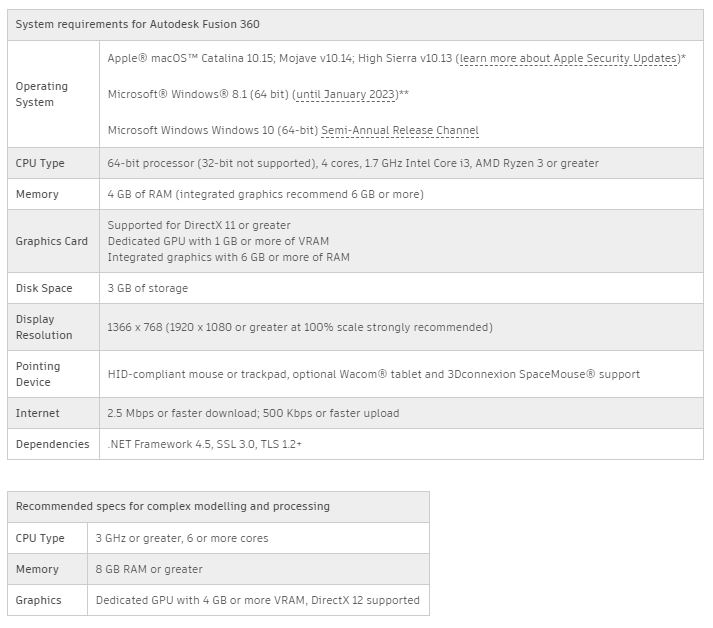
    Could you tell me if the Surface Pro 7 can run it and in which configuration?

    Thank you.

    Was this answer helpful?

    1 person found this answer helpful.
    0 comments No comments