Share via

Connecting a wireless keyboard to a computer

Anonymous
2024-08-19T15:28:10+00:00

Hello,

My wireless keyboard got disconnected.

There is no Bluetooth button on the keyboard or any reset button on the back that can be pressed for the computer to recognize it.

Do you see the 2 images I attached?

Please help me!!!!

Surface | Accessories | Surface mice and keyboards

Locked Question. This question was migrated from the Microsoft Support Community. You can vote on whether it's helpful, but you can't add comments or replies or follow the question.

0 comments No comments

3 answers

Sort by: Most helpful
  1. Anonymous
    2024-08-20T06:38:48+00:00

    Hello OrnaVH,

    Welcome to Microsoft Community.

    Thank you for the screenshot.

    It is understood that this is an ergonomic keyboard and mouse set, the ergonomic keyboard and numeric keyboard without Bluetooth buttons, then you should have a separate USB receiver:

    If the device contains a mouse, the receiver is usually stored in the mouse:

    Because it is very important to note that this set of devices may need to use a USB receiver to receive 2.5Ghz Bluetooth signals.

    So, I think you may need to find this receiver in order to keep your two Bluetooth keyboards working.

    Best Regards,

    Mitchell | Microsoft Community Support Specialist

    3 people found this answer helpful.
    0 comments No comments
  2. Anonymous
    2024-08-26T05:23:37+00:00

    Hi OrnaVH,

    It looks like I was right, and the devices usually have a USB receiver that comes with them.

    Because the receiver usually comes with a special fit at the factory, if you just buy a new receiver, it won't necessarily work with your ergonomic keyboard set.

    If it's already broken, then I actually recommend you contact accessory support directly and check if you can get a new USB receiver from them.

    I can direct you to parts support:

    1. Use your personal Microsoft account (not your organization account) to access the following links:

    Contact - Microsoft Support

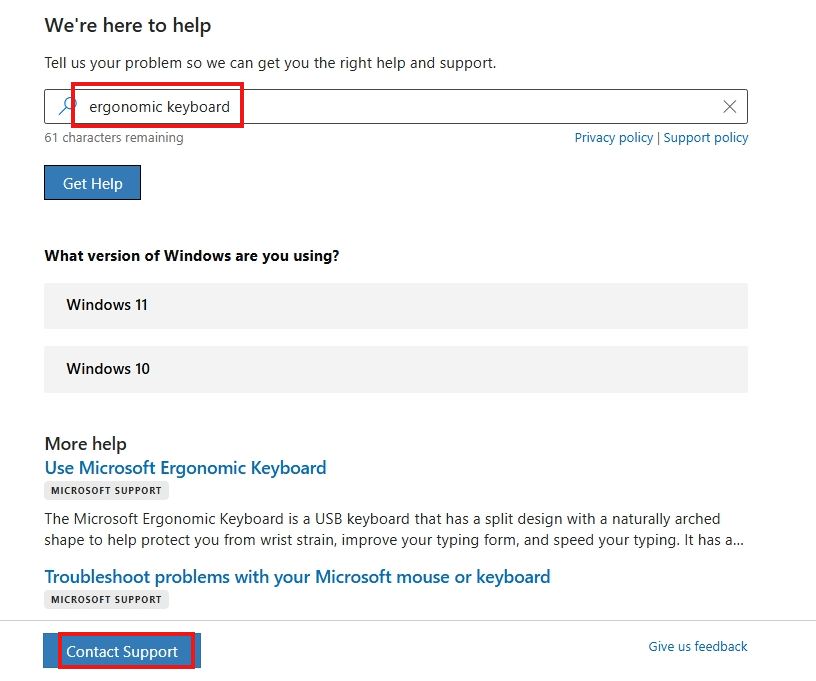
    1. Type ergonomic keyboard, press Enter, and click "Contact Support" at the bottom:
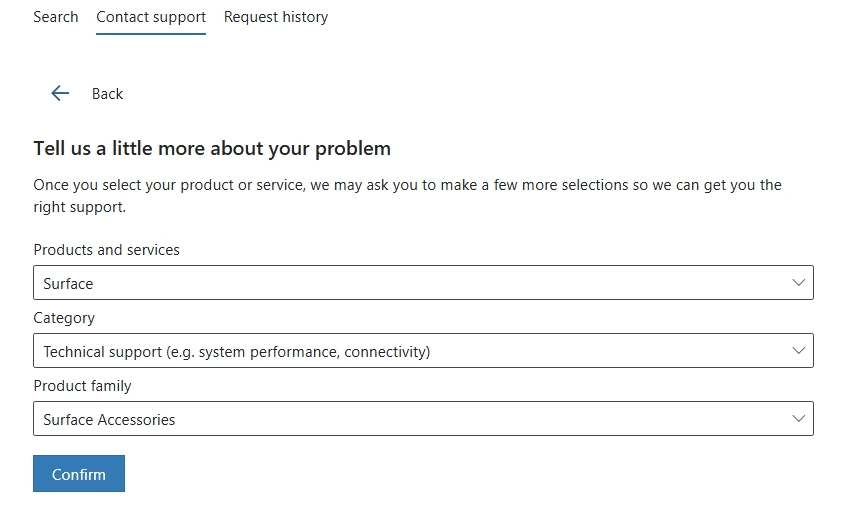
    1. Make a selection based on the screenshot below and click Confirm:
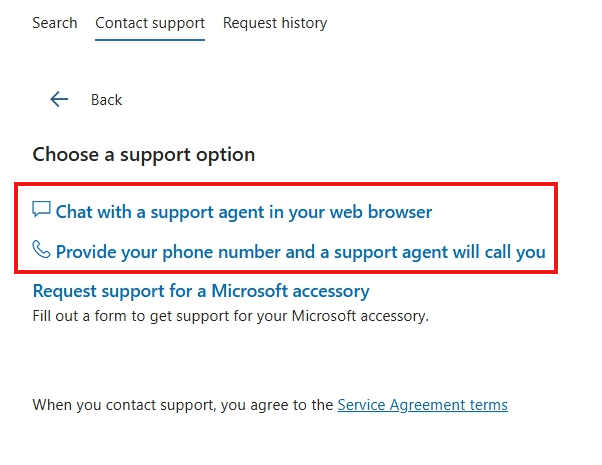
    1. You will see contact options for Chat support and Phone support, please contact them during business hours:
    I wish you all the best.

    As for Bluetooth laptops, let me kindly explain to you here that these are two different ways of connecting.

    Connect your device directly to your laptop via Bluetooth, using your laptop's Bluetooth function, but your ergonomic keyboard can only recognize the signal from your USB receiver (or adapter), not directly from your laptop's Bluetooth signal.

    Best Regards,

    Mitchell | Microsoft Community Support Specialist

    0 comments No comments
  3. Anonymous
    2024-08-20T07:46:18+00:00

    Thank you for your answer!!! The reciever I had with the mouse is broken (it fell).

    Can I buy any reciever that can receive 2.5Ghz Bluetooth signals or should it be only a special microsoft reciever?

    If I have a laptop computer with a Bluetooth, does it mean that I already have a reciever? The connection doesn't work...

    Best regards'

    Orna

    0 comments No comments