Share via

Program (NordVPN) won't run on the new Snapdragon processor

Anonymous
2024-06-27T13:18:38+00:00

Every program I've installed so far except one has run fine. With NordVPN, I get a message saying it requires an X86 or X64 processor. Is there any tweaks such as a compatibility mode that will fix the issue? If not, are there recommendations as to the best VPN to run on the new Surface Pro 11? Thanks....

Surface | Surface Pro | Install and update

Locked Question. This question was migrated from the Microsoft Support Community. You can vote on whether it's helpful, but you can't add comments or replies or follow the question.

0 comments No comments

13 answers

Sort by: Most helpful
  1. Anonymous
    2024-08-23T18:24:13+00:00

    The OpenVPN solutions that Nord and Express offer used to work on my Surface X on ARM but no longer does. I haven't found anything that works in 2 years. Web search and you may find that Nord is working on an app for ARM but that's it. No timescale for delivery.

    Was this answer helpful?

    1 person found this answer helpful.
    0 comments No comments
  2. Anonymous
    2024-06-29T06:10:16+00:00

    Hi iatricsb,

    Yes, if the software can't be installed and used on ARM-based devices, then following the advice of NordVPN customer service, manually configuring the VPN directly in the VPN Settings of the Surface may be a temporary solution (click on the Start menu - Settings - Network and Internet- VPN).

    You can confirm all the correct parameters with customer support of Nord VPN and set them here.

    But if you've followed all the right instructions and still can't manually configure a VPN in Windows, OpenVPN may be another choice.

    But as I mentioned at the end of my previous reply, you can search the Microsoft Store to see if there are any VPN software with good reviews, they can be listed in the Microsoft Store, which at least proves that it can be installed directly into your device. You can verify that the software matches your operating system and architecture in the system requirements of each software.

    Best Regards,

    Mitchell | Microsoft Community Support Specialist

    Was this answer helpful?

    1 person found this answer helpful.
    0 comments No comments
  3. Anonymous
    2024-06-28T13:26:51+00:00

    Thank you for the reply. I got some responses from NordVPN, and here in a short statement is their response regarding ARM.... "Unfortunately, due to incompatible issues between TAP and TUN virtual adapters and devices with ARM processors, the NordVPN application will not work"

    They did say that I could set up the VPN manually by either using the Windows manual VPN setup or using their config file in OpenVPN. I haven't tried the latter yet, but every attempt to do it with the Windows manual setup resulted in a policy error (they had instructions on how to do it but could not get it to work).

    I will try the link you posted from Nord regarding debugging compatibility mode, but I would think if that works they would have suggested it in their e-mails to me. But worth a try. Otherwise the last option will be to try getting their config file and downloading OpenVPN.

    Thanks for the response!

    Was this answer helpful?

    1 person found this answer helpful.
    0 comments No comments
  4. Anonymous
    2024-06-28T13:31:52+00:00

    I tried the link provided regarding compatibility issues, but that article deals with if you've got it installed and it doesn't work. Mine doesn't install at all, so there isn't a folder for NordVPN yet and I can't do the things they suggest. OpenVPN may be the only way, though I'm looking for other VPN programs that are compatible as an alternative.

    Was this answer helpful?

    0 comments No comments
  5. Anonymous
    2024-06-28T07:29:02+00:00

    Hello iatricsb,

    Welcome to Microsoft Community.

    After fully reading everything you posted here, I immediately went to NordVPN's **** support website to find the corresponding information.

    I noticed that it should be able to support Windows 11:

    https://support.nordvpn.com/hc/en-us/articles/20226455946257-What-operating-system-versions-does-NordVPN-support#:~:text=Windows%3A%20Windows%207%20Service%20Pack%201%20Windows%208.1,Sur%2C%20macOS%2012%20Monterey%2C%20and%20macOS%2013%20Ventura****
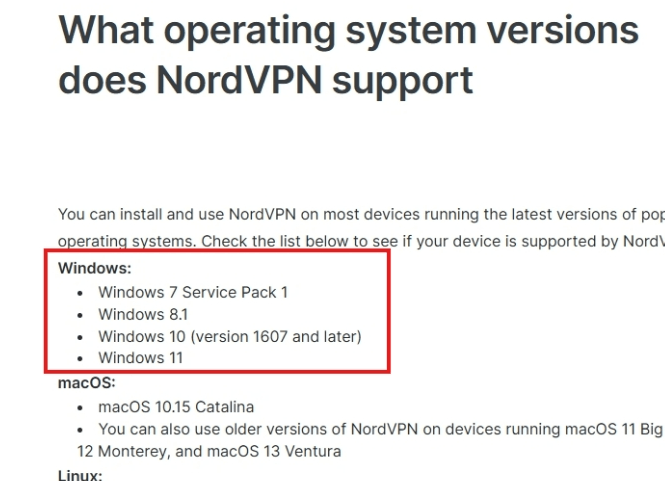
    However, the support link does not specify X86, X64, or arm, so at least from the information in the support link, the software should be compatible with all versions of Windows 11.

    The situation is that you can't use NordVPN properly on the Surface Pro 11. I found the corresponding support article from NordVPN's support website on how to debug compatibility mode, and after reading it thoroughly, I confirmed that this is the debugging procedure for compatibility mode:

    https://support.nordvpn.com/hc/en-us/articles/20286695851537-Error-This-program-does-not-support-the-version-of-Windows-your-computer-is-running****

    Disclaimer: These are non-Microsoft websites. The pages appear to be providing accurate and safe information. Watch out for ads on the site that may advertise products frequently classified as PUP (Potentially Unwanted Products). Thoroughly research any product advertised on the site before you decide to download and install it.

    Microsoft provides no assurances and/or warranties, implied or otherwise, and is not responsible for the information you receive from the third-party linked sites or any support related to technology.

    However, if you find that the VPN software cannot be run in compatibility mode, then I think you should report this issue to software customer support.

    Due to community rules, we are not allowed to recommend any third-party software to our customers, but I recommend that you do a search in the Microsoft Store and refer to the usage reviews of the software.

    Best Regards,

    Mitchell | Microsoft Community Support Specialist

    Was this answer helpful?

    0 comments No comments