Share via

Why isn’t my Surface Go (Model 1824) supported for Windows 11 despite being a Microsoft product?

Anonymous
2024-12-09T00:17:31+00:00

Hello,

I’m a dedicated Microsoft user with a Surface Go (Model 1824), which I rely on for work. I was disappointed to learn that my device doesn’t meet the requirements for Windows 11 due to the Intel Pentium Gold 4415Y processor, despite being a Microsoft product and relatively modern.

Windows 11 emphasizes innovation and security, which aligns perfectly with why I chose the Surface Go—a lightweight and efficient device ideal for professionals. However, excluding this model feels counterintuitive given its design and purpose.

I’d like to understand:

  1. Why wasn’t the Surface Go Model 1824 prioritized for Windows 11 compatibility?
  2. Are there plans to extend support to slightly older devices like mine, or provide an optimized Windows 11 version for Surface Go users?
  3. What options do Microsoft Surface users have to ensure their devices remain current with new OS releases?

I appreciate the work that goes into developing robust systems, but I’d like clarity on how Microsoft is addressing the needs of loyal Surface users who find themselves left behind in this transition.

Thank you in advance for your response and guidance.

***Move from Windows / Windows 11 / Windows update***

Surface | Surface Go | Install and update

Locked Question. This question was migrated from the Microsoft Support Community. You can vote on whether it's helpful, but you can't add comments or replies or follow the question.

0 comments No comments

4 answers

Sort by: Most helpful
  1. Anonymous
    2024-12-11T18:36:42+00:00

    Could you please elaborate on why the Intel Pentium Gold 4415Y processor does not meet the minimum hardware requirements for Windows 11, as the sister chip 4425y has a seemingly identical feature set, with only apparent difference being a 100mhz clock speed difference - yet still 1.6 ghz compared to the 1.0 ghz minimum requirement listed.

    As a Microsoft customer i got burned when you abandoned Windows Phone, and i have no trust in purchasing another microsoft again, if i get burned on my Surface Go and you guys turn it into e-waste.

    7 people found this answer helpful.
    0 comments No comments
  2. Anonymous
    2025-01-06T16:31:59+00:00

    Put simply, what does Microsoft recommend users with a first generation Surface Go do with the hardware? I have a hard time believing the only options are either never connect it to the internet, or throw it away. What do you suggest?

    3 people found this answer helpful.
    0 comments No comments
  3. Anonymous
    2025-01-09T18:23:13+00:00

    Hello i wil rescue you from this!

    I also have Surface Go which running Bodhi Linux altough before Linux i installed Windows 11 and used as daily OS 😊

    Well u need to bypass those f###### requirements

    1.If u setup Windows 11 directly from iso file file then get this bypasser and activate it by opening the file

    https://1drv.ms/u/c/ab31654c2d780984/EYQJeC1MZTEggKvxOwAAAAABceylNErIpn_qSXCOpJgHMg

    (If the link expires install a Windows 11 bypasser cmd file)

    2.If u setup it from usb download vbox guest additions and copy the bypasser registy export to Windows 11 boot drive! After booting usb simply press Shift + F10 to open CMD type regedit and enter and then import the regedit file you copied to usb drive !

    (If u use Ventoy like me just copy the root of Ventoy drive not in the iso)

    1. If u want to be Windows Insider go ahead and be a dev channel insider and install Windows 11 beta how u want

    BTW it will work exactly great since i installed this on my real Surface GO 1

    Think that Surface Go can run from Windows 10 RTM to Windows 11 24H2

    Windows 10 RTMImage(I dont have Windows 11 image)

    (But i swear i installed Windows 11 24H2 on this thing and it run succesfully)

    I tested this myslef and hope this helps u)

    😊

    And yeah if i install Windows 8.1 it goes but it just Bsods after the setup 😆😅😢

    (Please Comment to this post)

    2 people found this answer helpful.
    0 comments No comments
  4. Anonymous
    2024-12-09T08:49:07+00:00

    Hello, Youla Vellinis.

    Welcome to Microsoft Community!

    Your trust and support for Surface products and Microsoft products is greatly appreciated here. Regarding the system compatibility issue of Surface Go, please allow me to share the following with you.

    First of all, I fully understand your expectations. Running the latest system version on a modernized device is a very reasonable need from a usage perspective. However, the Surface Go, being the first generation of the Go lineup, has hardware-level limitations.

    Simply put, the main reason Surface Go does not currently support upgrading to Windows 11 is that the CPU model (Intel Pentium Gold 4415Y processor) does not meet the minimum hardware requirements for Windows 11. Meanwhile, you can also refer to the following official documents to learn more about Surface compatibility with Windows for more information:

    Surface supported operating systems - Surface | Microsoft Learn
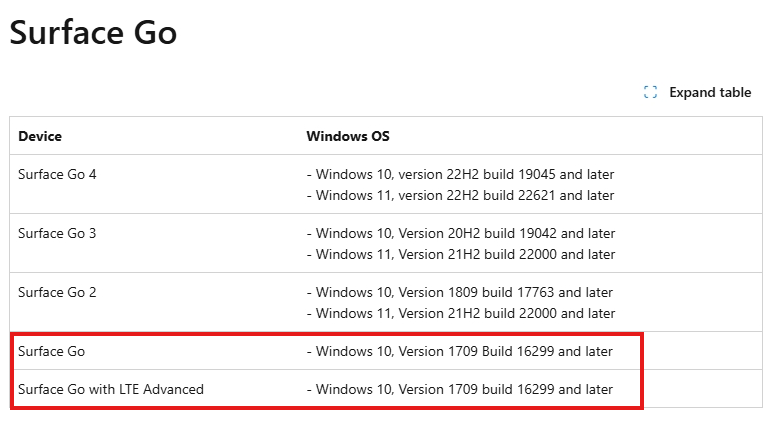
    Image

    I will continue to answer your questions:

    1. Why wasn’t the Surface Go Model 1824 prioritized for Windows 11 compatibility?

    The Surface Go release is scheduled for July 2018, while Windows 11 officially enters development in early 2021.The Surface Go is intended in order to provide a portable, affordable and powerful 2-in-1 device for students, home users and light office needs.

    The Intel Pentium Gold 4415Y processor was chosen for its balance of performance, battery life and thermal performance. While this processor is not the top of the line Core series, it provides enough performance to handle everyday tasks while keeping power consumption and heat generation low. This allows Surface Go to provide a great user experience while maintaining portability.

    2. Are there plans to extend support to slightly older devices like mine, or provide an optimized Windows 11 version for Surface Go users?

    Currently, Microsoft has no plans to offer an optimized version of Windows 11 for the initial Surface Go. The Microsoft community cannot hide this fact from you. From your perspective, we'd love to see Windows 11 have broader compatibility and include more older CPUs.

    In fact, Microsoft does continue to optimize Windows 11 to provide a better experience on more devices. Therefore, we can still look forward to a future update of Windows 11 that may be compatible with the Intel Pentium Gold 4415Y processor.

    You can view eligible devices at Which Surface devices can be upgraded to Windows 11? - Microsoft Support

    3. What options do Microsoft Surface users have to ensure their devices remain current with new OS releases?

    For the Surface devices to synchronize with the latest version of the system, users hardly need to worry about the issue in the later models released. As the hardware specifications of later products are upgraded and updated, they have greater performance and compatibility. Synchronizing the latest system version often just requires automatic installation when the device is booted.

    For older devices, Microsoft recommends continuing to use Windows 10 until the end of the device's support cycle. More at End of support for Windows 10, Windows 8.1, and Windows 7 | Microsoft Windows. Windows 10 is still a very reliable and convenient system version. Of course, if Windows 11 is optimized for compatibility with your Surface Go in the future, you can upgrade right away!

    I am sure you are a very caring user of your device and that is the reason why this Surface Go has been with you till now.

    We value user groups like you very much and will keep a record of the events and needs that you post.

    Thank you again for your support and love for Surface products.

    Finally, please allow me to express my sincere wishes.

    Best Regards.

    Leo.L - Microsoft Community Support Specialist

    1 person found this answer helpful.
    0 comments No comments