Share via

USB-C charging suddenly not working

Anonymous
2024-12-17T14:25:27+00:00

While on charge via the USB-C port the pc alternate every second between charging and not charging.

Charging with the surface charger works ok.

If I plug both the USB-C and the surface charger the surface charger go in error mode (the LED go off) and the charge status alternate once again. Unplugging the USB-C but letting the surface charger doesn't put the computer in charge, I have to unplug and re-plug the surface charger from the wall to get it working again.

I can't say about the charge status but the effect of having USB-C and the surface charger connected at the same time on the surface charger (having to unplug and re-plug the surface charger from the wall to get it working again) trigger without windows started (computer off and on the UEFI configuration mode).

As seen in the many posts about similar problems here, I've tried updating the drivers and firmware, used the system file checker, check with different cables and wall adapters (even an external battery).

PS: before the charge stop, the surface have the time to negotiate 20v from the Power Delivery USB-C charger.

PPS: the USB-C charging works with a 9v Power Delivery USB-C charger.

Is it an hardware failure or can I save this functionality ? USB-C is my primary way to charge the Surface ...

Surface | Surface Book | USB-C

Locked Question. This question was migrated from the Microsoft Support Community. You can vote on whether it's helpful, but you can't add comments or replies or follow the question.

0 comments No comments

2 answers

Sort by: Most helpful
  1. Anonymous
    2024-12-18T18:02:23+00:00

    I have the 60W surface charger (15v 4A) but a surface book 3 with a Nvidia 1650 and a i7 1065g7. My main usb charger is 100w pd compatible.

    Since yesterday I've found that restricting the input tension up to 15v allow me to charge the Surface on USB C.

    So hardware failure probably ...

    Was this answer helpful?

    1 person found this answer helpful.
    0 comments No comments
  2. Anonymous
    2024-12-18T05:47:38+00:00

    Hello, C_Denver.

    Welcome to Microsoft Community!

    After reading your description, I noticed that there seems to be some issues with the charging performance of the USB-C port on your Surface Book 3.

    Updating the drivers is a very effective method and usually resolves most faults originating from the drivers.

    It's worth noting that a similar situation can occur with your charging device if it's not capable of meeting the charging requirements of your Surface Book 3. Sometimes a change in the power connector can result in a change in current output.

    You can confirm this by referring to the content in the link below:

    Surface power supplies and charging requirements - Microsoft Support
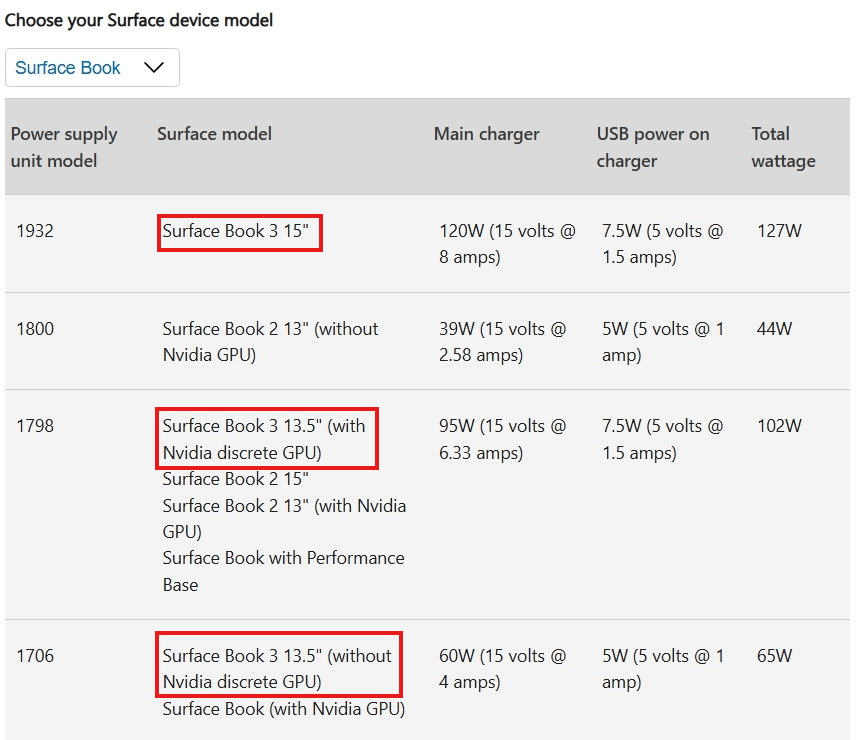
    After confirming that the charging requirements are met along with updating the drivers, if the problem persists, this could be a hardware issue originating from the USB-C port. We recommend that you contact the Surface Technical Support team for more efficient hardware service.

    I share with you the steps to create a service order here:

    Open the Surface App (usually built into your Surface device, or you can download it from the Microsoft Store if you don't have one) and follow the procedure below:

    1. Click "Help and Support" and then click "Get Help".
    2. Briefly describe your problem in the text box, such as "Cannot be charged via USB-C port", and then press Enter.
    3. Click "Contact Support" at the bottom.
    4. Select "Technical Support" and click "Confirm".
    5. You will see "Chat support" and "phone support" options, please contact them during working hours, you will get one-to-one support services.

    I wish you all the best.

    Best Regards.

    Leo.L - Microsoft Community Support Specialist

    Was this answer helpful?

    1 person found this answer helpful.
    0 comments No comments