Exchange | Exchange Server | Management
The administration and maintenance of Microsoft Exchange Server to ensure secure, reliable, and efficient email and collaboration services across an organization.
This browser is no longer supported.
Upgrade to Microsoft Edge to take advantage of the latest features, security updates, and technical support.

Exchange 2019 CU5 (no older Version in AD), 1 Server (Server core install), EX2019 CU 7 update is planed
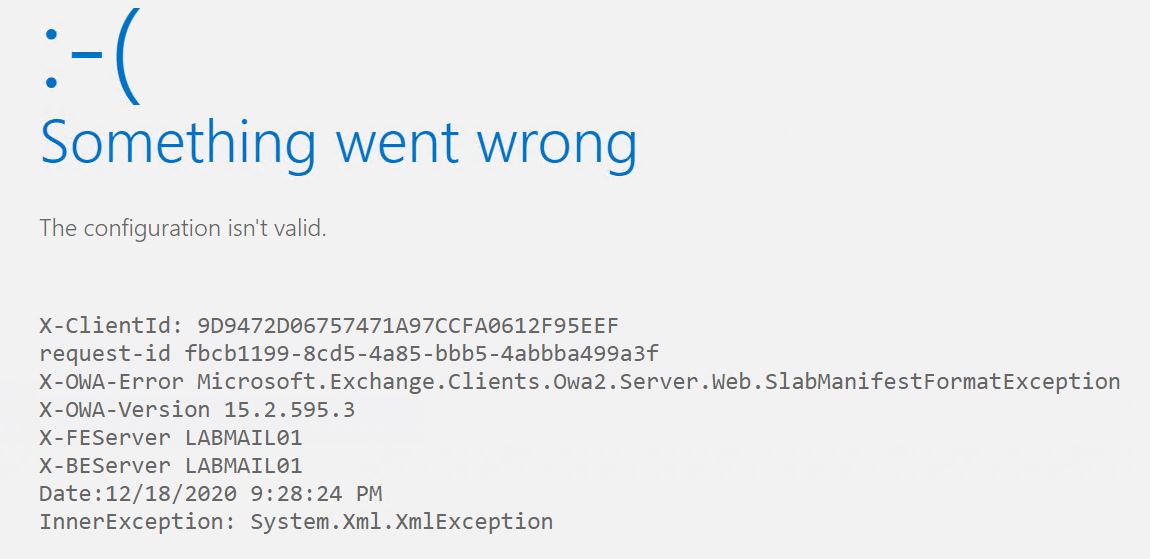
User login over ECP works perfect for all user. Switch to OWA or fresh OWA Login i gets an error for all user:
Something went wrong
The configuration isn't valid.
X-ClientId: 9D9472D06757471A97CCFA0612F95EEF
request-id fbcb1199-8cd5-4a85-bbb5-4abbba499a3f
X-OWA-Error Microsoft.Exchange.Clients.Owa2.Server.Web.SlabManifestFormatException
X-OWA-Version 15.2.595.3
X-FEServer MAIL01
X-BEServer MAIL01
Date:12/18/2020 9:28:24 PM
InnerException: System.Xml.XmlException
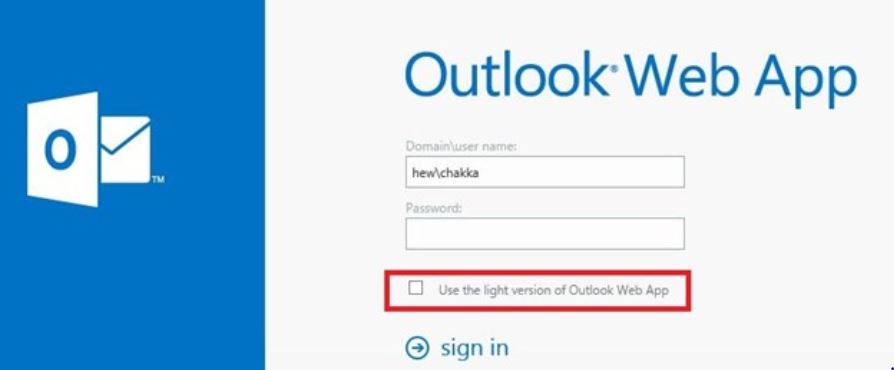
enabled OWA light by running this command in EMS:
Set-OWAVirtualDirectory –LogonPageLightSelectionEnabled $true
OWA light works for all Users.
Then I tried to use iisreset, msexchCanary clear and re-creation of OWA/ECP Web vDirs.
EWS Config
Get-WebServicesVirtualDirectory | fl
RunspaceId                      : 11c4a482-0ba4-487e-842c-8a7298d79f2b
CertificateAuthentication       :
InternalNLBBypassUrl            : https://mail01.domain.int/ews/exchange.asmx
GzipLevel                       : Low
MRSProxyEnabled                 : False
Name                            : EWS (Default Web Site)
InternalAuthenticationMethods   : {Ntlm, WindowsIntegrated, WSSecurity, OAuth}
ExternalAuthenticationMethods   : {Ntlm, WindowsIntegrated, WSSecurity, OAuth}
LiveIdNegotiateAuthentication   :
WSSecurityAuthentication        : True
LiveIdBasicAuthentication       : False
BasicAuthentication             : False
DigestAuthentication            : False
WindowsAuthentication           : True
OAuthAuthentication             : True
AdfsAuthentication              : False
MetabasePath                    : IIS://LABMAIL01.labad.int/W3SVC/1/ROOT/EWS
Path                            : D:\Exchange2019\FrontEnd\HttpProxy\EWS
ExtendedProtectionTokenChecking : None
ExtendedProtectionFlags         : {}
ExtendedProtectionSPNList       : {}
AdminDisplayVersion             : Version 15.2 (Build 595.3)
Server                          : LABMAIL01
InternalUrl                     : https://mail.domain.int/EWS/Exchange.asmx
OWA Config
Get-WebServicesVirtualDirectory | fl
RunspaceId : 11c4a482-0ba4-487e-842c-8a7298d79f2b
CertificateAuthentication :
InternalNLBBypassUrl : https://mail01.domain.int/ews/exchange.asmx
GzipLevel : Low
MRSProxyEnabled : False
Name : EWS (Default Web Site)
InternalAuthenticationMethods : {Ntlm, WindowsIntegrated, WSSecurity, OAuth}
ExternalAuthenticationMethods : {Ntlm, WindowsIntegrated, WSSecurity, OAuth}
LiveIdNegotiateAuthentication :
WSSecurityAuthentication : True
LiveIdBasicAuthentication : False
BasicAuthentication : False
DigestAuthentication : False
WindowsAuthentication : True
OAuthAuthentication : True
AdfsAuthentication : False
MetabasePath : IIS://LABMAIL01.labad.int/W3SVC/1/ROOT/EWS
Path : D:\Exchange2019\FrontEnd\HttpProxy\EWS
ExtendedProtectionTokenChecking : None
ExtendedProtectionFlags : {}
ExtendedProtectionSPNList : {}
AdminDisplayVersion : Version 15.2 (Build 595.3)
Server : LABMAIL01
InternalUrl : https://mail.domain.int/EWS/Exchange.asmx
ECP Config:
PS] C:\Windows\system32>Get-ecpVirtualDirectory | fl name,auth,url
Name                          : ecp (Default Web Site)
InternalAuthenticationMethods : {Basic, Fba}
BasicAuthentication           : True
WindowsAuthentication         : False
DigestAuthentication          : False
FormsAuthentication           : True
LiveIdAuthentication          : False
AdfsAuthentication            : False
OAuthAuthentication           : False
ExternalAuthenticationMethods : {Fba}
InternalUrl                   : https://mail.labad.int/ecp
ExternalUrl                   :
Thanks in advance
Joerg
The administration and maintenance of Microsoft Exchange Server to ensure secure, reliable, and efficient email and collaboration services across an organization.
Answer accepted by question author
' cx='32' cy='32' r='32' /%3E%3Ctext x='50%25' y='55%25' dominant-baseline='middle' text-anchor='middle' fill='%23FFF' %3EYS%3C/text%3E%3C/svg%3E)
Hi @Joerg Schmidtke ,
From the information included with the event, it seems like the issue is related to the following file:
D:\Exchange2019\ClientAccess\owa\prem\15.2.595.3\manifests\slabmanifest.standard.TouchWide.xml
Following the hint in the event information, I tried to locate "Line 6305, position 83" in the slabmanifest.standard.TouchWide.xml file within my current Exchange 2016 lab, but not sure if it's due to the different Exchange version, Line 6305 at my end is " </strings>" so I was not able to proceed.
Then after further research, I found that a new OWA version folder will get created under the path below after every CU is installed:
/ExchangeInstallPath/V15/ClientAccess/OWA/prem
Reference: Remove Old OWA Versions to free up Disk Space
Please Note: Since the web site is not hosted by Microsoft, the link may change without notice. Microsoft does not guarantee the accuracy of this information.
So I am assuming that a new slabmanifest.standard.TouchWide.xml will be used after a new CU is installed.
Given this, personally I'd suggest going ahead to install CU8 as you planned, then check if this issue can get resolved after the update.
If an Answer is helpful, please click "Accept Answer" and upvote it.
Note: Please follow the steps in our documentation to enable e-mail notifications if you want to receive the related email notification for this thread.
Hi,
yes Update to CU8 is done. OWA is now working fine.
Cool. Happy to know that it's now working :)
Hi,
yes, this recently occurred after installing Exchange 2019 CU5, it´s affecting all users in environment. Update to CU8 ist planed.
I seach also the web for "Microsoft.Exchange.Clients.Owa2.Server.Web.SlabManifestFormatException" and "InnerException: System.Xml.XmlException" but there is slighty few informations or nothing to find. Only 1 Thread similar to mine where MS PS Support can fix the issue, but there are no further informations to the solution.
With IE11 from Mgmt Server to (MAIL01 - Server Core) same error. Also with IE Compatibility View for "mail.lab.int/owa" same error.
In App/System Eventlog no clues/errors/warning to this exactly time, but some minutes before/and also after restart IIS or complete Server this in eventlog:
The description for Event ID 144 from source MSExchange OWA cannot be found. Either the component that raises this event is not installed on your local computer or the installation is corrupted. You can install or repair the component on the local computer.
If the event originated on another computer, the display information had to be saved with the event.

The following information was included with the event:

D:\Exchange2019\ClientAccess\owa\prem\15.2.595.3\manifests\slabmanifest.standard.TouchWide.xml
Microsoft.Exchange.Clients.Owa2.Server.Web.SlabManifestFormatException: ' ', hexadecimal value 0x07, is an invalid character. Line 6305, position 83. ---> System.Xml.XmlException: ' ', hexadecimal value 0x07, is an invalid character. Line 6305, position 83.
   at System.Xml.XmlTextReaderImpl.Throw(Exception e)
   at System.Xml.XmlTextReaderImpl.ParseAttributeValueSlow(Int32 curPos, Char quoteChar, NodeData attr)
   at System.Xml.XmlTextReaderImpl.ParseAttributes()
   at System.Xml.XmlTextReaderImpl.ParseElement()
   at System.Xml.XmlTextReaderImpl.ParseElementContent()
   at System.Xml.XmlLoader.LoadNode(Boolean skipOverWhitespace)
   at System.Xml.XmlLoader.LoadDocSequence(XmlDocument parentDoc)
   at System.Xml.XmlDocument.Load(XmlReader reader)
   at System.Xml.XmlDocument.Load(String filename)
   at Microsoft.Exchange.Clients.Owa2.Server.Web.SlabManifestLoader.Load(String folder, String slabManifestFileName, Action`2 logError, String manifestDiskRelativeFolderPath, String scriptDiskRelativeFolderPath, Func`1 isSmartCachingEnabled)
   --- End of inner exception stack trace ---
   at Microsoft.Exchange.Clients.Owa2.Server.Web.SlabManifestLoader.Load(String folder, String slabManifestFileName, Action`2 logError, String manifestDiskRelativeFolderPath, String scriptDiskRelativeFolderPath, Func`1 isSmartCachingEnabled)

The handle is invalid
Hi @Joerg Schmidtke ,
Is this a recently occurred issue or it started after installing Exchange 2019 CU5?
Is it affecting all users in your environment?
I tried to search around on the error"Microsoft.Exchange.Clients.Owa2.Server.Web.SlabManifestFormatException",but hardly find anything relevant. Given this, would you please have a check in the Event Viewer when the error occurs and see if there would be any clues?
Furthermore, it's suggested to test with different web browsers and check how it goes.
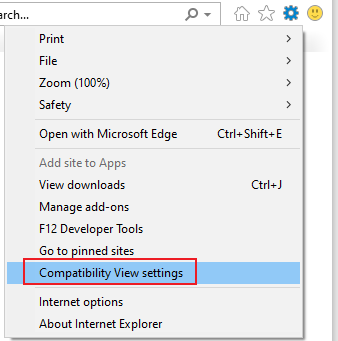
Besides, if you are using IE 11 on the machine, please try enabling Compatibility View for the OWA website to see if it works:
If an Answer is helpful, please click "Accept Answer" and upvote it.
Note: Please follow the steps in our documentation to enable e-mail notifications if you want to receive the related email notification for this thread.
The IIS Logs
2021-01-12 17:20:52 172.16.48.220 POST /owa/auth.owa &CorrelationID=<empty>;&cafeReqId=370783e0-b245-4649-84ec-66858324fcb2;&encoding=; 443 joergs 172.16.48.212 Mozilla/5.0+(Windows+NT+10.0;+Win64;+x64)+AppleWebKit/537.36+(KHTML,+like+Gecko)+Chrome/88.0.4324.41+Safari/537.36+Edg/88.0.705.22 https://mail.labad.int/owa/auth/logon.aspx?replaceCurrent=1&url=https%3a%2f%2fmail.labad.int%2fowa 302 0 0 14
2021-01-12 17:20:52 172.16.48.220 GET /owa &CorrelationID=<empty>;&ClientRequestId=637460688527503620&encoding=;&cafeReqId=aabb2223-7c19-44cb-a8e2-a905bb86004e; 443 joergs 172.16.48.212 Mozilla/5.0+(Windows+NT+10.0;+Win64;+x64)+AppleWebKit/537.36+(KHTML,+like+Gecko)+Chrome/88.0.4324.41+Safari/537.36+Edg/88.0.705.22 https://mail.labad.int/owa/auth/logon.aspx?replaceCurrent=1&url=https%3a%2f%2fmail.labad.int%2fowa 301 0 0 51
2021-01-12 17:20:52 172.16.48.220 GET /owa/ &ClientId=CC506BD416974C14ABF9D7EA0E843088&CorrelationID=<empty>;&ClientRequestId=637460688528003464&encoding=;&cafeReqId=01803cdd-5e4a-4d54-bc37-e481be75fd49; 443 joergs 172.16.48.212 Mozilla/5.0+(Windows+NT+10.0;+Win64;+x64)+AppleWebKit/537.36+(KHTML,+like+Gecko)+Chrome/88.0.4324.41+Safari/537.36+Edg/88.0.705.22 https://mail.labad.int/owa/auth/logon.aspx?replaceCurrent=1&url=https%3a%2f%2fmail.labad.int%2fowa 302 0 0 38
2021-01-12 17:20:52 172.16.48.220 GET /owa/auth/errorfe.aspx httpCode=500&msg=2099558169&owaError=Microsoft.Exchange.Clients.Owa2.Server.Web.SlabManifestFormatException&owaVer=15.2.595.3&be=LABMAIL01&ts=132549456528243605&ClientRequestId=637460688528003464&fe=LABMAIL01&reqid=01803cdd-5e4a-4d54-bc37-e481be75fd49&creqid=&cid=&inex=System.Xml.XmlException&rt=Form15&et=DefaultPage&tg=&MDB=68b4a74c-9163-4d8c-91de-3ced33768531&mbx=5e3f0959-4547-40f2-8bb8-a0d5a293c178&prem=0&pal=0&dag=DagNotFound&forest=labad.int&te=0&refurl=https%3a%2f%2flabmail01.labad.int%3a444%2fowa%2fdefault.aspx&ClientId=CC506BD416974C14ABF9D7EA0E843088&CorrelationID=<empty>;&cafeReqId=becf7435-dc60-4795-b32d-90d86192d3d3;&encoding=; 443 - 172.16.48.212 Mozilla/5.0+(Windows+NT+10.0;+Win64;+x64)+AppleWebKit/537.36+(KHTML,+like+Gecko)+Chrome/88.0.4324.41+Safari/537.36+Edg/88.0.705.22 https://mail.labad.int/owa/auth/logon.aspx?replaceCurrent=1&url=https%3a%2f%2fmail.labad.int%2fowa 500 0 0 3