Share via

windows 11 insider setting is automatically changing to dev channel from release preview

Anonymous
2024-09-20T18:45:12+00:00

I had set the insider setting to Release Preview. Since last week I am noticing that the insider setting is changing to Dev Channel automatically, I then changed the settings back to Release Preview, again the next day it was set to Dev Channel. Initially I was able to change the setting as the Release Preview option was enabled to opt back but now the Release Preview option is disabled.

Windows Insider program | Windows Insider preview | Security, privacy, and accounts

Locked Question. This question was migrated from the Microsoft Support Community. You can vote on whether it's helpful, but you can't add comments or replies or follow the question.

0 comments No comments

29 answers

Sort by: Most helpful
  1. Anonymous
    2024-09-20T19:33:41+00:00

    What exact build are you currently on?

    WIN+R and type winver for the build #.

    My current build is 26120.1542

    That's because you are on a Dev Channel build.

    And Dev Channel is now on .1843.

    yes, correct.
    But I didn't choose Dev Channel. I didn't check the settings when I got an update. Is there a way to set it to Release Preview?

    3 people found this answer helpful.
    0 comments No comments
  2. Johnny55 4,710 Reputation points Volunteer Moderator
    2024-09-20T20:02:34+00:00

    Hello Sushanth,

    The first thing we will do is take you out of Insider program. Delete the entire WindowsSelfHost Key. It will be rebuilt after a reboot:

    HKEY_LOCAL_MACHINE\SOFTWARE\Microsoft\WindowsSelfHost
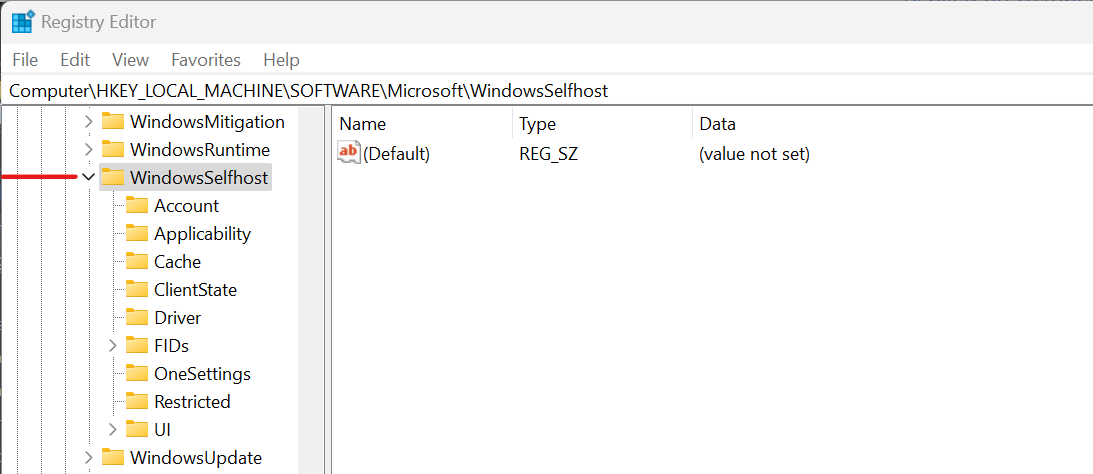
    Download the ISO of 26100.1150 from here:

    https://www.microsoft.com/en-us/software-download/windowsinsiderpreviewiso

    Mount the image file and run setup.exe within Windows. This is known as a repair install. You will retain all files. As with any major install, ensure you have your important files backed up.

    This will put you on 24H2 that will be released shortly. Run Windows Update and this will take you to 26100.1742. There is no need to join Insider for the updates.

    If you want to run the Release of 23H2, you will have to do a clean install which means removing everything. Your best option is going to 24H2.

    Regards,

    2 people found this answer helpful.
    0 comments No comments
  3. Anonymous
    2024-11-08T14:18:31+00:00

    Same thing happened to me... i leave the insider program and the settings change to dev automatically. Why is it doing that?

    edit: And for the record, i was on the beta setting before leaving the insider program, and no, i did not select the dev setting afterwards, it did that automatically without my permission.

    1 person found this answer helpful.
    0 comments No comments
  4. Anonymous
    2024-09-20T19:15:28+00:00

    What exact build are you currently on?

    WIN+R and type winver for the build #.

    My current build is 26120.1542

    1 person found this answer helpful.
    0 comments No comments
  5. CrazyKats 15,500 Reputation points Volunteer Moderator
    2024-09-20T19:03:40+00:00

    What exact build are you currently on?

    WIN+R and type winver for the build #.

    1 person found this answer helpful.
    0 comments No comments
