Share via

WSL2 not working on windows 11 insider: error 0x80370114

Anonymous
2022-03-07T18:30:01+00:00

Hi there!

Recently I tried to install WSL by writing wsl --install in cmd.

Everything got installed and seemed to work, but if I opened ubuntu the following message would appear:
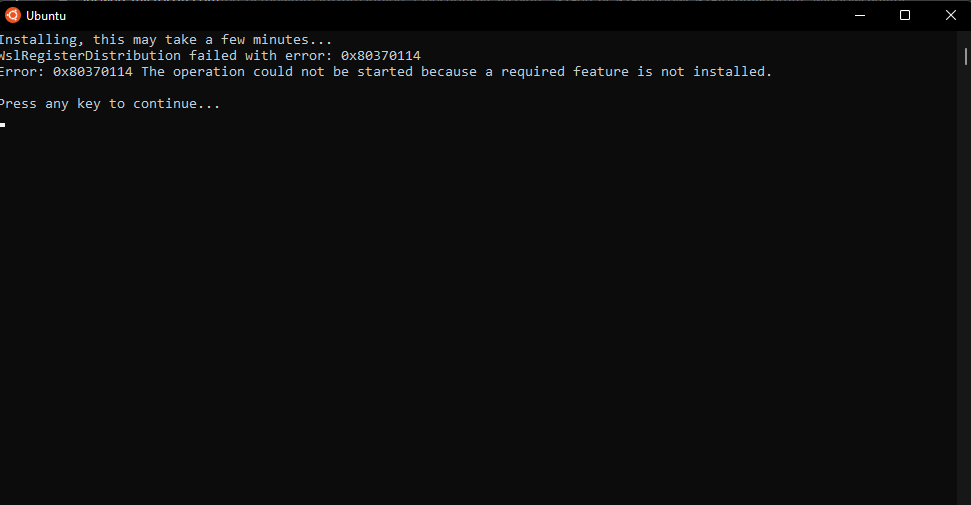
Could this be because I am using windows 11 insider preview? (Version dev OS build 22533.1001)

I have virtualization on, by the way. I saw this post but none of the answers helped https://answers.microsoft.com/en-us/insider/forum/all/wsl-2-installing-linux-failed-error-code/bae391d1-4215-4d93-b0c4-3d96404a7c74

I Tried multiple methods to solve this and it seems to be something with hyper-v?

Also, vmcompute.exe doen't seem to exist in my system32 folder. In Powershell, it told me that no such service existed. Neither does Windows Hypervisor Platform.

One time I also tried using "turn windows features on and off" but that didn't work either.

During the installation process, I also realized WSLg would not install which it should in windows11.

Hope someone can help!

Windows Insider program | Windows Insider preview | Install, activate, and Windows update

Locked Question. This question was migrated from the Microsoft Support Community. You can vote on whether it's helpful, but you can't add comments or replies or follow the question.

0 comments No comments

14 answers

Sort by: Most helpful
  1. Anonymous
    2022-04-24T22:21:21+00:00

    Windows Hypervisor Platform is a cut-down version of Hyper-V, H-V has more features but to run WSL without H-V you need WHP enabled.

    You missed the point.

    If you type wsl --install, Virtual Machine Platform gets installed and enabled automatically.

    No need to enable Windows Hypervisor Platform to run wsl (see edit on my previous post and screenshots above)

    Was this answer helpful?

    1 person found this answer helpful.
    0 comments No comments
  2. Anonymous
    2022-04-24T18:08:31+00:00

    Hey @Sibro.o, thanks for your solution! I followed it and it worked for me.

    One remark: the command wsl --install actually enables Virtual Machine Platform feature - have you enabled this when you tried to install WSL for the first time? Also, my Windows Hyper Vision feature is off.

    Was this answer helpful?

    1 person found this answer helpful.
    0 comments No comments
  3. Anonymous
    2022-03-10T20:31:31+00:00

    Thanks, I'll try it! Also, just in case, what were the commands you used to disable hyper-v?

    Was this answer helpful?

    1 person found this answer helpful.
    0 comments No comments
  4. Anonymous
    2022-03-07T19:18:43+00:00

    Could this be because I am using windows 11 insider preview? (Version dev OS build 22533.1001)

    I have the exact same issue and tried the same things on build 22557, it didn't work.

    Hopefully someone will post a solution or workaround.

    Was this answer helpful?

    1 person found this answer helpful.
    0 comments No comments
  5. Anonymous
    2022-03-10T20:31:50+00:00

    Thanks, I'll also try it!

    Was this answer helpful?

    0 comments No comments