SQL Server Integration Services
A Microsoft platform for building enterprise-level data integration and data transformations solutions.
This browser is no longer supported.
Upgrade to Microsoft Edge to take advantage of the latest features, security updates, and technical support.
' cx='32' cy='32' r='32' /%3E%3Ctext x='50%25' y='55%25' dominant-baseline='middle' text-anchor='middle' fill='%23FFF' %3EDN%3C/text%3E%3C/svg%3E)
My system is currently on the package deployment model with deployment to the file system for our SSIS jobs, and we are looking to transition to a project deployment SSIS DB model. We have many packages that are all separate from each other (and differ in their variables/parameters), and each has at least one .dtsConfig file associated with it. (If they have multiple, the config files all have the same variables, but different values.)
They are not associated with projects/solutions at all. In the interest of reducing manual intervention as much as possible, I would like to be able to take a .dtsx and a .dtsConfig to create project files (.ispac and project.params) for each package, so that these can be automatically deployed to the Integration Services Catalog (using the procedure SSISDB.catalog.deploy_project). Currently I would have to use Visual Studio to create a new project, import the package, select the config, and convert to project deployment, all manually, so I'm hoping there is a way to automate this step.
I've opened an .ispac file and found it contains the package, project.params, and a project manifest, but I'm not sure which of those are completely necessary, and if there is a way to programmatically create either project.params or the manifest.
A Microsoft platform for building enterprise-level data integration and data transformations solutions.
I'm aware of that. That is the system that we have now. We want to transition to having the packages on the server in the Integration Services Catalog and run them that way. Since that needs to use the project deployment model, I need to get all of these packages into projects, and I'm hoping to get that done in a script rather than manually.
' cx='32' cy='32' r='32' /%3E%3Ctext x='50%25' y='55%25' dominant-baseline='middle' text-anchor='middle' fill='%23FFF' %3EMM%3C/text%3E%3C/svg%3E)
Hi @Dan Noar ,
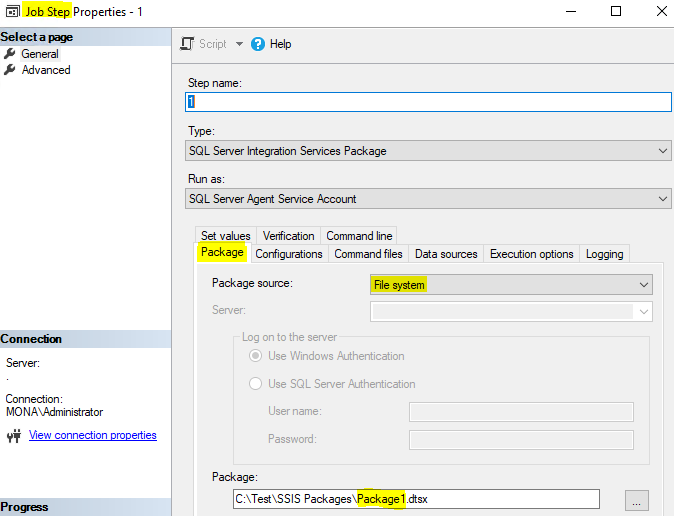
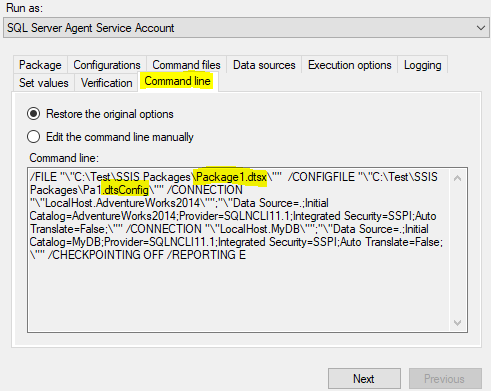
We can execute ssis package with config file from a .dtsx file and a .dtsConfig file in sql agent job.
Please refer to the following pictures:

Best Regards,
Mona
----------
If the answer is helpful, please click "Accept Answer" and upvote it.
Note: Please follow the steps in our documentation to enable e-mail notifications if you want to receive the related email notification for this thread.
Hi @Dan Noar ,
Best Regards,
Mona
Yes, I am aware of that as well. What I'm asking if it is possible to create the .ispac in a script, rather than going through the GUI of Visual Studio.
Hi @Dan Noar ,
I am sorry that creating the .ispac in a script cannot be implemented yet.
Please put forward your need in the following link:
Feedback-SQL Server
Best Regards,
Mona