Microsoft Edge | Other | Windows 10
Other issues or features related to Microsoft Edge on Windows 10

This browser is no longer supported.
Upgrade to Microsoft Edge to take advantage of the latest features, security updates, and technical support.
' cx='32' cy='32' r='32' /%3E%3Ctext x='50%25' y='55%25' dominant-baseline='middle' text-anchor='middle' fill='%23FFF' %3EA%3C/text%3E%3C/svg%3E)
Is it recommended to use secure network in Microsoft Edge by turning on free VPN?
Possibly when should one use VPN and not?
Does one have to be logged in to a Microsoft account for VPN to work?
Does the VPN turn on and off when needed?
Is there any point in using InPrivate if one uses VPN, and possibly when?
Other issues or features related to Microsoft Edge on Windows 10
Locked Question. This question was migrated from the Microsoft Support Community. You can vote on whether it's helpful, but you can't add comments or replies or follow the question.
A VPN is first and foremost for your online security.
When you have a VPN, instead of communicating directly with a website, your computer communicates with the VPN's owner, who then forwards your online traffic to the website. The VPN owner acts as your agent, sending and receiving information to and from the internet on your behalf.
The connection between your computer and the VPN's owner is encrypted - that's what provides security. If you are using a public WiFi connection - say, in a coffee shop or an airport - your connection to the internet is not encrypted. Anyone with the right equipment can see what you are sending to the internet and what you are receiving from the internet. That's very bad.
But when you have a VPN, your connection to the VPN owner is encrypted, so no one is able to see what you send to and receive from the internet. Now let's get to your questions:
When should one use a VPN and when not?
You should use a VPN whenever your computer is using a network with no encryption or weak encryption. You don't need to use a VPN at home, because your home network is secure. (Right?)
Does the VPN turn on and off when needed?
No, you have to turn it on and off.
Is there any point in using InPrivate if one uses VPN?
InPrivate is something completely different. InPrivate won't encrypt your connection to the internet.
Is it recommended to use the secure network in Microsoft Edge by turning on its free VPN?
That's entirely up to you. You can use Microsoft Edge's VPN if you want to. But once you've learned more about VPNs, I think you'll prefer a commercial VPN.
BTW: There is a second, completely different reason why people like to use a VPN. Because the VPN owner contacts the internet on your behalf, whatever website you are trying to reach doesn't know that it's you who is communicating with the website. So if you want to hide your identity on the internet for some reason, a VPN is the way to go.
Is it to be understood that even if Secure Network is switched on as shown below, one must be logged in at the Microsoft account for it to work?
I'm sorry that I can't help with that, as I do not use Microsoft Edge's VPN. My guess, knowing Microsoft, is that if you need to be signed in to your Microsoft account, and you are not already signed in, you'll be prompted to do so.
How do you see when VPN is on and off, and can you check how much data you have used?
The VPN puts an icon in the system tray (on a PC) or on the notification bar (on a phone.)
I don't need to know how much data I have used, as my commercial VPN offers unlimited data.
Should one use it for online shopping, or is it only necessary when one does not use the home network?
As I wrote earlier, you should use a VPN every time your device uses a network that has no encryption or weak encryption (like WEP.) Some people simply keep their VPN on all the time, but there is a drawback to doing that. A VPN will slow your connection to the internet, due to the constant encryption and decryption it performs. Some VPNs are better at this than others, and that's always something that is tested when VPNs are being reviewed by professional reviewers.
Is it to be understood that even if Secure Network is switched on as shown below, one must be logged in at the Microsoft account for it to work?
Select Settings and more > Privacy, search, and services, and under Security, turn on the Microsoft Edge Secure Network toggle.
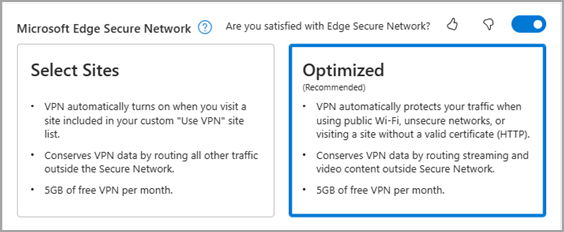
Is it to be understood that when in use, the Secure Network automatically turns protection on and off as needed, so you don't have to worry about managing bandwidth or knowing when you need extra protection?
Or do you have to switch it on and off even if you are logged in to a Microsoft account and have it activated as explained above?
How do you see when VPN is on and off, and can you check how much data you have used?
Should one use it for online shopping, or is it only necessary when one does not use the home network?
Hi RS1250, I am Paulo and I'd like to help.
It is recommended but not really required since the feature is limited to 5GB for free users. It is only an extra security and it is not an always-on feature. I'd say use it when you're on public Wi-Fi or when accessing an unsecured website. It needs a Microsoft Account, or your Edge profile should be logged in to MS account to track the amount of Secure Network data is used each month. There's a toggle button within the Browser Essentials in the toolbar by enabling it in Settings > Appearance > Browser essentials button (you can check the link below for more details). When it comes to the InPrivate window, it is designed to be used when you want to search or access websites without saving their data (passwords, cookies, etc.) or browsing history.
I hope this answer your questions. More info about VPN from this article
https://www.windowscentral.com/software-apps/wi...
(Disclaimer: This is a non-Microsoft website. The page appears to be providing accurate, safe information. Watch out for ads on the site that may advertise products frequently classified as PUP (Potentially Unwanted Products). Thoroughly research any product advertised on the site before downloading and installing it.)
I hope this helps :)