Share via

In windows 7 - I want to search for all files containing "A word or phrase in the file". The standard XP search box.

Anonymous
2009-12-06T19:24:59+00:00

In Windows 7 - I want to search/find all files containing "A word or phrase in the file".  The old standard XP search box.

I do NOT supply: file name; file type; drive letter; etc. - nothing.  

I tried searching for this - just can't find any discussion.  And of course, not having this search would be insane. It is precisely what we have a computer for. 

And no 3rd party programs are allowed.

Windows for home | Previous Windows versions | Files, folders, and storage

Locked Question. This question was migrated from the Microsoft Support Community. You can vote on whether it's helpful, but you can't add comments or replies or follow the question.

0 comments No comments
Answer accepted by question author
  1. Anonymous
    2010-08-19T18:11:15+00:00

    I've been looking into this because I know the search has been failing for me.  I think the difference in whether Windows search works or not depends on the FILE EXTENSION which contains your search text.  For example, if you look for the word "spam", it will be found if it is in a whatever.doc file, or whatever.txt file.  However, if you were to rename the file to whatever.xyz, it will no longer find the word.

    Here are all the steps I think you need to follow to actually search:

    1. Make sure that Windows 7 is actually going to search files with your extension, and it appears that using this list properly is important *whether or not you are looking in an indexed location*!!

        a.  Hit the start button and type "search" in the search box.

        b.  Select "Change How Windows Searches"

        c.  Hit "Advanced"

        d.  Select the "File Types" tab.

        e.  Make sure the file extension for the files you want to search in is on the list *and* is set to "Index Properties and File Contents" (yes, pick your jaw up off the floor).  I know this appears to be for file indexing, but it does seem to make a difference on whether you find the file in non-indexed locations as well.

        f.  Say "Ok" and exit all the dialog boxes

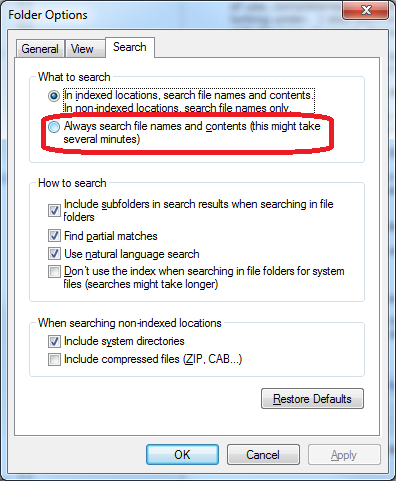
    2.  Actually perform your search on the folder in question.  Depending on some other settings you may have to type "content: spam" to find "spam" *in* the files instead of files with the word "spam" in the name.  Alternately, if you press the "Alt" key when you're exploring in the folder, you can choose "Tools / Folder Options" go to the "Search" tab and select "Always search file names and contents".

    If what I have written is actually correct, then IMHO Microsoft has coughed up the ball bigtime on this one.  Personally, I now recognize that I can't use the search feature, and I'm installing Cygwin so I can use "grep" to search the contents of files.  Not cool and not amused.

    Good luck to all the searchers.

    ~Pete

    100+ people found this answer helpful.
    0 comments No comments
Answer accepted by question author
  1. @CmdrKeene 90,616 Reputation points Volunteer Moderator
    2010-09-19T13:39:48+00:00

    There is an option that seems to match what you're looking for:


    If this was helpful, please vote by clicking the green triangle. If it solves the issue, click Propose as Answer. Thanks!

    20+ people found this answer helpful.
    0 comments No comments
Answer accepted by question author
  1. Anonymous
    2009-12-09T00:08:07+00:00

    To find "phrase in the file" type content:"phrase in the file" in the searchbox.

    10+ people found this answer helpful.
    0 comments No comments

364 additional answers

Sort by: Most helpful
  1. Anonymous
    2009-12-27T19:07:56+00:00

    "To find "phrase in the file" type content:"phrase in the file" in the searchbox."

    Another wonderful example of the stupid thought that went into the windows search function introduced with Vista: add extra steps to EVERYTHING that used to make sense about using windows.

    This example indicates I have to type 10 extra keystrokes. How does this explain the obvious improvements in the windows search app? STUPID!

    And who's ridiculous idea was it to remove the ability to search the current folder? The interface functionality of the windows XP search app is still far superior to this worthless piece of ____.

    I often use an old version of PowerDesk for vista and now 7 to search like an adult windows user. Slower, but I find what I am looking for without all the extra clicks, extra characters, and lousy results.

    Which type of search/find function do Macs have? I assume it is similar to the new windows search.

    J

    6 people found this answer helpful.
    0 comments No comments