Azure SQL Database
An Azure relational database service.
This browser is no longer supported.
Upgrade to Microsoft Edge to take advantage of the latest features, security updates, and technical support.
' cx='32' cy='32' r='32' /%3E%3Ctext x='50%25' y='55%25' dominant-baseline='middle' text-anchor='middle' fill='%23FFF' %3EB%3C/text%3E%3C/svg%3E)
I am having trouble getting an estimate of monthly cost for a small SQL Azure database I will be creating.
When I use the pricing calculator it seems way out to lunch with the lowest option way more than I would expect.
The database is for cloud enabling a VB5 Point of sale type application which is installed at 40 store locations using an Access Database. ( I know- bad idea but that's what my client wants to pay me to do - 250,000 lines of code so no budget to rewrite it) I plan to create a sql azure database and use an API (PaaS) to allow all the locations to use common data.
Each location would only have a average of 100 DB calls to a single Members table for accessing Memberdata and Rewards Program data. There will likely be a small number of additional tables for reward data etc.
I expected this would be less than $25 / month but the calculator says much much more than that. That said, maybe SQL azure is overkill.
Also, I would appreciate any ideas for keeping the on prem Access databases in synch with the Azure data. I want to do that in case of loss of internet connection at a location.
I don't think I can use Azure SQL Synch because all databases would need to be SQL Server DB's I was thinking that when a member makes a first call to the API -> database, it would return the member data and if the status code is not 'unchanged', the member data would get written to the local Access DB. That would handle updating the local access db, but I am not sure how I can trigger an update of the other 39 on prem access db's Maybe use some kind of Azure Function?
Is there maybe an Azure agent that can be installed on the on prem machines that would allow Azure to send it notifications or events? Worst case- I could put a timed function in each vb5 app to check for member changes somehow.
An Azure relational database service.
' cx='32' cy='32' r='32' /%3E%3Ctext x='50%25' y='55%25' dominant-baseline='middle' text-anchor='middle' fill='%23FFF' %3EKM%3C/text%3E%3C/svg%3E)
@billymac Welcome to Microsoft Q&A Forum and thank you for your interest in Azure services.
The pricing options for Azure SQL Database start from ~$4.89 a month for Basic Tier in DTU purchase model
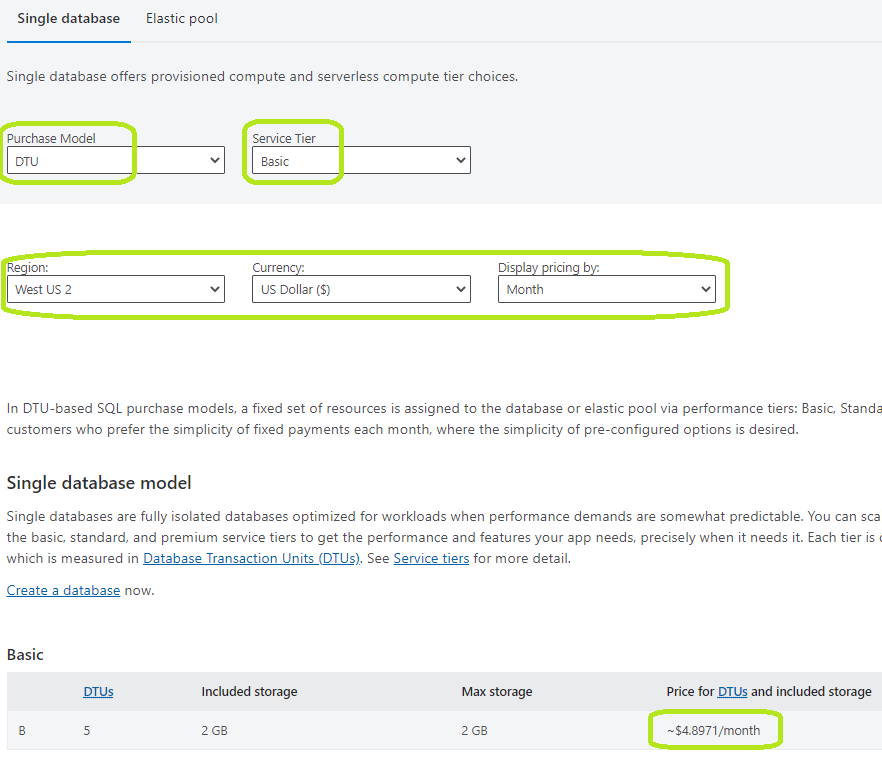
If the stores are functional only during the day and closed for business after regular working hours, you could also consider using Azure SQL Database Serverless
Continuous replication from Access database to Azure SQL database is not supported by SQL Data Sync.
You could find a third-party alternative or write one yourself to synchronize data, which would cost you either money or time.
However, you may still not have a robust system because you will need to account for delays in data getting synchronized across all 40 stores.
I would recommend that you use a live database instead and use a timed function from VB to write changes to the database only in case of "internet outage" scenarios.
Do let us know if you have any further questions.
----------
If an answer is helpful, please "Accept answer" or "Up-Vote" for the same which might be beneficial to other community members reading this thread.