
Go into the control panel, into the hardware section, and click on sound. You should get a popup like this
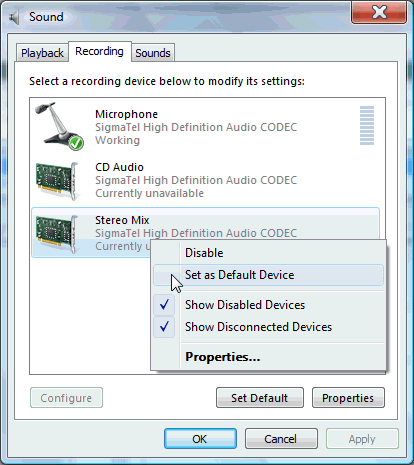
Find your microphone, right click, and select disable as it shows in the picture.
This browser is no longer supported.
Upgrade to Microsoft Edge to take advantage of the latest features, security updates, and technical support.
' cx='32' cy='32' r='32' /%3E%3Ctext x='50%25' y='55%25' dominant-baseline='middle' text-anchor='middle' fill='%23FFF' %3EA%3C/text%3E%3C/svg%3E)
I have an E-system Laptop and the built in microphone suddenly turned itself on yesterday and I havent been able to get it off.. I have tried all the tips and nothing is working. please help :(
Locked Question. This question was migrated from the Microsoft Support Community. You can vote on whether it's helpful, but you can't add comments or replies or follow the question.
Answer accepted by question author
Go into the control panel, into the hardware section, and click on sound. You should get a popup like this
Find your microphone, right click, and select disable as it shows in the picture.
I tried this and it disapeared from the list. But it's still not shutting off.
Thanx dude it worked for me
Contact the manufacturer to see what you can do.