Hi,
I am trying to run a program "VATSPY" on a Window 7 Pro x64bit OS. It is a simple Air Traffic COntrol map for VATSIM flying on Microsoft Flight Sim.
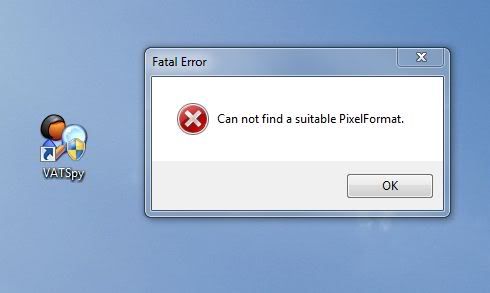
However I am having this error occur on start up "Can not find a Suitable Pixel Format" it has previously worked on this machine and has only stopped working after a recent windows update. Restoring and rolling back the update did not work.
Below is a screen and error report, any imput would be greatly appreciated.
[IMG]http://i923.photobucket.com/albums/ad75/mattchewau/Capture.jpg[/IMG]
http://i923.photobucket.com/albums/ad75/mattchewau/Capture.jpg
Version=1
EventType=CLR20r3
EventTime=129538217407470262
ReportType=2
Consent=1
UploadTime=129538217409492267
ReportIdentifier=c710a2d6-a245-11e0-ac2d-6cf0490d6b67
Response.type=4
Sig[0].Name=Problem Signature 01
Sig[0].Value=vatspy.exe
Sig[1].Name=Problem Signature 02
Sig[1].Value=1.0.3719.41261
Sig[2].Name=Problem Signature 03
Sig[2].Value=4b95c6aa
Sig[3].Name=Problem Signature 04
Sig[3].Value=VATSpy
Sig[4].Name=Problem Signature 05
Sig[4].Value=1.0.3719.41261
Sig[5].Name=Problem Signature 06
Sig[5].Value=4b95c6aa
Sig[6].Name=Problem Signature 07
Sig[6].Value=c3
Sig[7].Name=Problem Signature 08
Sig[7].Value=c
Sig[8].Name=Problem Signature 09
Sig[8].Value=System.IO.FileNotFoundException
DynamicSig[1].Name=OS Version
DynamicSig[1].Value=6.1.7600.2.0.0.256.48
DynamicSig[2].Name=Locale ID
DynamicSig[2].Value=3081
UI[2]=C:\Program Files (x86)\VATSpy\VATSpy.exe
UI[3]=VATSpy has stopped working
UI[4]=Windows can check online for a solution to the problem.
UI[5]=Check online for a solution and close the program
UI[6]=Check online for a solution later and close the program
UI[7]=Close the program
LoadedModule[0]=C:\Program Files (x86)\VATSpy\VATSpy.exe
LoadedModule[1]=C:\Windows\SYSTEM32\ntdll.dll
LoadedModule[2]=C:\Windows\SYSTEM32\MSCOREE.DLL
LoadedModule[3]=C:\Windows\system32\KERNEL32.dll
LoadedModule[4]=C:\Windows\system32\KERNELBASE.dll
LoadedModule[5]=C:\Windows\system32\ADVAPI32.dll
LoadedModule[6]=C:\Windows\system32\msvcrt.dll
LoadedModule[7]=C:\Windows\SYSTEM32\sechost.dll
LoadedModule[8]=C:\Windows\system32\RPCRT4.dll
LoadedModule[9]=C:\Windows\system32\SHLWAPI.dll
LoadedModule[10]=C:\Windows\system32\GDI32.dll
LoadedModule[11]=C:\Windows\system32\USER32.dll
LoadedModule[12]=C:\Windows\system32\LPK.dll
LoadedModule[13]=C:\Windows\system32\USP10.dll
LoadedModule[14]=C:\Windows\system32\IMM32.DLL
LoadedModule[15]=C:\Windows\system32\MSCTF.dll
LoadedModule[16]=C:\Windows\Microsoft.NET\Framework64\v2.0.50727\mscorwks.dll
LoadedModule[17]=C:\Windows\WinSxS\amd64_microsoft.vc80.crt_1fc8b3b9a1e18e3b_8.0.50727.4927_none_88dce9872fb18caf\MSVCR80.dll
LoadedModule[18]=C:\Windows\system32\shell32.dll
LoadedModule[19]=C:\Windows\system32\ole32.dll
LoadedModule[20]=C:\Windows\system32\profapi.dll
LoadedModule[21]=C:\Windows\assembly\NativeImages_v2.0.50727_64\mscorlib\b654f93b365c4463014d8b41152efd54\mscorlib.ni.dll
LoadedModule[22]=C:\Windows\system32\CRYPTBASE.dll
LoadedModule[23]=C:\Windows\system32\uxtheme.dll
LoadedModule[24]=C:\Windows\Microsoft.NET\Framework64\v2.0.50727\mscorjit.dll
LoadedModule[25]=C:\Windows\assembly\NativeImages_v2.0.50727_64\System\99a6933ae74c0ab8a886bd6c38164b02\System.ni.dll
LoadedModule[26]=C:\Windows\assembly\NativeImages_v2.0.50727_64\System.Configuration\7343284f67e3c15289594d979bd6be05\System.Configuration.ni.dll
LoadedModule[27]=C:\Windows\assembly\NativeImages_v2.0.50727_64\System.Xml\a413318043a6d2cf335510930906ba86\System.Xml.ni.dll
LoadedModule[28]=C:\Windows\system32\rasapi32.dll
LoadedModule[29]=C:\Windows\system32\rasman.dll
LoadedModule[30]=C:\Windows\system32\WS2_32.dll
LoadedModule[31]=C:\Windows\system32\NSI.dll
LoadedModule[32]=C:\Windows\system32\rtutils.dll
LoadedModule[33]=C:\Windows\system32\mswsock.dll
LoadedModule[34]=C:\Windows\System32\wshtcpip.dll
LoadedModule[35]=C:\Windows\System32\wship6.dll
LoadedModule[36]=C:\Windows\system32\winhttp.dll
LoadedModule[37]=C:\Windows\system32\webio.dll
LoadedModule[38]=C:\Windows\system32\IPHLPAPI.DLL
LoadedModule[39]=C:\Windows\system32\WINNSI.DLL
LoadedModule[40]=C:\Windows\system32\dhcpcsvc6.DLL
LoadedModule[41]=C:\Windows\system32\dhcpcsvc.DLL
LoadedModule[42]=C:\Windows\system32\SspiCli.dll
LoadedModule[43]=C:\Windows\system32\credssp.dll
LoadedModule[44]=C:\Windows\system32\CFGMGR32.dll
LoadedModule[45]=C:\Windows\assembly\NativeImages_v2.0.50727_64\System.Drawing\a2a7565bc69f3bc0adf70215025aad4a\System.Drawing.ni.dll
LoadedModule[46]=C:\Windows\assembly\NativeImages_v2.0.50727_64\System.Windows.Forms\23da8c6665d17e291129a01294e90958\System.Windows.Forms.ni.dll
LoadedModule[47]=C:\Windows\system32\shfolder.dll
LoadedModule[48]=C:\Windows\system32\CRYPTSP.dll
LoadedModule[49]=C:\Windows\system32\rsaenh.dll
LoadedModule[50]=C:\Windows\system32\RpcRtRemote.dll
LoadedModule[51]=C:\Windows\system32\apphelp.dll
LoadedModule[52]=C:\Windows\system32\VERSION.dll
FriendlyEventName=Stopped working
ConsentKey=CLR20r3
AppName=VATSpy
AppPath=C:\Program Files (x86)\VATSpy\VATSpy.exe
ReportDescription=Stopped working
' cx='32' cy='32' r='32' /%3E%3Ctext x='50%25' y='55%25' dominant-baseline='middle' text-anchor='middle' fill='%23FFF' %3EA%3C/text%3E%3C/svg%3E)