' cx='32' cy='32' r='32' /%3E%3Ctext x='50%25' y='55%25' dominant-baseline='middle' text-anchor='middle' fill='%23FFF' %3ESM%3C/text%3E%3C/svg%3E)


If you are using a local account named administrator, and uses a Microsoft account login in. At this moment, windows 10 will binding your Microsoft account and administrator, and the option “Sign in with a local account instead” is disappear.
For this situation, Delete account represented as a key in registry from the following location:
HKEY_USERS.DEFAULT\Software\Microsoft\IdentityCRL\StoredIdentities
After delete, restart computer and test again.
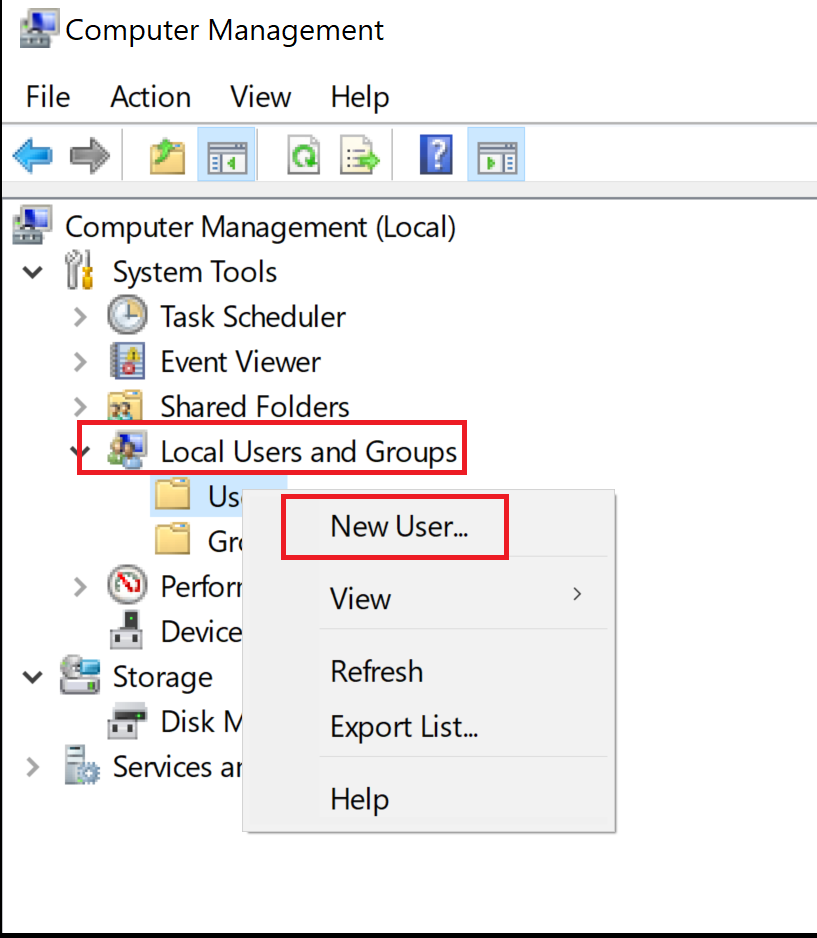
Of course, you could create a new local admin account by Computer Management\Local Users and Groups\Users\New Users
-------------------------------------------------------------------------------------
If the Answer is helpful, please click "Accept Answer" and upvote it.
Note: Please follow the steps in our documentation to enable e-mail notifications if you want to receive the related email notification for this thread.
' cx='32' cy='32' r='32' /%3E%3Ctext x='50%25' y='55%25' dominant-baseline='middle' text-anchor='middle' fill='%23FFF' %3ELD%3C/text%3E%3C/svg%3E)
' cx='32' cy='32' r='32' /%3E%3Ctext x='50%25' y='55%25' dominant-baseline='middle' text-anchor='middle' fill='%23FFF' %3EA%3C/text%3E%3C/svg%3E)