Share via

Arial Narrow Font is missing!

Anonymous
2010-04-27T15:33:53+00:00

I have Windows 7 Professional that was factory installed on a Dell  laptop that I purchased in late November of 2009.  The following Arial fonts are installed:

  1. Arial Black
  2. Arial Bold
  3. Arial Bold Italic
  4. Arial Italic
  5. Arial Regular

I have some software that is expecting Arial Narrow which is obviously not in the above list.  Is Arial Narrow not automatically installed as part of Windows 7?

I have/see Arial Narrow on another PC that has Windows XP Professional installed.  And, I have/see Arial Narrow on still another PC that has Windows Vista Business installed.  Was Arial Narrow installed as part of these earlier versions of Windows?  Or, was Arial Narrow installed as part of some other application like Microsoft Office which resides on these 2 PC's, but not on the Windows 7 PC?

Thanks for any help or insight anyone might provide.

Windows for home | Previous Windows versions | Accessibility

Locked Question. This question was migrated from the Microsoft Support Community. You can vote on whether it's helpful, but you can't add comments or replies or follow the question.

0 comments No comments

Answer accepted by question author

  1. Anonymous
    2010-04-27T18:08:29+00:00

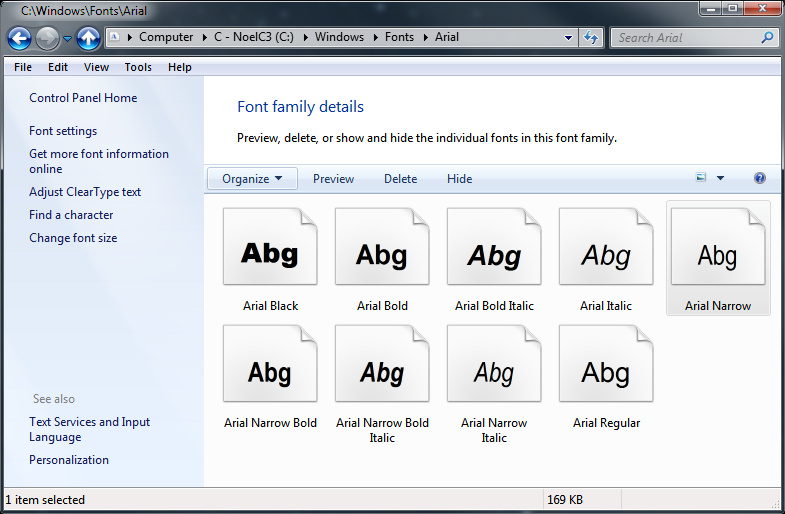
    FYI, when I open C:\Windows\Fonts in Explorer I see Arial.  When I double click it, I get a Font family details screen:
    Right-click > Properties on the Arial Narrow font in the above window yields:
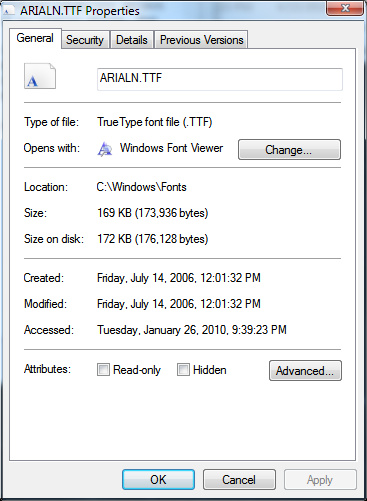
     

    What I don't know is whether an app that I have installed brought the ARIALN.TTF file along with it.  I don't have a fresh, out-of-the box Windows 7 system to look at right now.

    -Noel

    Was this answer helpful?

    100+ people found this answer helpful.
    0 comments No comments

9 additional answers

Sort by: Most helpful
  1. Anonymous
    2017-11-22T04:02:33+00:00

    This is incredibly annoying. I am so sick of Microsoft pulling features arbitrarily.

    I could have found the font file and installed it on the machine that I'm writing on, but I elected not to because I have to work across a range of work and home machines. Because:

    (a) I can't rely on Arial Narrow being on any particular one of them; and

    (b) Because if the font is missing Word assumes that you want "The ugliest kinda-sorta script font which looks nothing like a sans serif font that Windows can find",

    I've elected to abandon Arial Narrow and start using a different font which will be on each standard machine.

    Until Microsoft elects to pull that one as well.

    Was this answer helpful?

    4 people found this answer helpful.
    0 comments No comments
  2. Anonymous
    2011-11-19T14:00:56+00:00

    I have arial narrow font on a windows 7 laptop but did not have it on a windows 7 desktop. I just went into windows\fonts\arial on my laptop and copied them to the desktop and all worked just fine.

    Was this answer helpful?

    4 people found this answer helpful.
    0 comments No comments
  3. Anonymous
    2010-04-27T18:26:17+00:00

    Okay, I used a snapshot I'd made of a Windows 7 virtual machine before installing any applications.  Indeed Arial Narrow is NOT installed as part of Windows 7.

    I'm not sure what application I installed, above, that added it to my system, but clearly one did.

    -Noel

    Was this answer helpful?

    3 people found this answer helpful.
    0 comments No comments
  4. Anonymous
    2016-06-17T11:41:02+00:00

    Problem: Windows 10 upgrade from Windows 7 didn't carry forward Arial Narrow font.

    In Windows 7, I had Arial Narrow, maybe from installation of Microsoft Office. I use it heavily in Excel and often in Word. With promise that Windows 10 would "leave all your files in place", I upgraded to Windows 10 from Windows 7 and found that Arial Narrow was missing.

    Solution: I found the Arial Narrow ("ArialN*.TTF") files on my other Windows 7 computer and copied them into the C:\Windows\Fonts folder. After a re-start, Arial Narrow was again available.

    Lesson: Before upgrading to Windows 10 from Windows 7, backup your files, and specifically on fonts, keep a copy of the C:\Windows\Fonts folder.

    Was this answer helpful?

    2 people found this answer helpful.
    0 comments No comments
