Hi Tom,
This particular conversation is focused on Windows 7. Here's the brass tacks:
- Windows 8 still has this same Contacts folder (it's been unchanged from Vista to 7 to 8).
- This Contacts folder (also known as WAB in the pre-Vista days) is offline-only. That is, contacts you put there are only stored on your hard drive. So if you add someone there, it won't show up in any connected email systems like your tablet, phone, or
when you go to your email website and look at the address book there.
- For the above reason, most people don't use WAB/Contacts folder. It's basically a legacy vestige from the past since it's so cut off and isolated.
- The Mail app and People app in Windows 8 are built for phones/tablets (that's why they're so basic and touch-friendly). They are also apps that connect to online services. So they do not actually store mail and contacts themselves, they just display whatever
mail/contacts are stored online. This way they are always in sync and updated. If you add a contact or move an email to a folder, the contact shows up on all your devices/phones or the email moves for every device (or if you were to go to your email account
on the web and look, the mail would be moved).
- So for the best experience, plus a backup in case your hard drive crashes/catches fire/gets wet/etc., the recommendation is to store your contacts in your online account, rather than the Contacts folder. This can be any provider you choose (Gmail, Outlook.com/Hotmail/MSN/Live
Mail, Yahoo, etc.)
So if I were you, or if we were sitting together right now, here's the steps I'd recommend taking:
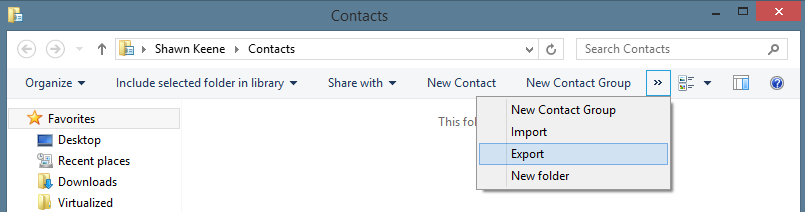
- Open your Contacts folder/WAB and click Export on the toolbar (you might have to click the
>> arrows to get to the option if it doesn't fit on the toolbar) and export it as a CSV file.
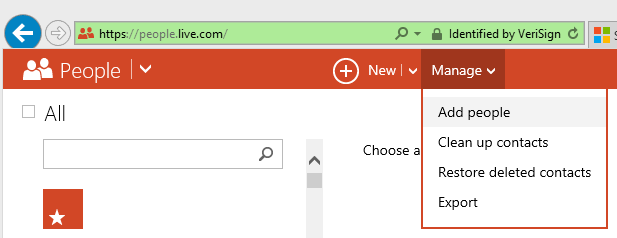
 2. Go to your email provider's website and import the contacts using that file. For the best experience, use whatever provider links to your phone or other devices. Or if you want, you can use your Microsoft Account, which I'll demonstrate from
http://people.live.com below. Just choose "Add People" and then "Import from a file":
2. Go to your email provider's website and import the contacts using that file. For the best experience, use whatever provider links to your phone or other devices. Or if you want, you can use your Microsoft Account, which I'll demonstrate from
http://people.live.com below. Just choose "Add People" and then "Import from a file":
 3. Now that everyone is in your online account, they will show up in your People app. If you make changes to someone in the People app, it will sync to the online account, and vise-versa. At this point you can delete them out of the Contacts folder if you
like, since those are offline copies.
3. Now that everyone is in your online account, they will show up in your People app. If you make changes to someone in the People app, it will sync to the online account, and vise-versa. At this point you can delete them out of the Contacts folder if you
like, since those are offline copies.
When you go to the Add People menu, you can also tell it to sync with your Google or Facebook account so all those people are in your Address Book too, and always updated with the details the other person provides, no work on your part!
If you really prefer to keep an offline copy, you can do that. You would just not be able to use the People/Mail apps. Instead, you'd have to keep using whatever program you used before Windows 8 (which is perfectly okay, it would still work just fine).
If you want a suggestion of a offline email program, Microsoft makes a free one called Windows Essentials Mail, which you can get
here.
' cx='32' cy='32' r='32' /%3E%3Ctext x='50%25' y='55%25' dominant-baseline='middle' text-anchor='middle' fill='%23FFF' %3EA%3C/text%3E%3C/svg%3E)

