Share via

lastlogon attribute updates only after 2 failure login attempts

Noob9590 1 Reputation point
2021-03-06T20:43:54.787+00:00

I am coding a program in PS to preform users authentication in the domain.
The goal that I'm trying to achieve is to preform value in LastLogon attribute in AD.

The code that I use to authenticate users remotely:

Add-Type -AssemblyName System.DirectoryServices.AccountManagement
$ct = [System.DirectoryServices.AccountManagement.ContextType]::Domain
$pc = New-Object System.DirectoryServices.AccountManagement.PrincipalContext $ct,$Domain
$pc.ValidateCredentials($UserName,$Password)

I also tried to use:

(new-object directoryservices.directoryentry"",$username,$password).psbase.name -ne $null

none of the options seems to work for changing this attribute...
after a lot of googling, I found someone who says that the LastLogon is changing after two 2 failure login attempts.
I tried to use ValidateCredentials() function with incorrect password for two times and then to use it again with the correct password.
ONLY after that the LastLogon attribute has been updated.

Please help me to understand why this is happening...
Why LastLogon attribute changes only after two 2 failure login attempts?

Windows for business | Windows Client for IT Pros | Directory services | Active Directory
Windows for business | Windows Server | User experience | PowerShell
Windows for business | Windows Server | Devices and deployment | Configure application groups

6 answers

Sort by: Most helpful
  1. Andreas Baumgarten 132K Reputation points MVP Volunteer Moderator
    2021-03-06T21:18:56.163+00:00

    Hi @Noob9590 ,

    how many domain controllers are you running for the domain?

    In short some details:
    The lastLogon" attribute is the timestamp on a specific DC of a domain. The lastLogon` attribute is not replicated between the DCs in the domain.
    https://learn.microsoft.com/en-us/windows/win32/adschema/a-lastlogon#remarks

    The lastLogonTimestamp attribute is replicated to all DC within the domain.
    https://learn.microsoft.com/en-us/windows/win32/adschema/a-lastlogontimestamp

    How often/how fast the lastLogonTimestap is replicated between the DCs is configured in the ms-DS-Logon-Time-Sync-Interval
    https://learn.microsoft.com/en-us/windows/win32/adschema/a-msds-logontimesyncinterval
    https://learn.microsoft.com/en-us/openspecs/windows_protocols/ms-ada2/1516361f-e412-46af-bcdb-caacf27158bd

    ----------

    (If the reply was helpful please don't forget to upvote and/or accept as answer, thank you)

    Regards
    Andreas Baumgarten
    Was this answer helpful?

    1 person found this answer helpful.
    0 comments No comments

  2. Anonymous
    2021-03-08T01:39:47.813+00:00

    Hi,
    How is the situation now?
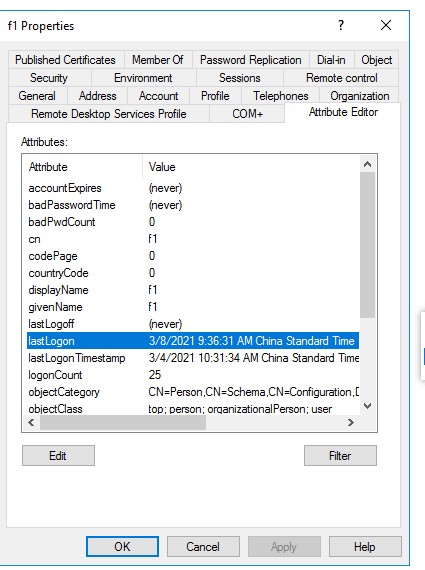
    When a user logs on, this attribute is updated on the Domain Controller that provided the authentication ONLY.
    Did you check the result through the GUI way on the DC?
    75120-382.jpg

    Was this answer helpful?

    0 comments No comments

  3. Rich Matheisen 48,116 Reputation points
    2021-03-06T22:27:19.857+00:00

    Check the event log on the DC (assuming you've enabled at least "Success" events for logons. IIRC, the LastLogon property only represents successful "Interactive" logons. I don't think it reflects "network" logins.

    IOW, try logging on to the domain from the keyboard and then check the lastLogon property value.

    Was this answer helpful?

    0 comments No comments

  4. Andreas Baumgarten 132K Reputation points MVP Volunteer Moderator
    2021-03-06T22:18:28.483+00:00

    Here is another link that might be helpful:

    https://learn.microsoft.com/en-us/archive/blogs/askds/the-lastlogontimestamp-attribute-what-it-was-designed-for-and-how-it-works

    The lastLogon attribute is not designed to provide real time logon information.

    Not sure what you would like to achieve. If it's "find inactive users" it might be ok to work with the lastlogonattribute.
    Another option is to search in the Security Event Log for logon events.

    ----------

    (If the reply was helpful please don't forget to upvote and/or accept as answer, thank you)

    Regards
    Andreas Baumgarten

    Was this answer helpful?

    0 comments No comments

  5. Noob9590 1 Reputation point
    2021-03-06T21:52:04.013+00:00

    I am running only 1 DC

    This is my lab configuration:

    Lab Setup
    Server 1:
    Active Directory
    DNS

    Server 2:
    Domain-joined
    IIS
    SQL Server

    Server 3:
    Domain-joined
    A few shared folders with access for all domain users

    Workstation 1:
    Domain-joined

    Workstation 2:
    Domain-joined

    AD:
    Disable Defender via GPO

    Was this answer helpful?

    0 comments No comments

Your answer

Answers can be marked as 'Accepted' by the question author and 'Recommended' by moderators, which helps users know the answer solved the author's problem.
