Share via

Do downloads and updates continue while computer is in sleep mode?

Anonymous
2011-12-27T23:07:37+00:00

I want to  have a sleep timer to put my computer to sleep after an hour of inactivity but still want any downloads or computer updates to be installed. will they continue even if the computer is on sleep mode?

Windows for home | Previous Windows versions | Accessibility

Locked Question. This question was migrated from the Microsoft Support Community. You can vote on whether it's helpful, but you can't add comments or replies or follow the question.

0 comments No comments
Answer accepted by question author
  1. @CmdrKeene 90,616 Reputation points Volunteer Moderator
    2011-12-28T01:30:18+00:00

    They will not continue to download, but Windows will wake-up at the pre-determined update time to apply updates (usually 3am by default).  This only works if the computer is asleep... if it is fully shut-down or in hibernate mode, it will not turn itself on.

    300+ people found this answer helpful.
    0 comments No comments
Answer accepted by question author
  1. Anonymous
    2011-12-27T23:26:25+00:00

    No.

    Just turn off sleep and hybird sleep,

    If you want to step away just turn your monitor off.

    Some utilities have the ability to wake your computer,

    Downloads is not one of them.

    100+ people found this answer helpful.
    0 comments No comments

9 additional answers

Sort by: Most helpful
  1. @CmdrKeene 90,616 Reputation points Volunteer Moderator
    2017-09-11T19:41:49+00:00

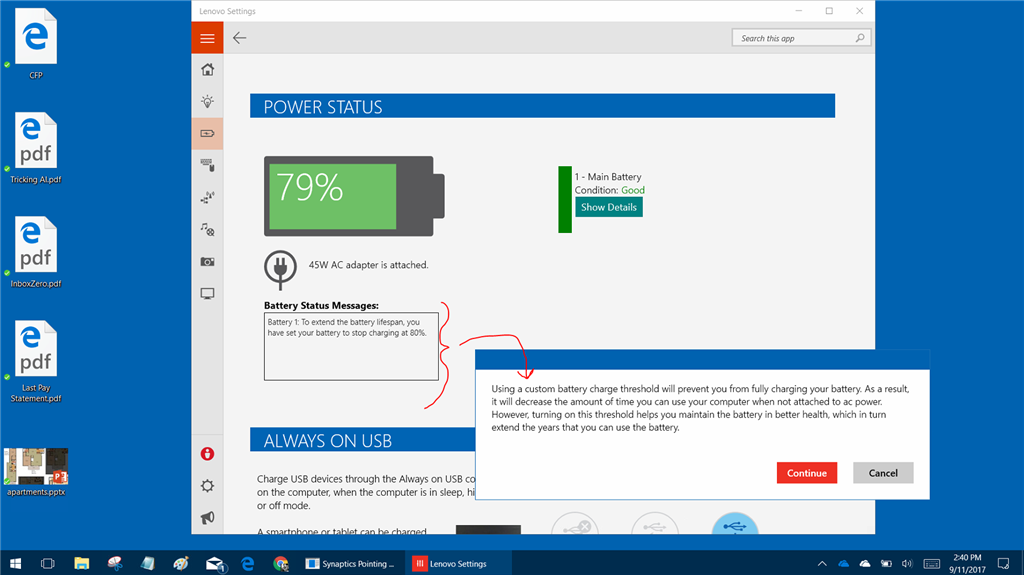
    Keeping a battery at 100% charged all the time for many weeks and months can cause the battery to wear out over time and shorten its lifetime.  Most charging systems on modern laptops and phones account for this and will automatically vary the charge slightly, for example it may stop charging at 99%, let it fall to 90%, then repeat, all without the user ever knowing it's happening.  This way the battery lifespan is better than if it stayed at 100% all the time without ever discharging.

    Some laptop builders DO let the user control this, but it varies from each company.  For example, Lenovo lets the user pick the threshold.  Here's a screenshot from my Lenovo Yoga laptop:
    My advice to you would be to check your owner's manual and follow the manufacturer's recommendations for charging and battery care.  They will know best how to care for their equipment.

    3 people found this answer helpful.
    0 comments No comments
  2. @CmdrKeene 90,616 Reputation points Volunteer Moderator
    2015-08-03T03:38:39+00:00

    Because it will bog down your system and subject you to more headaches than just using the built-in security (UAC and Defender).

    3 people found this answer helpful.
    0 comments No comments
  3. Anonymous
    2015-08-03T03:18:00+00:00

    Why shouldn't we use Norton or McAfee with Windows?  Tnx..........

    2 people found this answer helpful.
    0 comments No comments
