Outlook | Windows | Classic Outlook for Windows | For business
Using classic Outlook for Windows in business environments

This browser is no longer supported.
Upgrade to Microsoft Edge to take advantage of the latest features, security updates, and technical support.
' cx='32' cy='32' r='32' /%3E%3Ctext x='50%25' y='55%25' dominant-baseline='middle' text-anchor='middle' fill='%23FFF' %3EML%3C/text%3E%3C/svg%3E)
Hi everyone
I would like to redirect/forward(before the email is receiving in Inbox) all incoming emails to shared mailbox except 2 email addresses...
How can I do it?
Thanks
Michael
Using classic Outlook for Windows in business environments

Hi @michael lustig ,
Just checking in to see if above information was helpful. If you have any further updates on this issue, please feel free to post back.
Answer accepted by question author
Hi @michael lustig ,
Welcome!
Since you would like to redirect emails before they arrived your Inbox, I'm afraid that it is more likely a server-based operation, instead of operations from your Outlook desktop client side.
So, what email accounts are you using right now? As I know, if you are using Exchange email account, you can create a mail flow rule like below from your server side:
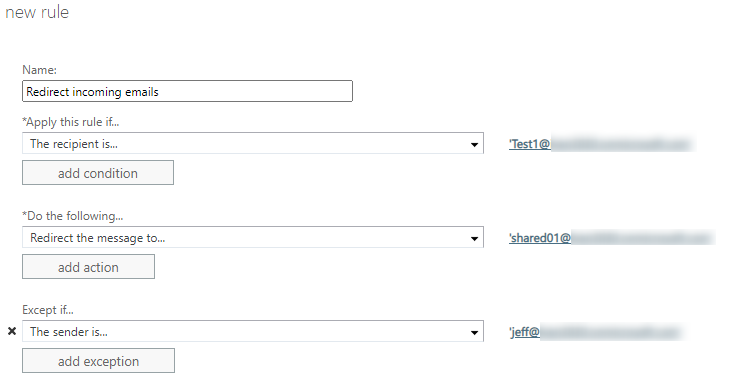
If you are using POP or IMAP email accounts, you might need to contact the administrator of your mailbox for help.
Hope this can be helpful.
If an Answer is helpful, please click "Accept Answer" and upvote it.
Note: Please follow the steps in our documentation to enable e-mail notifications if you want to receive the related email notification for this thread.