Share via

Uninstall Systweak spyware was installed in my computer without my permission

Anonymous
2012-07-27T18:42:04+00:00

Original Title:Uninstall Systweak

Uninstall Systweak spyware was installed in my computer without my permission.     I  already have Microsoft Security Essentials installed to eliminate spyware.

Windows for home | Previous Windows versions | Apps

Locked Question. This question was migrated from the Microsoft Support Community. You can vote on whether it's helpful, but you can't add comments or replies or follow the question.

0 comments No comments

8 answers

Sort by: Most helpful
  1. Deleted

    This answer has been deleted due to a violation of our Code of Conduct. The answer was manually reported or identified through automated detection before action was taken. Please refer to our Code of Conduct for more information.


    Comments have been turned off. Learn more

  2. Anonymous
    2012-07-28T07:50:57+00:00

    Hi,

    1.       Are you trying to uninstall the program?

    2.       Were there any changes made in the Computer prior to this issue?

    I would suggest you to try the methods mentioned below and check if it helps:

    Method 1:

    How to manually remove programs from the Add or Remove Programs tool

    http://support.microsoft.com/kb/314481


    Method 2:

    Fix problems with programs that can't be installed or uninstalled

    http://support.microsoft.com/mats/Program_Install_and_Uninstall/

    Hope this information is useful.

    1 person found this answer helpful.
    0 comments No comments
  3. Anonymous
    2013-11-16T22:24:51+00:00

    Original Title:Uninstall Systweak


    Uninstall Systweak spyware was installed in my computer without my permission.     I  already have Microsoft Security Essentials installed to eliminate spyware.

    Run System Restore to turn back the clock to a time prior to Systweak appearing on your system.

    To run System Restore, go to Start | Programs | Accessories | System Tools | System Restore.

    Click "Restore my computer to an earlier time" and then click Next.

    From the calendar which appears, choose a date when you know the unwanted software wasn't installed.

    Follow the prompts which can take a few minutes to complete during which the PC will reboot.

    Be aware that any programs, antivirus updates, Windows Updates etc., which were installed after the date you choose to restore to will be removed. You'll have to reinstall all of those again.

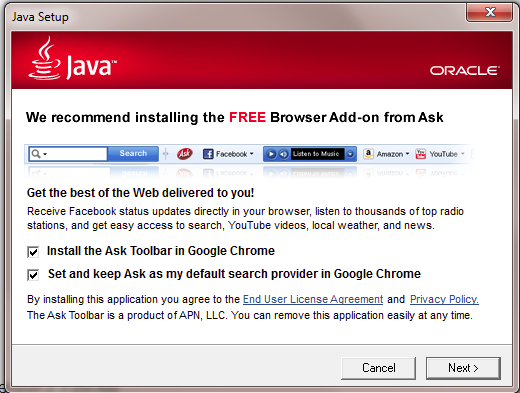
    Last but not least, be careful when you install free software. It often comes bundled with unwanted applications which are sometimes difficult to remove.

    In the following screenshot, the Ask Toolbar will be installed and Ask will be reset as your default search provider if you don't remove the checkmarks before clicking Next during a Java installation.
    0 comments No comments
  4. Anonymous
    2013-11-16T16:46:53+00:00

    This web site continues to open but I don't think I have installed it..

    How can I block this web site I have nortons 360 and keep all my microsoft stuff updated

    Can anyone help please

    thanks

    0 comments No comments
  5. Anonymous
    2013-10-09T22:31:55+00:00

    Systweak is not only installing w/out our permission, it's raining their junk on us AND they claim that Microsoft has them as an "approved" affiliate of some sort. I did not find them on the Microsoft page, but since they are invasive and claiming that they have Microsoft's blessing (and they refuse to say how they got installed; when I called they insisted that I must have clicked to install it!!!!), can't Microsoft shut them down?

    Hi,

    1.       Are you trying to uninstall the program?

    2.       Were there any changes made in the Computer prior to this issue?


    I would suggest you to try the methods mentioned below and check if it helps:


    Method 1:

    How to manually remove programs from the Add or Remove Programs tool

    http://support.microsoft.com/kb/314481


    Method 2:

    Fix problems with programs that can't be installed or uninstalled

    http://support.microsoft.com/mats/Program_Install_and_Uninstall/


    Hope this information is useful.

    no microsoft has never been able to sort anything I have the same problem like millions my hopes are set on companies like g data avg microsoft just doesn't care about customers

    0 comments No comments
