
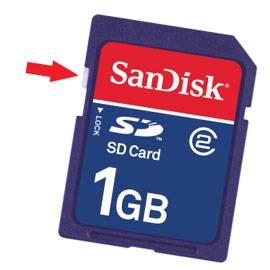
While I am sure you probably checked this, most SD cards have a very small slider switch on the side for locking the device preventing files from being placed on the disk. SD = Secure Digital.
This browser is no longer supported.
Upgrade to Microsoft Edge to take advantage of the latest features, security updates, and technical support.
' cx='32' cy='32' r='32' /%3E%3Ctext x='50%25' y='55%25' dominant-baseline='middle' text-anchor='middle' fill='%23FFF' %3EA%3C/text%3E%3C/svg%3E)
I downloaded a bin. file I need in order to update another device. It is in my document folder and I need to get it to a SD card/chip. When I ty to send it to the SD I get an error message saying "Cannot find the specified file. Make sure you specify the correct path and file name." I also trie to just copy and paste it to SD but got same message. Don't know what to do??
Locked Question. This question was migrated from the Microsoft Support Community. You can vote on whether it's helpful, but you can't add comments or replies or follow the question.
While I am sure you probably checked this, most SD cards have a very small slider switch on the side for locking the device preventing files from being placed on the disk. SD = Secure Digital.
' cx='32' cy='32' r='32' /%3E%3Ctext x='50%25' y='55%25' dominant-baseline='middle' text-anchor='middle' fill='%23FFF' %3EL%3C/text%3E%3C/svg%3E)
The problem is that your card reader is too old.
The "Secure Digital' (SD) storage format comes in several flavors. The original SD cards were 2 GB or less in size. Then in about 2006, SDHC (HC = high capacity) was developed. This standard permits storage capacity up to 32 GB. SDXC (up to 2 TB) was introduced several years later.
Your 4 GB card is an SDHC card -- and can't be used in early model SD card readers.
Fortunately, USB card readers that can read the new larger SD cards (as well as many other storage card formats) are both readily available and inexpensive. For example, http://www.amazon.com/s/ref=a9_asi_1?rh=i%3Aaps%2Ck%3Asdhc+reader&keywords=sdhc+reader&ie=UTF8&qid=1348603144
Read the specs -- and the reviews. If you want one that can read multiple types of devices, this one looks pretty reasonable: http://www.amazon.com/Kingston-Flash-Memory-Reader-FCR-HS219/dp/B00109Y2DQ/ref=sr_1_4?ie=UTF8&qid=1348603344&sr=8-4&keywords=sdhc+reader
If you're going to get cards bigger than 32 GB, be sure to get a reader that can handle SDXC.
Thank you. I'll check out the items above. I really appreciate your help.
2.48 MB
4GB
No, Tried to send other files to this card and got same message. Then, tried a different SD card and still got same message.
XP - Media Center Edition
No
Gateway GT5028 2005
What's the size of the file?
What's the capacity of the SD card?
Can you successfully read/write other files using this card?
What version of Windows do you have, including service pack?
If you are using a separate card reader for the SD card, what is its make and model and when (approx.) did you buy it?
If you are using a card reader built into your computer, what is the make and model of your computer and when (approx.) did you buy it?