Azure Data Factory
An Azure service for ingesting, preparing, and transforming data at scale.
This browser is no longer supported.
Upgrade to Microsoft Edge to take advantage of the latest features, security updates, and technical support.
' cx='32' cy='32' r='32' /%3E%3Ctext x='50%25' y='55%25' dominant-baseline='middle' text-anchor='middle' fill='%23FFF' %3EFA%3C/text%3E%3C/svg%3E)
The following link states that a prerequisite for copying data sources using Azure Data Factory is to install an ODBC driver in the Azure Runtime Environment.
https://learn.microsoft.com/en-us/azure/data-factory/connector-odbc
However, I can't find anything that documents how to do this. I would expect that many, many people have either done this or need this information. Please help! I'm stuck
An Azure service for ingesting, preparing, and transforming data at scale.
An extension of Azure for running apps in an on-premises environment and delivering Azure services in a datacenter.
' cx='32' cy='32' r='32' /%3E%3Ctext x='50%25' y='55%25' dominant-baseline='middle' text-anchor='middle' fill='%23FFF' %3EA%3C/text%3E%3C/svg%3E)
You didn't answer his question. He knows he needs an ODBC driver and wants to know how to install it on an I.R.
' cx='32' cy='32' r='32' /%3E%3Ctext x='50%25' y='55%25' dominant-baseline='middle' text-anchor='middle' fill='%23FFF' %3ESS%3C/text%3E%3C/svg%3E)
@Frank Admin Thanks for using Microsoft Q&A.
Which data source you want to connect to using ODBC ? In order to connect using ODBC you need to install specific ODBC drivers on your machine. ODBC drivers are different for different sources so if you would like to connect to a SQL Server using ODBC you need to install ODBC driver(64-bit) and if you want to connect to Microsoft Access source then you need to install ODBC driver for Microsoft Access. Also, you can find installed ODBC drivers in your system by going to Administrative Tools > Data Sources (ODBC).
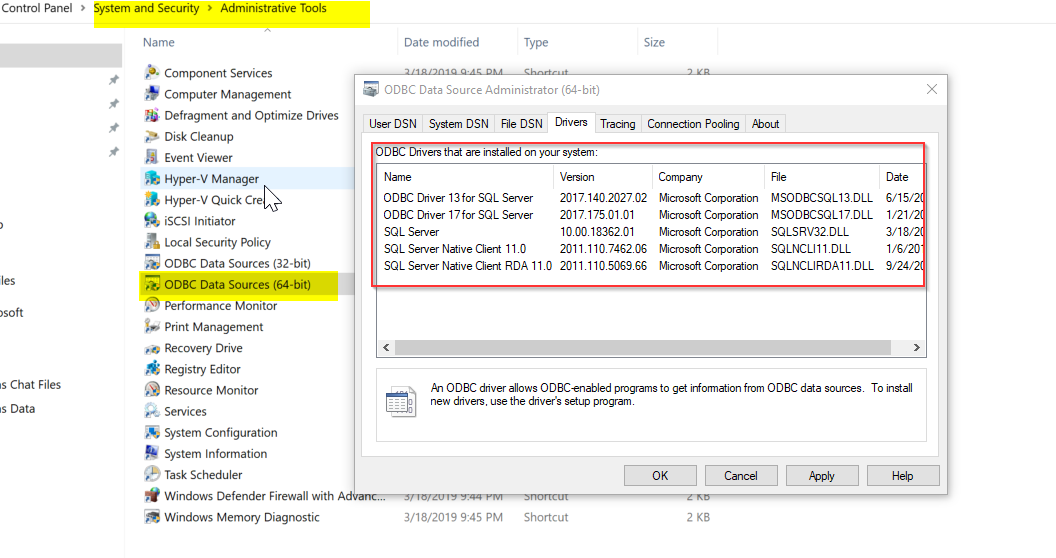
Reference:
@Frank Admin Please let me know if you having any questions.
@Frank Admin Please let me know if you find above reply useful. If yes, do click on 'Mark as answer' link in above reply. This will help other community members facing similar query to refer to this solution. Thanks.