Developer technologies | Windows Presentation Foundation
A part of the .NET Framework that provides a unified programming model for building line-of-business desktop applications on Windows.
This browser is no longer supported.
Upgrade to Microsoft Edge to take advantage of the latest features, security updates, and technical support.
' cx='32' cy='32' r='32' /%3E%3Ctext x='50%25' y='55%25' dominant-baseline='middle' text-anchor='middle' fill='%23FFF' %3EE%3C/text%3E%3C/svg%3E)
hi
i'm trying to change ContentControl.Content at run time based on ContentControl.DataContext, so at run time i change ContentControl.DataContext Source property and i want the ContentControl.Content to be changed based on the ContentControl.DataContext Source property new value,
here is my try:
<UserControl
    x:Class="wpf1.UI.View.CurrentView"
    xmlns="http://schemas.microsoft.com/winfx/2006/xaml/presentation"
    xmlns:x="http://schemas.microsoft.com/winfx/2006/xaml"
    xmlns:vm="clr-wpf1.UI.ViewModel"
    xmlns:view="clr-namespace:wpf1.UI.View"
    DataContext="{Binding}">
    <UserControl.Resources>
        <DataTemplate DataType="{x:Type vm:MyViewModel1}">
            <view:MyViewModel1View DataContext="{Binding}"/>
        </DataTemplate>
        <DataTemplate DataType="{x:Type vm:MyViewModel2}">
            <view:MyViewModel2View DataContext="{Binding}"/>
        </DataTemplate>
    </UserControl.Resources>
    <ContentControl DataContext="{Binding}" />
</UserControl>
and here is how i use it in mainwindow
<view:CurrentView
            Grid.Row="2"
            DataContext="{Binding CurrentVM}"/>
and here is the mainwindow viewmodel
...
private ViewModelBase _currentVM;
 public ViewModelBase CurrentVM
        {
            get => _currentVM;
            set
            {
                _currentVM = value;
                OnPropertyChanged(nameof(CurrentVM));
            }
        }

        MyViewModel1 _myVM1;
        MyViewModel2 _myVM2;
...

// at some point i do so
CurrentVM = _myVM1;

// at some point i do so
CurrentVM = _myVM2;
i want the CurrentView control to have only one view which matches it's datacontext.
i'm using .NetFramework 4.7 VS2019
any help will be appreciated, thanks in advance.
A part of the .NET Framework that provides a unified programming model for building line-of-business desktop applications on Windows.
A language based on Extensible Markup Language (XML) that enables developers to specify a hierarchy of objects with a set of properties and logic.
anyone can help me , is there a way to do that without TemplateSelectror ?
Answer accepted by question author

Hi,
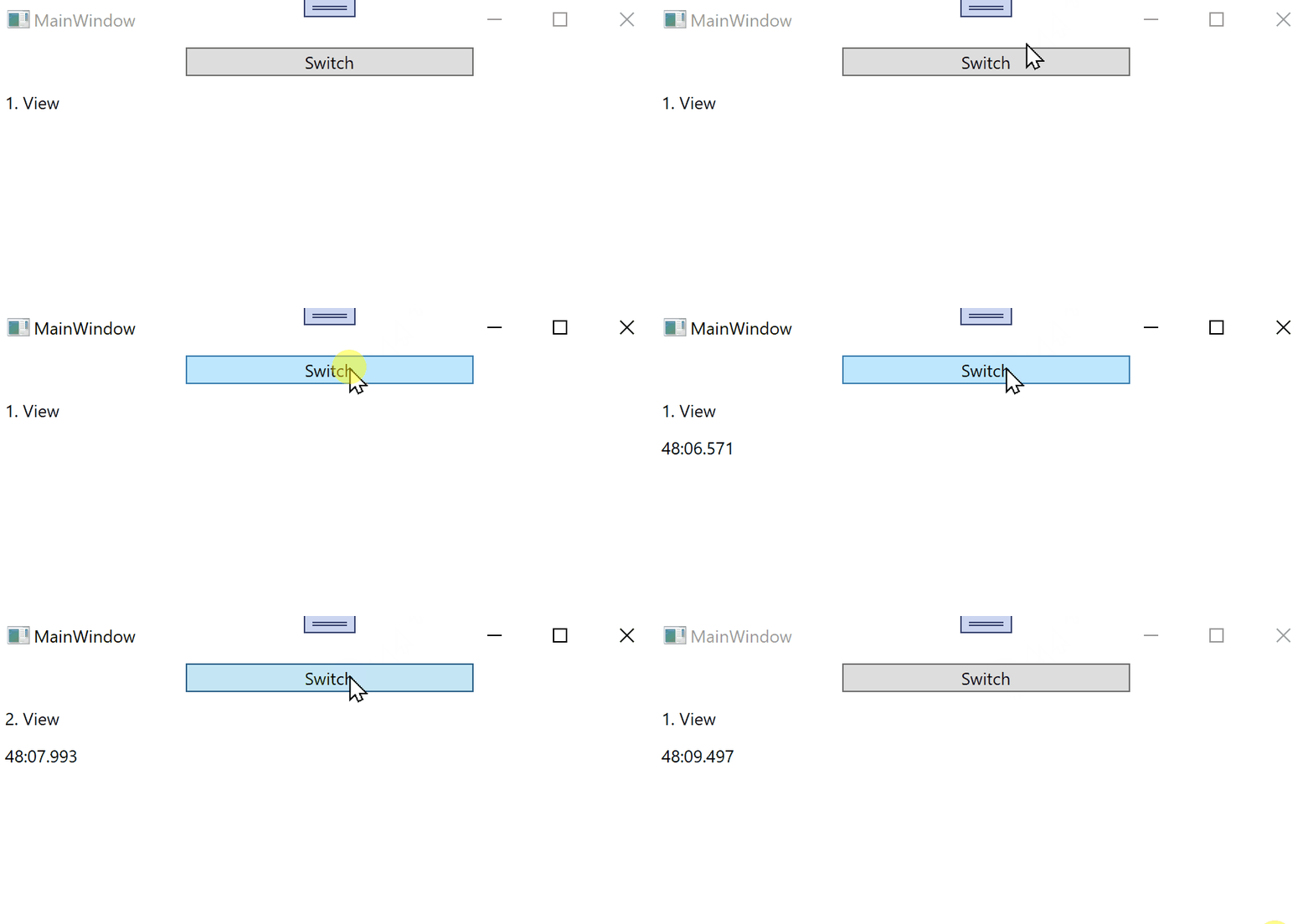
in ContentControl you can use Content = {Binding CurrentVM}.
Try following demo:
XAML MainWindow:
<Window x:Class="WpfApp1.Window033"
        xmlns="http://schemas.microsoft.com/winfx/2006/xaml/presentation"
        xmlns:x="http://schemas.microsoft.com/winfx/2006/xaml"
        xmlns:d="http://schemas.microsoft.com/expression/blend/2008"
        xmlns:mc="http://schemas.openxmlformats.org/markup-compatibility/2006"
        xmlns:local="clr-namespace:WpfApp033"
        xmlns:view="clr-namespace:WpfControlLibrary1;assembly=WpfControlLibrary1"
        mc:Ignorable="d"
        Title="MainWindow" Height="450" Width="800">
  <Window.DataContext>
    <local:ViewModel/>
  </Window.DataContext>
  <StackPanel>
    <Button Content="Switch" Command="{Binding}" Width="200" Margin="5"/>
    <view:Window033UC1 DataContext="{Binding CurrentVM}"/>
  </StackPanel>
</Window>
Main ViewModel:
using System;
using System.ComponentModel;
using System.Runtime.CompilerServices;
using System.Windows;
using System.Windows.Input;

namespace WpfApp033
{
  public class ViewModel : ICommand, INotifyPropertyChanged
  {
    public object CurrentVM { get; set; } = new WpfControlLibrary033.MyViewModel1();

    public void Execute(object parameter)
    {
      if (CurrentVM is WpfControlLibrary033.MyViewModel2)
        CurrentVM = new WpfControlLibrary033.MyViewModel1() { Info1 = DateTime.Now.ToString("mm:ss.fff") };
      else CurrentVM = new WpfControlLibrary033.MyViewModel2() { Info2 = DateTime.Now.ToString("mm:ss.fff") };
      OnPropertyChanged(nameof(CurrentVM));
    }

    public event EventHandler CanExecuteChanged;
    public bool CanExecute(object parameter) => true;

    public event PropertyChangedEventHandler PropertyChanged;
    private void OnPropertyChanged([CallerMemberName] string propName = "") =>
      PropertyChanged?.Invoke(this, new PropertyChangedEventArgs(propName));
  }
}
XAML UserControl:
<UserControl x:Class="WpfControlLibrary1.Window033UC1"
             xmlns="http://schemas.microsoft.com/winfx/2006/xaml/presentation"
             xmlns:x="http://schemas.microsoft.com/winfx/2006/xaml"
             xmlns:mc="http://schemas.openxmlformats.org/markup-compatibility/2006"
             xmlns:d="http://schemas.microsoft.com/expression/blend/2008"
             xmlns:local="clr-namespace:WpfControlLibrary1"
             xmlns:view="clr-namespace:WpfControlLibrary033"
             xmlns:vm="clr-namespace:WpfControlLibrary033"
             mc:Ignorable="d"
             d:DesignHeight="450" d:DesignWidth="800">
    <UserControl.Resources>
      <DataTemplate DataType="{x:Type vm:MyViewModel1}">
        <view:MyViewModel1View DataContext="{Binding}"/>
      </DataTemplate>
      <DataTemplate DataType="{x:Type vm:MyViewModel2}">
        <view:MyViewModel2View DataContext="{Binding}"/>
      </DataTemplate>
    </UserControl.Resources>
    <ContentControl Content="{Binding}"/>
</UserControl>
ViewModels for UserControls:
using System.Windows.Controls;
using System.Windows.Data;

namespace WpfControlLibrary033
{
  public class MyViewModel1
  {
    public string Info1 { get; set; }
  }
  public class MyViewModel2
  {
    public string Info2 { get; set; }
  }
  public class MyViewModel1View : UserControl
  {
    public MyViewModel1View()
    {
      StackPanel stp = new StackPanel();
      this.Content = stp;
      stp.Children.Add(new Label() { Content = "1. View" });
      Label lbl = new Label();
      lbl.SetBinding(Label.ContentProperty, new Binding("Info1"));
      stp.Children.Add(lbl);
    }
  }
  public class MyViewModel2View : UserControl
  {
    public MyViewModel2View()
    {
      StackPanel stp = new StackPanel();
      this.Content = stp;
      stp.Children.Add(new Label() { Content = "2. View" });
      Label lbl = new Label();
      lbl.SetBinding(Label.ContentProperty, new Binding("Info2"));
      stp.Children.Add(lbl);
    }
  }
}
Result: