Developer technologies | VB
An object-oriented programming language developed by Microsoft that can be used in .NET.
This browser is no longer supported.
Upgrade to Microsoft Edge to take advantage of the latest features, security updates, and technical support.
' cx='32' cy='32' r='32' /%3E%3Ctext x='50%25' y='55%25' dominant-baseline='middle' text-anchor='middle' fill='%23FFF' %3EBB%3C/text%3E%3C/svg%3E)
Hi Everyone: I am using VB.NET 2019, and I have a question about the IsNumeric fundtion for checking if a textbox contains numbers or not? The code that I am using is: If Not IsNumeric(TextBox1.Text) Then MsgBox("Please enter a numeric value.", MsgBoxStyle.Critical, My.Application.Info.ProductName & " Error") TextBox1.SelectAll() TextBox1.Focus() Endif Here is my question. If in my textbox I input "5 5" (of course without the quotations), the program catches the error. However if I input "5 ", it does not catch it. Can someone please explain why, and if there are other exceptions as well. I appreciate your help. Bob
An object-oriented programming language developed by Microsoft that can be used in .NET.

It behaves like TryParse, which accepts optional leading
or trailing whitespace. See the Remarks here:
https://learn.microsoft.com/en-us/dotnet/api/system.int32.tryparse?view=net-5.0

Here are a couple ideas
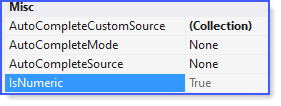
The following are basics that can be expanded on
Public Class Form1
    Private Sub IsNumberButton_Click(sender As Object, e As EventArgs) Handles IsNumberButton.Click

        If SpecialTextBox1.IsNumeric Then
            MessageBox.Show("Numeric")
        Else
            MessageBox.Show("Not numeric")
        End If

    End Sub
    ''' <summary>
    ''' Integer, Decimal, Double
    ''' </summary>
    ''' <param name="sender"></param>
    ''' <param name="e"></param>
    Private Sub TextBox1_KeyPress(sender As Object, e As KeyPressEventArgs) Handles TextBox1.KeyPress

        If Not Char.IsControl(e.KeyChar) AndAlso Not Char.IsDigit(e.KeyChar) AndAlso (e.KeyChar <> "."c) Then
            e.Handled = True
        End If

        If (e.KeyChar = "."c) AndAlso ((TryCast(sender, TextBox)).Text.IndexOf("."c) > -1) Then
            e.Handled = True
        End If

    End Sub
    ''' <summary>
    ''' Integer only
    ''' </summary>
    ''' <param name="sender"></param>
    ''' <param name="e"></param>
    Private Sub TextBox2_TextChanged(sender As Object, e As EventArgs) Handles TextBox2.TextChanged

        Dim textBox = ctype(sender, TextBox)

        If System.Text.RegularExpressions.Regex.IsMatch(TextBox.Text, "[^0-9]") Then
            TextBox.Text = TextBox2.Text.Remove(TextBox.Text.Length - 1)
        End If

    End Sub
End Class

Public Class SpecialTextBox
    Inherits TextBox

    ''' <summary>
    ''' Determine if we are dealing with a number
    ''' </summary>
    ''' <returns></returns>
    Public ReadOnly Property IsNumeric() As Boolean
        Get
            If Double.TryParse(Text.Replace(" "c, "").Trim(), Nothing) Then
                Return True
            Else
                Return False
            End If
        End Get
    End Property

End Class

It seems to also return True in these cases: "&HAC", "&o0", "5.2", "5,2", "5+". Maybe it is better to use TryParse in your case, where you can specify more parameters and even the language (culture)? Sometimes you can also use Regular Expressions.
' cx='32' cy='32' r='32' /%3E%3Ctext x='50%25' y='55%25' dominant-baseline='middle' text-anchor='middle' fill='%23FFF' %3EXZ%3C/text%3E%3C/svg%3E)
Hi @Babak Boloury ,
You can remove all spaces when using 'IsNumeric'.
For example:
        If Not IsNumeric(TextBox1.Text.Replace(" ", "")) Then
            MsgBox("Please enter a numeric value.", MsgBoxStyle.Critical, My.Application.Info.ProductName & " Error")
            TextBox1.SelectAll()
            TextBox1.Focus()
        End If
Best Regards,
Xingyu Zhao
*
If the answer is helpful, please click "Accept Answer" and upvote it.
Note: Please follow the steps in our documentation to enable e-mail notifications if you want to receive the related email notification for this thread.