Microsoft Security | Microsoft Entra | Microsoft Entra ID
A cloud-based identity and access management service for securing user authentication and resource access

This browser is no longer supported.
Upgrade to Microsoft Edge to take advantage of the latest features, security updates, and technical support.
' cx='32' cy='32' r='32' /%3E%3Ctext x='50%25' y='55%25' dominant-baseline='middle' text-anchor='middle' fill='%23FFF' %3EA%3C/text%3E%3C/svg%3E)
Hello,
Hope you are well. Can someone guide me how do I buy AZURE AD PREMIUM P2 license for my tenant please?
I am currently on free license for 30 days.
A step by step process will be great
A cloud-based identity and access management service for securing user authentication and resource access
Answer accepted by question author
' cx='32' cy='32' r='32' /%3E%3Ctext x='50%25' y='55%25' dominant-baseline='middle' text-anchor='middle' fill='%23FFF' %3ESS%3C/text%3E%3C/svg%3E)
@NeerajV-6011 You need login to O365 Admin portal with the global administrator account and purchase licenses from there. You need to search for Azure Active directory on the page. You will see various available Azure AD services on the page.
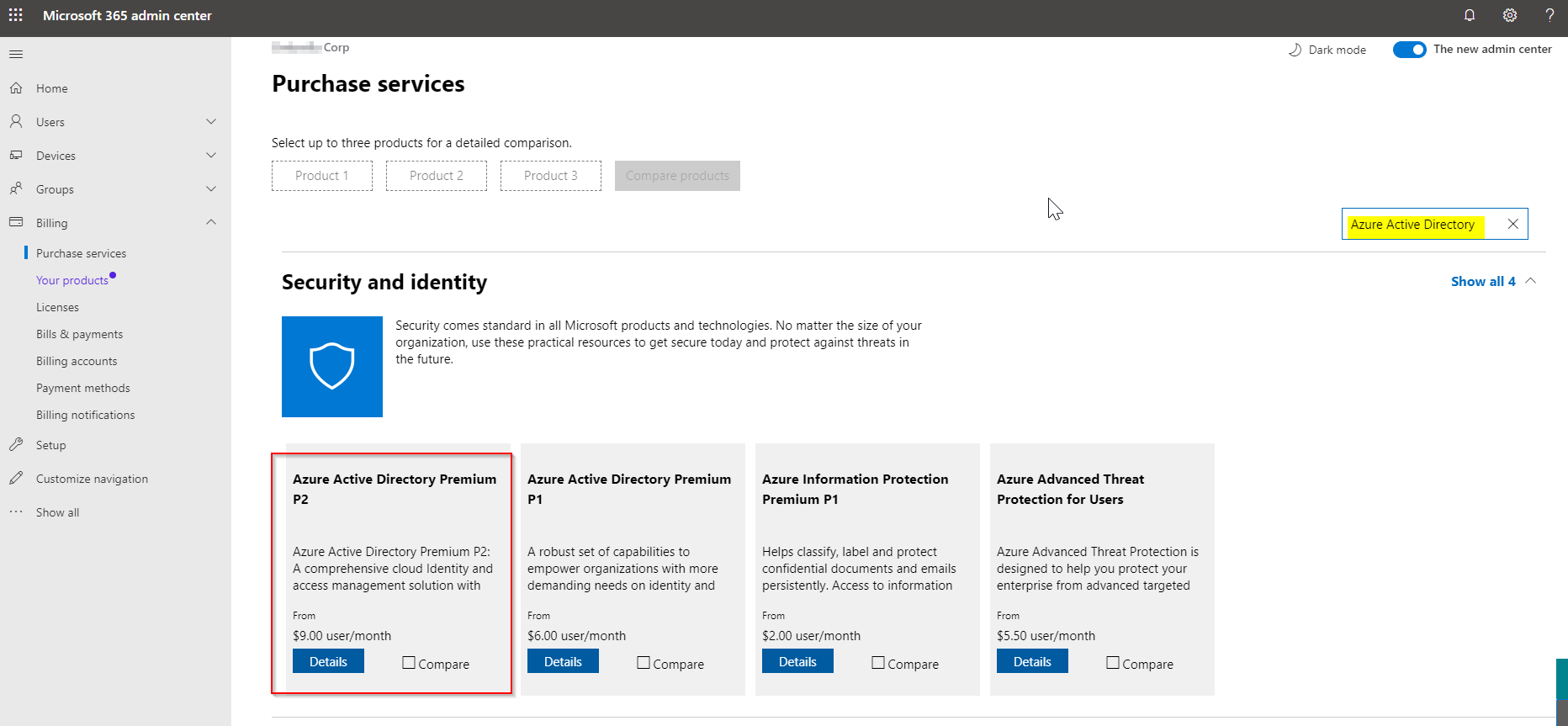
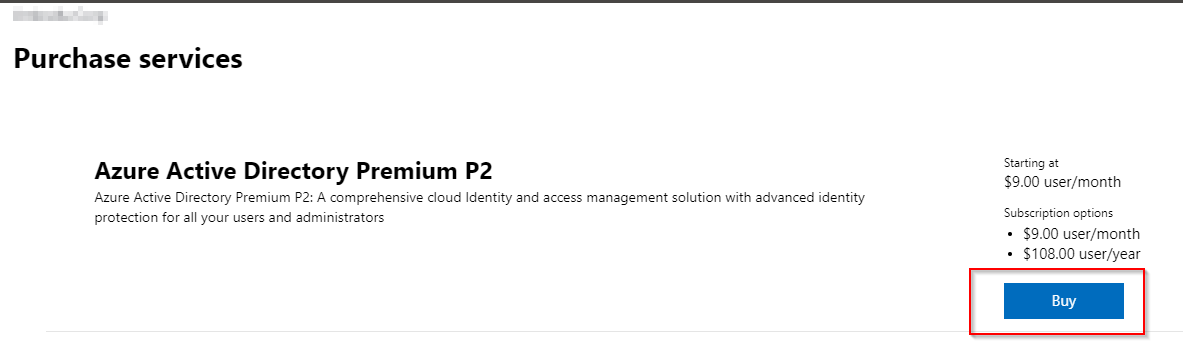
Once you click on Details you can get the license plan details and you can "Buy" from page as shown below.
' cx='32' cy='32' r='32' /%3E%3Ctext x='50%25' y='55%25' dominant-baseline='middle' text-anchor='middle' fill='%23FFF' %3EAV%3C/text%3E%3C/svg%3E)
One thing nowhere explicitly mentioned but which is quite important and I only realized today I want to mention here.
Maybe it helps someone like me :-)
For (now) obvious reasons you need to have a local account in this tenant which has the Global Administrator role. And one needs to take this account to buy licenses for the tenant.
A little background why this was an issue for me so far:
We have many tenants we are managing, but we invite all the admins as guests from our home tenant to the "child" tenants (let's call them like this, they are in fact not really related - different customers, different projects, whatever). And when I logged in to the M365 Admin portal I always ended up seeing the licenses and users of out home tenant and I always asked myself how I would buy licenses for the others. Today I suddenly realized how this is meant to work and voila, it did. :-)
' cx='32' cy='32' r='32' /%3E%3Ctext x='50%25' y='55%25' dominant-baseline='middle' text-anchor='middle' fill='%23FFF' %3EA%3C/text%3E%3C/svg%3E)
No dice. It's gone. Where did MS hide it? Why make it so hard to purchase something from you MS?
' cx='32' cy='32' r='32' /%3E%3Ctext x='50%25' y='55%25' dominant-baseline='middle' text-anchor='middle' fill='%23FFF' %3EMW%3C/text%3E%3C/svg%3E)
How i can invite users from premium p2 license to Azure directory users (Azure portal)?
' cx='32' cy='32' r='32' /%3E%3Ctext x='50%25' y='55%25' dominant-baseline='middle' text-anchor='middle' fill='%23FFF' %3EMI%3C/text%3E%3C/svg%3E)
Hi everyone,
I have a Visual Studio Enterprise (MPN) subscription (offer id: MS-AZR-0029P),
and i'm just wondering is it possible to use my monthly credit to pay for AAD Premium 2?
Pricing available here
https://azure.microsoft.com/en-us/pricing/details/active-directory/
then sign in to purchase.
--please don't forget to Accept as answer if the reply is helpful--
Regards, Dave Patrick ....
Microsoft Certified Professional
Microsoft MVP [Windows Server] Datacenter Management
Disclaimer: This posting is provided "AS IS" with no warranties or guarantees, and confers no rights.