Developer technologies | .NET | .NET Runtime
.NET: Microsoft Technologies based on the .NET software framework. Runtime: An environment required to run apps that aren't compiled to machine language.
This browser is no longer supported.
Upgrade to Microsoft Edge to take advantage of the latest features, security updates, and technical support.
' cx='32' cy='32' r='32' /%3E%3Ctext x='50%25' y='55%25' dominant-baseline='middle' text-anchor='middle' fill='%23FFF' %3EP%3C/text%3E%3C/svg%3E)
Hi,
How to create treeview in .Net Core console application dynamically
.NET: Microsoft Technologies based on the .NET software framework. Runtime: An environment required to run apps that aren't compiled to machine language.
An object-oriented and type-safe programming language that has its roots in the C family of languages and includes support for component-oriented programming.
' cx='32' cy='32' r='32' /%3E%3Ctext x='50%25' y='55%25' dominant-baseline='middle' text-anchor='middle' fill='%23FFF' %3ETY%3C/text%3E%3C/svg%3E)
The treeview object has no meaning in console applications. Do you want to get tree-structured data in console applications?
That doesn't need a treeview object, but a class like this:
class Node
{
    public string Name { get;  set; }
    public List<Node> Children { get; set; }
    public Node()
    {
        Children = new List<Node>();
    }
}
You can use this class to store the tree structure and display it.
    static Node Node = new Node();
    static void Main(string[] args)
    {
        LoadDirectory(@"d:\test");

        List<Node> nodes = Node.Children;
        //......

        Console.WriteLine("Press any key to continue...");
        Console.ReadLine();
    }
    public static void LoadDirectory(string Dir)
    {
        DirectoryInfo di = new DirectoryInfo(Dir);
        Node.Name = di.Name;
        LoadFiles(Dir,  Node);
        LoadSubDirectories(Dir,  Node);
    }
    private static void LoadSubDirectories(string dir,  Node node)
    {
        string[] subdirectoryEntries = Directory.GetDirectories(dir);
        foreach (string subdirectory in subdirectoryEntries)
        {
            DirectoryInfo di = new DirectoryInfo(subdirectory);

            Node node1 = new Node();
            node1.Name = di.Name;
            node.Children.Add(node1);

            LoadFiles(subdirectory, node1);
            LoadSubDirectories(subdirectory, node1);
        }
    }
    private static void LoadFiles(string dir,  Node node)
    {
        string[] Files = Directory.GetFiles(dir, "*.*");

        foreach (string file in Files)
        {
            FileInfo fi = new FileInfo(file);

            Node node1 = new Node();
            node1.Name = fi.Name;
            node.Children.Add(node1);
        }
    }
If the response is helpful, please click "Accept Answer" and upvote it.
Note: Please follow the steps in our documentation to enable e-mail notifications if you want to receive the related email notification for this thread.
' cx='32' cy='32' r='32' /%3E%3Ctext x='50%25' y='55%25' dominant-baseline='middle' text-anchor='middle' fill='%23FFF' %3EC%3C/text%3E%3C/svg%3E)
Yup. Just like the output of "tree" command you can create the effect of "treeview" by using combination of characters.
For better effect you could consider using U+2500(─), U+2502(│), U+251C(├) and U+2514(└) if you know the application will run on console with font that supports Unicode so as to eliminate the gaps between the connecting line.
Hi All,
I want to create treeview structure dynamically as per below snapshot. I need it in console application, i dont need to create any GUI.
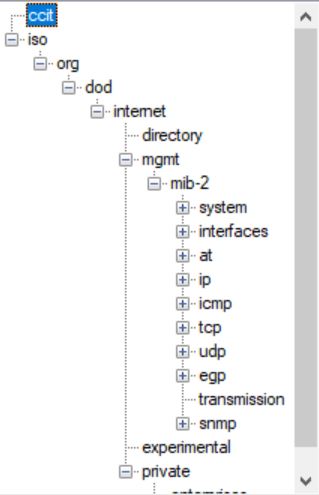
@Prabs
It looks a bit like a folder and its sub.
If you insist on using Treeview, you can add a reference: System.Windows.Forms.dll.
But the simple Node class I provided can also be used to store these contents.
I updated my answer and added code to use Treeview and my class at the same time.
Please see if the current code is closer to your needs.

According to https://www.bing.com/search?q=add+reference+windows+forms+console+core and https://learn.microsoft.com/en-US/dotnet/core/project-sdk/msbuild-props-desktop, try right-clicking the project in Solution Explorer, then select “Edit Project File” and add two elements:
<Project Sdk="Microsoft.NET.Sdk">
  <PropertyGroup>
    . . .
    <UseWindowsForms>true</UseWindowsForms>
    <DisableWinExeOutputInference>true</DisableWinExeOutputInference>
  </PropertyGroup>
</Project>
Now the next line should work:
var t = new System.Windows.Forms.TreeView( );
Hello all,
if i use below lines,Publish is not happening. it is giving error.
error : There was no runtime pack for Microsoft.WindowsDesktop.App.WindowsForms available for the specified RuntimeIdentifier 'linux-x64'
<Project Sdk="Microsoft.NET.Sdk">
<PropertyGroup>
. . .
<UseWindowsForms>true</UseWindowsForms>
<DisableWinExeOutputInference>true</DisableWinExeOutputInference>
</PropertyGroup>
</Project>
Please help me on this issue
@Prabs
Winform is a technology unique to Windows, and it cannot run on Linux.
I think using Treeview is not your only option.
Explain your needs in detail, and we will provide solutions that we think are feasible. If not suitable for you, ask your questions and let us continue to discuss how to improve.
Hi,
I am migrating .Net Framework console to .net core console to support on Linux.
Before i used System.windows.forms for creating treeview and treenode dynamically.
Before my aplplication supported only for windows.
I want to create data like TreeView structure format dynamically like below snapshot,
Please help me on this..
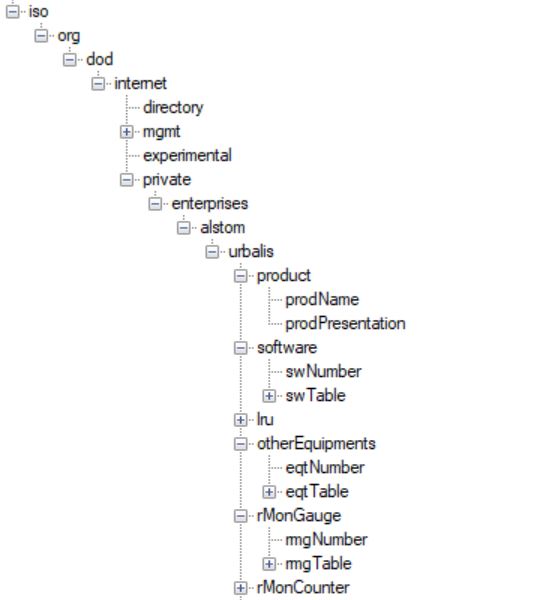
@Prabs
The class I provided in the answer above can be used to store such structure format data, have you tried it?
I will list all subfolders and files in a folder as an example.
Even if your situation is different from mine, it should be able to provide an idea.
If you have any questions or do not understand the code, please let me know.

You cannot use any controls in a console application. If you need a GUI create a windows forms or WPF application
Hi,I don't need GUI but i need treeview object in console application.
How can i approach this?

A TreeView is a control (child of a window) to display a hierarchy of items, so, as vb2ae said, you need to create a window
(it can be done, but it is not the purpose of a Console app)
Hi, I am maintaining some of the objects in treeview structure.
Can i use .Net Core Windows forms instead of Console application?
Is Windows Forms .NET Core available?
.net core 3.1 and .net 5 offer windows forms projects keep in mind they are windows only projects
Hi,I have Visual Studio 2019 version 16.9.2
There is no .Net core Windows form projects.Please see the snapshot below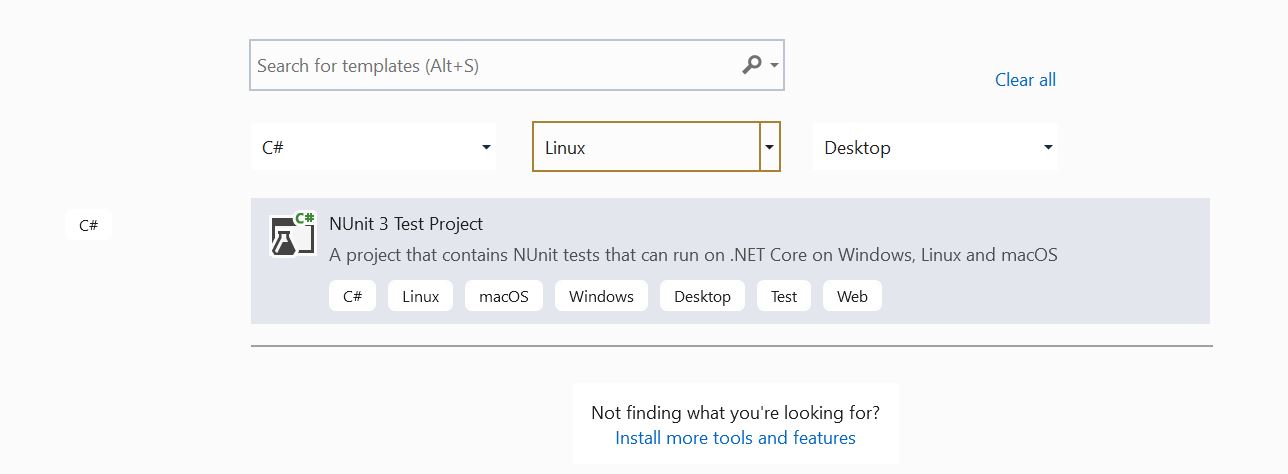
they are windows only you wont see them for linux
i know,it is not purpose of console application but in my application need to create treeview objects.
is there any user defined treeview class available? instead of using .Net treeview
maybe this will help https://www.avaloniaui.net/