Share via

what is load.js from loadm.exelator.com

Anonymous
2013-09-19T13:15:31+00:00

Since yesterday I have been getting this popup asking me "do you want to open or save load.js from loadm.exelator.com?"  I of course click cancel and exit out.  I have Spybot and windows defender and ran full scans of both and come up clean.  This popup has appeared now 4 times in the last 15 hours and I am worried that something is embedded even though my programs cannot find anything.  I have Windows 8.  Can someone please help?

Windows for home | Previous Windows versions | Security and privacy

Locked Question. This question was migrated from the Microsoft Support Community. You can vote on whether it's helpful, but you can't add comments or replies or follow the question.

0 comments No comments
Answer accepted by question author
  1. Anonymous
    2013-09-22T21:13:59+00:00

    I have the have/had the same pop-up too. Started early yesterday and pops-up intermittently.  I ran a full scan with Kaspersky and Malwarebytes. Both scans indicated no problems. I checked cookie enabling in Internet Options (I'm using IE10) and disallowed third-party cookies. So far so good.  It has not reappeared.......so far

    2 people found this answer helpful.
    0 comments No comments

21 additional answers

Sort by: Most helpful
  1. Anonymous
    2013-09-23T03:07:02+00:00

    I got this as soon as I installed Paltalk. Doesn't pop up as long as I'm not using it. Went away permanently when I uninstalled.

    0 comments No comments
  2. Anonymous
    2013-09-23T01:21:21+00:00

    I had the pop-up to "download / save/ run / cancel" once while playing PCH games.  I forced "end now" on all IE tabs after doing a search on original IE tab on my home site.  I cleaned out temporary internet files and web sites.  Rebooted, ran full Microsoft Security Essentials scan with no "bad things" detected or quarantined, and have not had pop up since.

    I have Windows 7 (64-bit), IE10, Java SE Environment Runtime add on enabled.

    I also have Windows Firewall and Webroot for viruses, malware, spyware, etc.

    I have Windows Security Essentials real time protection turned off.

    0 comments No comments
  3. Anonymous
    2013-09-22T22:37:52+00:00

    Aloha !

    We have it too.

    The ONLY time it shows up is when I am playing Internet Spades.

    Windows XP, SP3, IE 8, Java NOT installed.

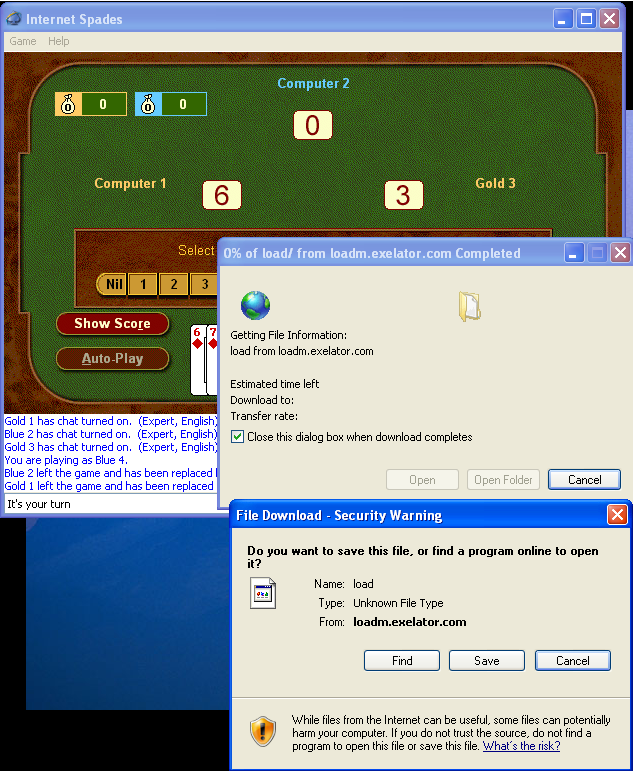
    After a game concludes and you get tossed into a new game, that is when the pop up occurs I have the strong suspicion it is one of their glorious advertisers that has planted a malicious line in their ad from Zone games or whatever feeds the advertisements from Internet Spades.

    I have a screen shot.  Again.  Internet Spades is the ONLY window i have running and the computer was rebooted about 5 minutes earlier. Our computers run Windows Steady State and have been completely clean for 4 years now. They reset to a clean state so i know there is nothing already on the computers.

    Anyone else seeing this while playing the zone games ?
    0 comments No comments
  4. Anonymous
    2013-09-21T04:33:02+00:00

    I think I got rid of it. 

    I ran my IObit malware fighter and then  CCCleaner.  Restarted my computer and it did not come back when I did this.

    Hopefully it will stay away too.

    0 comments No comments
