Exchange | Exchange Server | Management
The administration and maintenance of Microsoft Exchange Server to ensure secure, reliable, and efficient email and collaboration services across an organization.
This browser is no longer supported.
Upgrade to Microsoft Edge to take advantage of the latest features, security updates, and technical support.
' cx='32' cy='32' r='32' /%3E%3Ctext x='50%25' y='55%25' dominant-baseline='middle' text-anchor='middle' fill='%23FFF' %3ESA%3C/text%3E%3C/svg%3E)
Outlook 2019
Exchange 2016
My Outlook is not displaying the Quota settings in the lower right corner of Outlook when viewing my primary mailbox. However if I select my Archive mailbox I can see the quota settings/limits.
I have confirmed that the "Quota Information (off)" is unchecked and I have also updated the registry key "SOFTWARE\Microsoft\Office\16.0\Outlook\StatusBar\QuotaThermometer" is set to 1.
The funny thing is both my Primary and Archive mailboxes are both in the same Exch DB, thought this could be a DB setting (old Exch 2010 server had separate DBs) so that is not the case. This is the same result for mailboxes still on our old Exch2010 server.
I also read that the "Limit - Prohibit Send & Receive" needs to be set for the quota to be displayed but even after setting that on my Primary mailbox there is no change (waited 30+min after closing Outlook).
What am I missing?
The administration and maintenance of Microsoft Exchange Server to ensure secure, reliable, and efficient email and collaboration services across an organization.
Answer accepted by question author
Used article https://www.exchangeitup.net/2017/01/exchangeoutlook-not-showing-quota.html to resolve the issue.
' cx='32' cy='32' r='32' /%3E%3Ctext x='50%25' y='55%25' dominant-baseline='middle' text-anchor='middle' fill='%23FFF' %3EYS%3C/text%3E%3C/svg%3E)
Hi @S A
According to your description, do you mean when selecting the primary mailbox, Outlook doesn't show Quota Information in Status Bar?

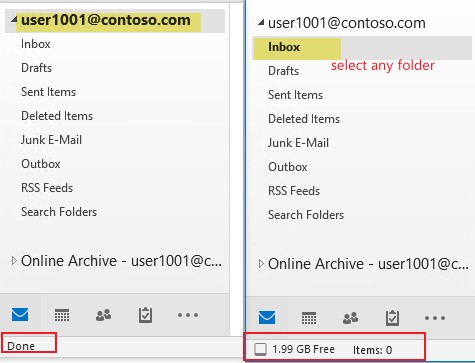
If this describes your situation, could you have a check to see if you are choosing a folder rather than the root mailbox when viewing the quota information? As based on my test, for the primary mailbox, the quota information only shows when a folder is selected:
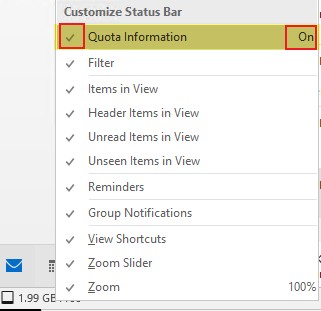
Besides, as regards to the "Quota Information" setting, please check if it's the same as the screenshot below:
In case the issue remains, it's suggested to run the command below for one of the affected users, then share the output here for further analysis after removing any personal information involved:
Get-Mailbox <identity> | fl IssueWarningQuota,ProhibitSendQuota,ProhibitSendReceiveQuota,UseDatabaseQuotaDefaults,database
Get-MailboxDatabase <db name>|fl IssueWarningQuota,ProhibitSendQuota,ProhibitSendReceiveQuota
If an Answer is helpful, please click "Accept Answer" and upvote it.
Note: Please follow the steps in our documentation to enable e-mail notifications if you want to receive the related email notification for this thread.
Hi @S A ,
I am writing to check if provided information is helpful. Please let me know if you need further assistance. Thank you.
If an Answer is helpful, please click "Accept Answer" and upvote it.
Note: Please follow the steps in our documentation to enable e-mail notifications if you want to receive the related email notification for this thread.
After doing some reading I found an article that stated that the Prohibit Send&Receive needs to be set. We currently were only using the Issue Warning and Prohibit Send. I set this value for all mailboxes and after some time (many hours) the quota did finally show up for staff.
This was the article but we didn't need to set manually set the registry setting. this appears to change when the user checks off the Quota information checkbox in outlook.
https://www.exchangeitup.net/2017/01/exchangeoutlook-not-showing-quota.html
Hi @S A ,
Happy to know that you've figured it out and thanks for sharing the solution :)
If an Answer is helpful, please click "Accept Answer" and upvote it.
Note: Please follow the steps in our documentation to enable e-mail notifications if you want to receive the related email notification for this thread.