I have two Windows 2003 servers and three Windows 7 Clients in a WORKGROUP on a network through Moxa fibre/copper switches
Server 1 is the sole timekeeper so the other machines need to synchronise their clocks to server 1, but it is not working :(
These machines will be afloat on a boat and will never connect to the internet.
I have set server1 to use its own hardware clock by:
a) setting announce flags to a (10) in regedit
HKEY_LOCAL_MACHINE\SYSTEM\CurrentControlSet\Services\W32Time\Config\AnnounceFlags
b) Configure server1 as an NTP server: Add LocalNTP with a value of 1 to w32time parameters. See
http://support.automation.siemens.com/CN/llisapi.dll?func=cslib.csinfo&objId=22144503&load=treecontent&lang=en&siteid=cseus&aktprim=0&objaction=csview&extranet=standard&viewreg=CN
for details.
c) Double click the time to open
time and Date Properties then select Internet Time
and UnCheck the automatically synchronise with an internet time server box.
This seems to be working fine, I no longer have errors in system event viewer.
For the Client I have modified the following
a) Double click the time to open the clock, click
change date and time settings, select internet time then
change settings and type svr1 ip address in the server field and click the
update now button. I get "the peer is unreachable."
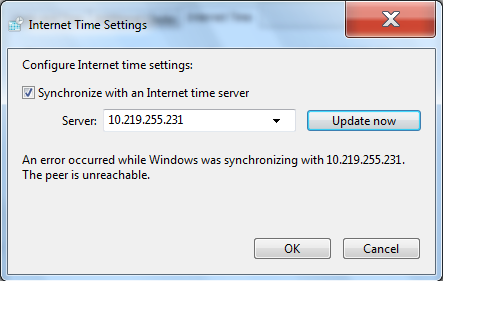
I was earlier getting a timeout here untill I added rules to the client windows firewall to allow port 123, both udp and tcp, inbound and outbound. This was the same result as turning the firewall off, so the firewall path seems to be working.
Windows firewall is turned off on both Server machines
For Server2 I have set the following:
a) Set announce flags to a (10) in regedit. (I'm not sure what this should be set to??)
HKEY_LOCAL_MACHINE\SYSTEM\CurrentControlSet\Services\W32Time\Config\AnnounceFlags
b) Double click the time to open
time and Date Properties then select Internet Time
and leave the automatically synchronise with an internet time server box
Checked, then type svr1's IP address into the server field.
This gives me "An error occured while windows was synchronising with 10.219.255.231" but i cannot see any errors in the System Event Viewer
Can anyone tell me where I'm going wrong?
' cx='32' cy='32' r='32' /%3E%3Ctext x='50%25' y='55%25' dominant-baseline='middle' text-anchor='middle' fill='%23FFF' %3EA%3C/text%3E%3C/svg%3E)
