Microsoft Security | Microsoft Defender | Microsoft Defender for Cloud
A cloud-native solution that protects workloads across hybrid and multi-cloud environments with threat detection and security recommendations

This browser is no longer supported.
Upgrade to Microsoft Edge to take advantage of the latest features, security updates, and technical support.
' cx='32' cy='32' r='32' /%3E%3Ctext x='50%25' y='55%25' dominant-baseline='middle' text-anchor='middle' fill='%23FFF' %3EJJ%3C/text%3E%3C/svg%3E)
I noticed that all our users created in Office 365 get an Azure account too. This normally would not be a problem, but it looks like even a low privileged user can login to Azure, view all users, memberships, devices, and domains.
I found conditional policies can be setup, but it looks like as long as a user can sign-in, they can login to Azure and view all this data.
Our tenant only has a few users that login to Azure as a domain, but the rest use Office 365 to login.
A cloud-native solution that protects workloads across hybrid and multi-cloud environments with threat detection and security recommendations
Additional Microsoft Entra services and features related to identity, access, and network security
Answer accepted by question author

Hello @JohnJr-9222
You can use below option to restrict any Non-administrator user from accessing Azure Active Directory:
Azure Portal > Azure Active Directory > Users > User Settings > Restrict access to Azure AD administration portal and set it to Yes
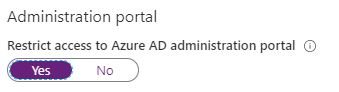
Please do not forget to "Accept the answer" wherever the information provided helps you. This will help others in the community as well.

You can restrict access on several levels, including restricting access to the portal, as detailed here: https://learn.microsoft.com/en-us/azure/active-directory/fundamentals/users-default-permissions#to-restrict-the-default-permissions-for-member-users
Thank you for that helpful link.
The problem is that Office 365 user does not have any roles attached to their Azure account and they have no Office 365 licenses attached.
IF there are not roles attached, how are they able to login to Azure? This user does have sign-in rights, but we wanted to limit their sign-in to Office 365 to access their mailbox, but need see the rest of Azure's AD.
License or role don't matter, there are default permissions that everyone in the organization "inherits", as detailed in the article I linked to above. Which also details how to restrict those when needed.