Share via

Bluetooth Driver for dell(Inspiron N5110(ST: 3v82np1 ) is still not working well.

Anonymous
2014-02-05T03:04:54+00:00

Hi,

I have tried installing "Dell Wireless 1701 802.11 b/g/n, Bluetooth v3.0+HS Driver "

But I saw neither wireless nor Bluetooth was defined.

As  the drivers listed below are only  the driver for wireless and bluetooth, I almost tried all of them, except the last three.

File TitleImportanceRelease DateVersionActions

Intel Centrino Wireless-N 1030 WiFi Driver 

(Driver) 

Other Formats

Description

Intel 6230/N1030/N1000 WiFi Driver for win7 64-bit This package provides the driver for the Intel Centrino Wireless-N 1030 WiFi Driver and imore…

![](http://i.dell.com/das/xa.ashx/global-site-design%20WEB/d0c9e96b-ee6c-9387-76b8-df7796df5150/1/OriginalPng?id=Dell/Non-Product_Images/Icons/get-driver.png)Download File

![](http://i.dell.com/das/xa.ashx/global-site-design%20WEB/f919c388-a875-df58-cb3d-2e40994b40f2/1/OriginalPng?id=Dell/Non-Product_Images/Icons/add-to-my-dl-list.png)Add to My Download List

Intel Centrino Wireless-N 1030/Advanced-N 6230 Bluetooth Adapter Driver 

(Driver)

Description

This package provides the Intel Centrino Wireless-N 1030/Advanced-N 6230 Bluetooth Adapter Driver and is supported on Inspiron N5110 and Vosmore…

Dell Wireless 1701 802.11 b/g/n, Bluetooth v3.0+HS Driver 

(Driver)

Description

This package provides the Dell Wireless 1701 802.11 b/g/n, Bluetooth v3.0+HS Driver and is supported on Inspiron N5110 and Vostro Notebook 3more…

Dell Wireless 1702 WiFi + Bluetooth Driver 

(Driver)

s

Description

This package provides the Dell Wireless 1702 802.11 b/g/n, Bluetooth 3.0+HS Driver and is supported on Inspiron and Vostro Notebook models tmore…

Intel Centrino Wireless-N 1000, Centrino Advanced-N 6230, Centrino Wireless-N 1030, v.14.2.0.10, A01 

(Driver)

Recommended

Description

This package provides the Intel Centrino Wireless-N 1000/1030, Advanced-N 6230 Driver and is supported on Inspiron N5110 and Vostro Notebook more…

Intel Centrino Advanced-N 6230/Wireless-N 1030 Bluetooth Adapter Driver 

(Driver)

Description

This package provides the Intel Centrino Advanced-N 6230/Wireless-N 1030 Bluetooth Adapter Driver and is supported on Inspiron N5110 and Vosmore…

![](http://i.dell.com/das/xa.ashx/global-site-design%20WEB/d0c9e96b-ee6c-9387-76b8-df7796df5150/1/OriginalPng?id=Dell/Non-Product_Images/Icons/get-driver.png)Download File

![](http://i.dell.com/das/xa.ashx/global-site-design%20WEB/f919c388-a875-df58-cb3d-2e40994b40f2/1/OriginalPng?id=Dell/Non-Product_Images/Icons/add-to-my-dl-list.png)Add to My Download List

Dell Wireless WLAN 1502 Half Mini-Card Driver 

(Driver)

Description

This package provides the driver for Dell Wireless WLAN 1502 Half Mini-Card and is supported on Inspiron Notebook and Vostro Notebook modelmore …

Intel WiMax Link 6150 Driver 

(Driver)

Description

This package provides the Intel WiMax Link 6150 Driver and is supported on Inspirion and XPS Notebook models that are running the following

Realtek RTL8111E-VB Gigabit and RTL8105E-VB 10/100 Ethernet Controller Driver 

(Driver)

Description

This package provides the Realtek RTL8111E-VB Gigabit and RTL8105E-VB 10/100 Ethernet Controller Driver and is supported on Inspiron N5110 amore…

I had to install Dell Wireless 1702 WiFi + Bluetooth Driver
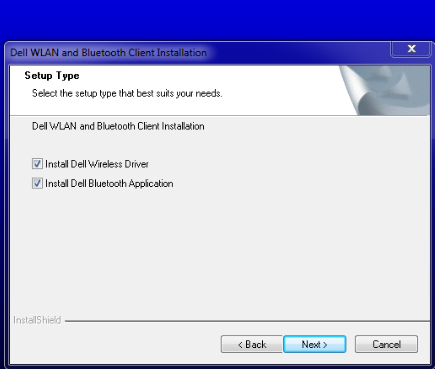
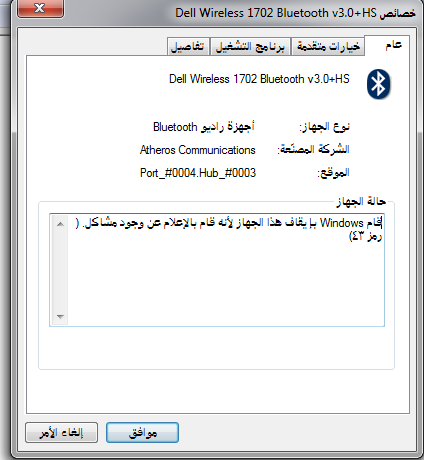
The wireless adapter was defined by this driver, however, the Bluetooth still has an exclamation mark in front of it, and when the Dell WLAN and Bluetooth client installation finished, a pop up message said that Windows couldn't install the device well, although there was a folder added in documents folder named 'Bluetooth Folder'

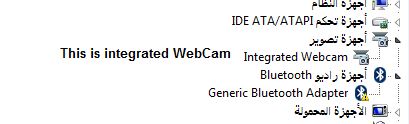
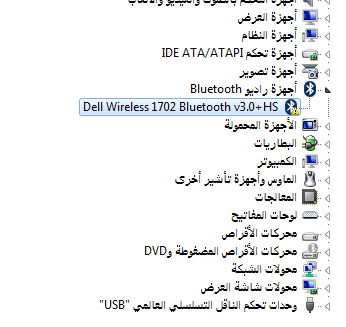
Yes, the Bluetooth was named with 'Generic Bluetooth adapter' before installing 'Driver above'. However, after installing the driver above, the Bluetooth adapter named with ' Dell wireless 1702 Bluetooth v3.0". But as you see it's still not working will.


The sceen shot shows the device manger before installing  Dell Wireless 1702 WiFi + Bluetooth Driver
These screen shots shows the device manger after installing  Dell Wireless 1702 WiFi + Bluetooth Driver
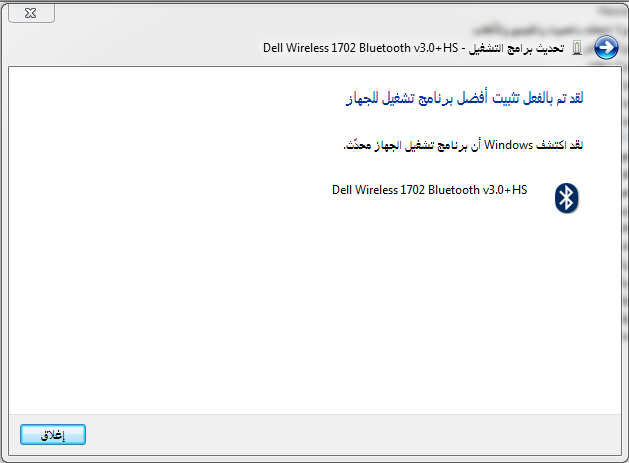
I've lit windows detect the operating program for this device on the internet, it said "Windows has detected that the operating  program of this device is up to date. As this screenshot shows.

What should I do because nothing lift to try? If you have a look at the ninth drivers in my previous message, you will see that no other drivers for Bluetooth lift.

Also, I have tried  to install Intel Centrino Wireless-N 1030 WiFi Driver

But I have been told that "the installation is blocked', This package of installation cannot be installed on your system' I don't know what this means, is it because Dell Wireless 1702 WiFi + Bluetooth Driver is being installed
Windows for home | Previous Windows versions | Devices and drivers

Locked Question. This question was migrated from the Microsoft Support Community. You can vote on whether it's helpful, but you can't add comments or replies or follow the question.

0 comments No comments

5 answers

Sort by: Most helpful
  1. Anonymous
    2014-02-13T12:49:41+00:00

    Hello,

    We apologies for the late response.

    I would suggest you to try the following methods:

    Method 1:

    Run the Hot fix for Bluetooth devices do not work correctly on a computer that is running Windows 7.

    http://support.microsoft.com/kb/980396/en-us

    Method 2:

    Try the following steps to Uninstall and reinstall the Bluetooth device drivers:

    1. Click Start, type Device Manager in the Start Search box, and then press ENTER.

    1. Click Continue. The Device Manager Dialog box is displayed.

    3. If you are prompted for an administrator password or for a confirmation, type the password, or click Continue.

    4. Locate and double-click the Bluetooth device.

    a. Right-click the device (Listed under Bluetooth device) and then click Properties.

    b. Click the Driver tab.

    7. Click Uninstall. Click Ok.

    8. In the Device Manager Dialog box, click the Action menu, and then click Scan for hardware changes.

    9. Restart the computer which automatically reinstall the drivers.

    1. If Windows is unable to find a driver update for the Bluetooth device, then try to download the latest updated drivers which is compatible with Windows 7 Operating system from the manufacturer’s website and install them.

    Refer to the below link for assistance -

    Add a Bluetooth enabled device to your computer

    http://windows.microsoft.com/en-US/windows7/Add-a-Bluetooth-enabled-device-to-your-computer

    Connect to Bluetooth and other wireless or network devices

    http://windows.microsoft.com/en-US/windows7/Connect-to-Bluetooth-and-other-wireless-or-network-devices

    Change settings for a Bluetooth enabled device

    http://windows.microsoft.com/en-us/windows/change-bluetooth-device-settings#1TC=windows-7

    Update drivers: recommended links

    http://windows.microsoft.com/en-us/windows/update-drivers-recommended-links#update-drivers-recommended-links=windows-7

    Hope this information is helpful. Please do let us know if you need further assistance, we’ll be glad to assist you.

    Thank you

    5 people found this answer helpful.
    0 comments No comments
  2. Anonymous
    2014-02-05T14:49:59+00:00

    Hi,

    Are you using Windows 7 (32-Bit or 64-Bit)?

    I would suggest you to try the following steps.

    a. Go to support.dell.com and enter the tag no and click on Submit  as show in figure.

    b. Once you see dell Inspiron N5110 select Click on Get drivers and downloads.

    c. Click on Analyze now. once you click on analyze now and follow on screen instructions.

    d. If you are still facing the issue after performing the above works, then you can download and install the updates manually by selecting "View all drivers for your Inspiran 15 R N5110".

    http://www.dell.com/support/drivers/us/en/19/servicetag/3V82NP1

    Hope this helps. Let us know if you have any other issues with Windows in future.

    1 person found this answer helpful.
    0 comments No comments
  3. Anonymous
    2014-02-08T08:52:42+00:00

    Could anyone kindly take some of his preciuos time out to go through my pervious post points and reply to me to close this issue?

    0 comments No comments
  4. Anonymous
    2014-02-07T10:26:26+00:00

    Could anyone please reply to me?

    0 comments No comments
  5. Anonymous
    2014-02-06T23:39:24+00:00

          Are you using Windows 7 (32-Bit or 64-Bit)?

    d. If you are still facing the issue after performing the above works, then you can download and install the updates manually by selecting "View all drivers for your Inspiran 15 R N5110".

    http://www.dell.com/support/drivers/us/en/19/servicetag/3V82NP1

    Hope this helps. Let us know if you have any other issues with Windows in future.

    Thanks a lot,

    Could you please take some of your preciout time out to read carefully my points below to finish this problem?

    first:

    Yes, if you had a look at my first post, you would have seen that I really have downloaded and installed the drivers suitable for bluetooth, which was only Dell Wireless 1702 WiFi + Bluetooth Driver, which made the bluetooth recognized by Windows 7(64Bit). However, the bluetooth in the device manager still has an exclamation mark as it is shown in the device manager.

    I don't have any other drviers which can do more than the what Dell Wireless 1702 WiFi + Bluetooth Driver did because I have tried all the drivers listed under 'Network', exept the what are for Etherent.

    Yes, when I have tried adding the bluetooth between two laptops(Mohammad and Nasreen).  the bluetooth was added for both laptops as you see in these screenshots below:

    The Bluetooth devices of Nasreen's laptop whose bluetooth is having some problems in Device mangage.

    The Bluetooth devices of Mohammad's laptop  whosse Bluetooh is defined well in device manager.

    But there is still problem in the device managre as shown in the screenshot listed before.

    Second: (Important) That when I want to send files or recieving between two bluetooth added in either laptop, I could send them. Also, when I open the Mohammad's bluetooth added in Nansreen's laptop( screenshot below), I can show what is inside it.

     However, when I open the the Nasreen's bluetooth addd in Mohammad's laptop, I noticed  no reponse at all because as you see that disconnected is written in fornt "Nasreen-Pc" as this screenshot: 

    Although sometimes Nasreen-Pc gets connected as screensthos below, but I am still not able to open the bluetooth folder of Nasreen-pc from Mohammad-pc.

    Third:: I noticed that the name of Laptop whose bluetooth was added listed in 'My computer' for the laptop whose bluetooth is having some problems in the device manager.(First Screen shot below)  Howevever, the name of the laptop whose bluetooth is having problems wasn't listed on other laptop's "my computer"(Second Screen shot below)

    Finally: : when I clicked "right-click" on "Nasreen-PC" and then clicking on "detecting and troublshooting issues", I found that windows informed me that :

    But which driver should I reinstall because I have alread instlled the Dell Wireless 1702 WiFi + Bluetooth Driver alomst twice?

    0 comments No comments