Developer technologies | C#
An object-oriented and type-safe programming language that has its roots in the C family of languages and includes support for component-oriented programming.
This browser is no longer supported.
Upgrade to Microsoft Edge to take advantage of the latest features, security updates, and technical support.
' cx='32' cy='32' r='32' /%3E%3Ctext x='50%25' y='55%25' dominant-baseline='middle' text-anchor='middle' fill='%23FFF' %3EB%3C/text%3E%3C/svg%3E)
I have the below data table and i want to get the FinalValue based on the range.
For example, i have the parameter value "20".
this "20" will go and find from the data table and in where it will suite between "A" and "B" column of the data table.
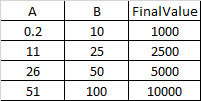
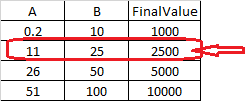
the above example table, parameter value "20" will come in between "A" of 11 and "B" of 25.
so the final value is "2500"
How to write LINQ statement in C#
An object-oriented and type-safe programming language that has its roots in the C family of languages and includes support for component-oriented programming.
Answer accepted by question author
' cx='32' cy='32' r='32' /%3E%3Ctext x='50%25' y='55%25' dominant-baseline='middle' text-anchor='middle' fill='%23FFF' %3ETY%3C/text%3E%3C/svg%3E)
Please check the following code, I load the data in excel into a Datatable, then use linq to find the row where the parameter is located, and output the final value.
    static void Main(string[] args)
    {
        System.Data.DataTable dataTable = GetSheetDataAsDataTable(@"D:\test\excel\3.xlsx");
        int result =  GetFinalValue(dataTable, 11);
        Console.WriteLine(result);

        Console.WriteLine("Press any key to continue...");
        Console.ReadLine();
    }

    public static int GetFinalValue(System.Data.DataTable dataTable, int num)
    {
        var row1 = (from row in dataTable.AsEnumerable()
                 where double.Parse(row["A"].ToString()) <= num && double.Parse(row["B"].ToString()) >= num
                 select row).First();
        return int.Parse(row1["FinalValue"].ToString());
    }
    public static System.Data.DataTable GetSheetDataAsDataTable(String filePath)
    {
        Application xlApp = new Excel.Application();
        Workbook xlBook = xlApp.Workbooks.Open(filePath);
        Worksheet xlSheet = (Worksheet)xlBook.Worksheets[1];
        Range xlRange = xlSheet.UsedRange;
        //Range xlRange = xlSheet.get_Range("A1", "C5");
        System.Data.DataTable dt = new System.Data.DataTable();
        try
        {
            DataRow row = null;
            for (int i = 1; i <= xlRange.Rows.Count; i++)
            {
                if (i != 1)
                    row = dt.NewRow();
                for (int j = 1; j <= xlRange.Columns.Count; j++)
                {
                    if (i == 1)
                        dt.Columns.Add(((Range)xlRange.Cells[1, j]).Value.ToString(),typeof(string));
                    else
                        row[j - 1] = ((Range)(xlRange.Cells[i, j])).Value;
                }
                if (row != null)
                    dt.Rows.Add(row);
            }
        }
        catch (Exception ex)
        {
            Console.WriteLine(ex.Message);
        }
        finally
        {
            xlBook.Close();
            xlApp.Quit();
        }
        return dt;
    }
If there is more than one table in the excel file, you can use code like this to get the required range:
Range xlRange = xlSheet.get_Range("A1", "C5");
If the response is helpful, please click "Accept Answer" and upvote it.
Note: Please follow the steps in our documentation to enable e-mail notifications if you want to receive the related email notification for this thread.
Thanks for your support.
I have posted one more related to this. can you give us the correct solution.
can you help us the below thread to proceed further..? I want exact solution.
@BeUnique
I noticed that the thread you mentioned has accepted an answer. Is the problem solved?
Has the current problem been solved? Is the code right for you?
Sorry for the late reply.
how-to-combine-two-column-values-and-find-the-dupl.html ==> Solved.
current thread, i am testing on this. i will let you know by today or tomorrow.