Share via

Custom dynamic link libraries are being loaded for every application.

Anonymous
2014-02-20T14:42:07+00:00

Here's a copy of the warning I get in Event Viewer.

Log Name:      System

Source:        Microsoft-Windows-Wininit

Date:          20-Feb-14 14:51:38

Event ID:      11

Task Category: None

Level:         Warning

Keywords:      

User:          SYSTEM

Computer:      Somebody

Description:

Custom dynamic link libraries are being loaded for every application. The system administrator should review the list of libraries to ensure they are related to trusted applications. Please visit http://support.microsoft.com/kb/197571 for more information.

Event Xml:

<Event xmlns="http://schemas.microsoft.com/win/2004/08/events/event">

  <System>

    <Provider Name="Microsoft-Windows-Wininit" Guid="{206F6DEA-D3C5-4D10-BC72-989F03C8B84B}" />

    <EventID>11</EventID>

    <Version>0</Version>

    <Level>3</Level>

    <Task>0</Task>

    <Opcode>0</Opcode>

    <Keywords>0x4000000000000000</Keywords>

    <TimeCreated SystemTime="2014-02-20T13:51:38.940222500Z" />

    <EventRecordID>5507</EventRecordID>

    <Correlation />

    <Execution ProcessID="616" ThreadID="752" />

    <Channel>System</Channel>

    <Computer>Somebody</Computer>

    <Security UserID="S-1-5-18" />

  </System>

  <EventData>

    <Data Name="StringCount">2</Data>

    <Data Name="String">C:\Windows\system32\nvinitx.dll</Data>

    <Data Name="String">C:\WINDOWS\system32\nvinitx.dll</Data>

  </EventData>

</Event>

I took a look at the article in that link and subsequently went to the AppInit_DLLs Registry key which reads as follows:

C:\Windows\system32\nvinitx.dll,C:\WINDOWS\system32\nvinitx.dll  (and yes, it is written twice like that).

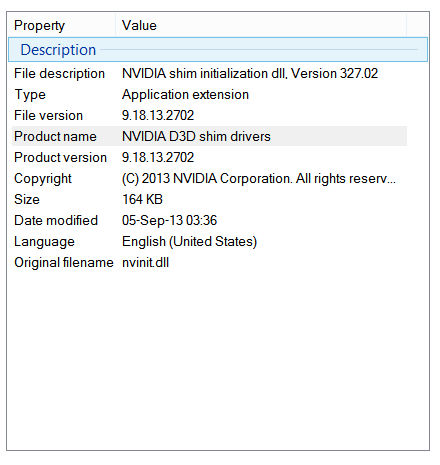
I checked the file at that  location and it appears to belong to NVIDIA. Here's a screenshot of the Properties for it.
This machine is a laptop I bought at the beginning of February. The only driver installation I've performed is this one.
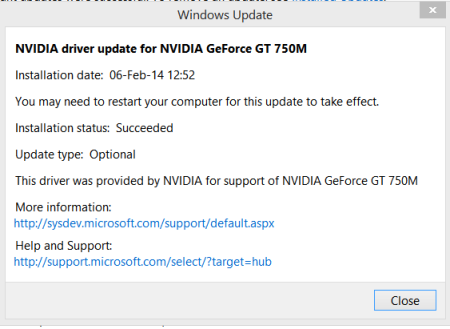
That link in the screenshot just takes me to a page which says, "Coming Soon" incidentally.

My main concern here is whether this constitutes a security risk or not. Unfortunately, there's no option to roll back the driver since the update was performed prior to upgrading to Windows 8.1

So advice please on how I can resolve this issue.

Windows for home | Previous Windows versions | Security and privacy

Locked Question. This question was migrated from the Microsoft Support Community. You can vote on whether it's helpful, but you can't add comments or replies or follow the question.

0 comments No comments

Answer accepted by question author

Anonymous
2014-02-27T07:26:40+00:00

Hi,

  1. Nvinitx.dll is a Nvidia dll file and it will not cause any security risks.
  2. The AppInit DLLs are loaded by using the LoadLibrary() function during the DLL_PROCESS_ATTACH process of User32.dll. Therefore, executables that do not link with User32.dll do not load the AppInit DLLs. There are very few executables that do not link with User32.dll. Because of their early loading, only API functions that are exported from Kernel32.dll are safe to use in the initialization of the AppInit DLLs.

Modifying the registry key path from  nvinitx.dll  to user32.dll might cause unknown results. So we do not recommend it.

  1. Upgrading to Windows 8.1 will not remove the recovery partition. If you are using a Windows install media to install Windows 8.1 directly, do not delete or format the recovery partition during installation.

Hope this answers your questions. If you need any further information, please reply.

Was this answer helpful?

0 comments No comments

5 additional answers

Sort by: Most helpful
  1. Anonymous
    2015-03-14T03:39:35+00:00

    I am having the exact same warning event id 11 nvinitx.dll.  it is on a Lenovo t420 win 7pro 64.  I went so far as to restore to factory defaults using official Lenovo restore disks for my specific machine type.  this warning pops up from the very beginning and I checked it before and after each of the vast number of updates it does not go away.  UNLESS, I DISABLE NVIDIA OPTIMUS IN BIOS AND USE INTEL INTEGRATED GRAPHICS.  Then I still have to change the registry key for loadappinit from 1 to 0.  Now here is the killer if I re-enable NVidia in bios warning event id 11 comes back and the registry key setting gets changed back from 0 to 1.  does anyone have any advice?

    HKEY_LOCAL_MACHINE\SOFTWARE\Microsoft\Windows NT\CurrentVersion\Windows

    **-** <Eventxmlns="**http://schemas.microsoft.com/win/2004/08/events/event**">

    **-** <System>


    <Provider Name="Microsoft-Windows-Wininit"Guid="{206F6DEA-D3C5-4D10-BC72-989F03C8B84B}"/>


    <EventID>11</EventID>


    <Version>0</Version>


    <Level>3</Level>


    <Task>0</Task>


    <Opcode>0</Opcode>


    <Keywords>0x4000000000000000</Keywords>


    <TimeCreated SystemTime="2015-03-14T04:11:16.961277200Z"/>


    <EventRecordID>7111</EventRecordID>


    <Correlation />


    <Execution ProcessID="716"ThreadID="736"/>


    <Channel>System</Channel>


    <Computer>T420-4236LR0</Computer>


    <Security UserID="S-1-5-18"/>


    </System>

    **-** <EventData>


    <DataName="StringCount">1</Data>


    <DataName="String">C:\Windows\system32\nvinitx.dll</Data>


    </EventData>


    </Event>

    Was this answer helpful?

    1 person found this answer helpful.
    0 comments No comments
  2. Anonymous
    2014-02-21T19:25:16+00:00

    Babu,

    I went through this step by step in the way you suggested, but to no avail.

    I've installed the latest NVIDIA drivers v334.89 released three days ago on 18 February, but the error still appears on bootup.

    Event ID: 11 and Source is Wininit. That latter loads before I logon according to Event Viewer.

    After uninstalling the Nvidia graphics and Physix drivers, I checked the registry key at:

    HKEY_LOCAL_MACHINE\Software\Microsoft\Windows NT\CurrentVersion\Windows but the same value was still present.

    As regards malware, I did a full system scan with both Windows Defender and Malwarebytes Pro (I have a license for the latter), but both drew a blank.

    Here's a file analysis of the nvinitx.dll file in case it's of any use to you:

    http://www.herdprotect.com/nvinitx.dll-7bafc714d6832e2c912a59532a8e29cd67abbea1.aspx

    I also looked up "Shim" on Wikipedia: http://en.wikipedia.org/wiki/Shim_%28computing%29

    But I guess you know all that stuff already.

    Would it do any good to modify the registry key to read

    C:\Windows\system32\user32.dll,C:\WINDOWS\system32\user32.dll instead of:

    C:\Windows\system32\nvinitx.dll,C:\WINDOWS\system32\nvinitx.dll ?

    Or would I risk screwing up my system doing something like that?

    Was this answer helpful?

    1 person found this answer helpful.
    0 comments No comments
  3. Anonymous
    2014-02-21T13:06:23+00:00

    Babu,

    I shall try that later.

    You didn't answer my question as to whether the nvinitx.dll file poses a security risk or not?

    Slightly off topic if I may, but in the event of corruption which necessitates reinstalling the OS, how can that be achieved?

    The reason I ask is because according to the following site, installing Windows 8.1 destroys the manufacturer's Recovery partition which would make it impossible to reinstall Windows should that prove to be necessary: http://howto.cnet.com/8301-11310_39-57610729-285/how-to-uninstall-windows-8.1/

    Was this answer helpful?

    0 comments No comments
  4. Anonymous
    2014-02-21T07:00:00+00:00

    Hi,

    Thank you for the detailed issue description with screenshots and event logs. Nvinitx.dll file is part of NVIDIA D3D shim drivers.

    Let’s reinstall the NVIDIA drivers and check if that makes any difference.

    To uninstall, refer to the method below.

    •       Press Windows key + R, type devmgmt.msc in the run prompt.

    •       Expand the Display adapters section, right-click the display adapter, click uninstall.

    •       Restart the computer, let Windows detect the driver and install by itself.

    Visit the NVIDIA website, download the latest drivers for the NVIDIA graphics card.

    Download and install drivers

    Now go to the Event viewer and check if you receive the error.

    Also perform a full scan using Microsoft Safety Scanner.

    http://www.microsoft.com/security/scanner/en-us/default.aspx

    Note: Any data files that are infected may only be cleaned by deleting the file entirely, which means there is a potential for data loss.

    Hope the information provided is useful. If the issue persists, reply here and we will be glad to help you.

    Was this answer helpful?

    0 comments No comments
