' cx='32' cy='32' r='32' /%3E%3Ctext x='50%25' y='55%25' dominant-baseline='middle' text-anchor='middle' fill='%23FFF' %3EA%3C/text%3E%3C/svg%3E)

Hi,
I need to connect to the INTERNET with my Samsung Galaxy Ace GT-S5830i and Windows XP2 desktop using the USB tether option.
I dont want to install any other software. I just want to connect to the Internet using my phone as a modem in a dial up method. I dont want to install any Samsung Kies (Samsung PC Suite) or upgrade to XP3.
I already contacted the Samsung Customer care and they said I need a Samsung PC suite software, which I dont agree because all I need is to connect to the internet using my phone as modem, and connect to the Internet using a dial up connection method.
I know how to connect to the internet using a dial up method and I tried using the dial up method, and these drivers are missing in the device manager.
P.S: However, I am able to connect to the internet using a Nokia 6233 and the dial up method on the same PC with no additional softwares.
I found the answer my self to connect a android phone to XP using just USB tether option.
Ignore the CDC Abstract Control Model and CDC ACM Data error, it is not required for USB tether connectivity. You just need the BCM21553-Thunderbird driver.
Samsung Galaxy Ace USB Tethering on Windows XP
Of course, you have to install drivers for you to connect to the internet. In this tutorial I’m going show you how to use USB tethering feature of your Samsung Galaxy Y without installing Kies. Though Kies is a good software it is still a pain to download that large file on a limited internet speed. So what I am writing now is to help you use USB tethering feature without downloading or using Kies. See steps below for guide and driver requirements.
Requirements:
1.Samsung Galaxy Ace GT-S5830i
2.USB Cable
3.Sim Card with Regular load or subscribed to unlimited internet plan
- Download Windows XP USB tethering driver (download here)
Steps
1.Simply connect the USB cable from your phone to the computer or laptop (Don’t connect as USB mass storage)
(Normally if you do not have Kies on your computer, it will prompt you with CDC Abstract Control Model Driver and CDC ACM Data drivers. Just click Cancel when those 2 installation wizard pop ups)
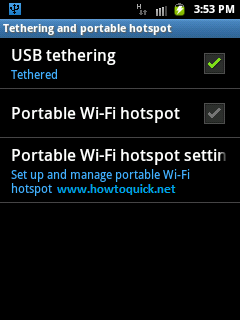
2.On your phone go to Settings, tap Wireless and networks then tap Tethering and portable hotspot.
3.Tick USB tethering check box.
(You can now see the color blue USB notification on the upper left of your phone screen indicating that USB tether feature is ready.)
4.After ticking, another driver installation wizard pop up, this is will ask for BCM 21553-Thunderbird driver. (Do not close this pop installation wizard or else you’ll go back to step 1 lol)
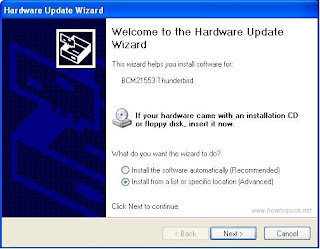
5.Now go to Start, right click My Computer, then select Manage and open Device Manager.
6.Locate BCM21553-Thunderbird ( usually preceded with yellow question mark icon)
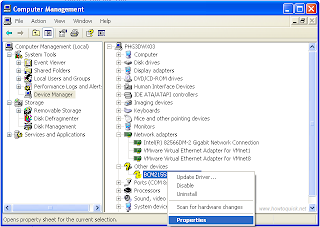
7.Right Click and select Properties, on properties window click Details tab then take note with the Device Instance ID. (See image below)
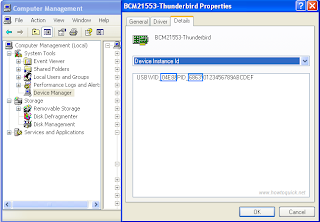
8.Locate the tetherxp.inf file you download earlier. Right click and select Open with then select WordPad
(Don’t use Notepad, if you can’t find WordPad select Choose program and navigate and look for WordPad. It should be there)
9.Once you already opened the tetherxp.inf file in WordPad, you can see version details, manufacturer, Android devices and more. Look for these text file [AndroidDevices.NT.5.1], right after that you can see numbers and characters. Edit the file and put the Device Instance ID details we noted earlier. (see image below on where to edit)
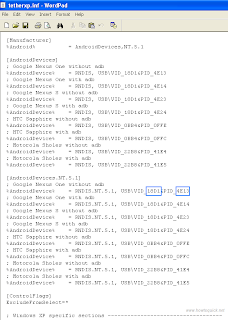
10.Replace the details on .inf files, see image below.
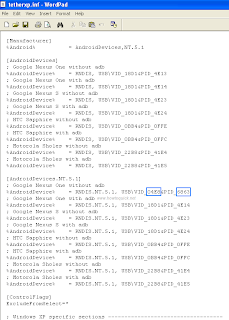
Click File and Save!
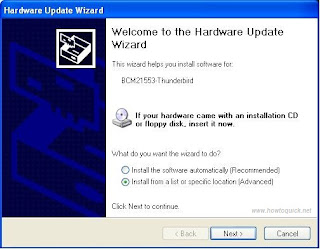
11.Now here’s how to install Android tether driver we edited. Once the BCM21553-Thunderbird Hardware Update Wizard pop up select Install from a list or specific location (Advanced) option.
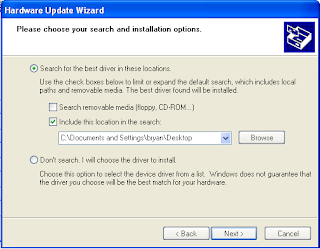
12.Select Search the best driver in these locations then check include this location in the search. Click browse and locate the path or folder where tetherxp.inf file we edited earlier saved.
13.Click Next the let Windows search and install the driver, one successfully installed you will see the image below.
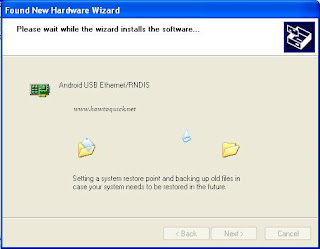
Click Finish and That’s it.
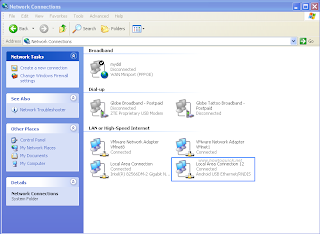
To double check it we did it correctly, unplugged the USB cable from your PC or laptop then plug it again. Repeat steps 2 and 3 then go to Start, Control Panel, click on Network Connections. You should see the Android USB Ethernet/RNDIS installed. (see image below)
I found the help here, Visit if you need more info.
If it still doesn’t works:
I also found the BCM 21553-Thunderbird drivers here and here