This article will give a comprehensive understanding on CDA file, along with three surefire ways for converting CDA files to MP3.
- Part One: Introduction to CDA file.
- Part Two: Best Solution-Streaming Audio Recorder
- Part Three: Easy Solution-FreeRIP CD to MP3 Converter
- Part Four: Free Way-iTunes
Part One: Introduction to CDA file
 when you play audio CD on your computer, you will see that each track is labeled as “Track##.CDA”.
However, CDA is actually not a file format nor it contains any information at all. CDA stands for Compact Disk Audio, it represents a shortcut of audio track from a Windows perspective. In reality, it does not have any music file in it but only track time
and length. This is the main reason why copying an audio CD into your computer and playing it afterwards without the CD will return CDA playback error.
when you play audio CD on your computer, you will see that each track is labeled as “Track##.CDA”.
However, CDA is actually not a file format nor it contains any information at all. CDA stands for Compact Disk Audio, it represents a shortcut of audio track from a Windows perspective. In reality, it does not have any music file in it but only track time
and length. This is the main reason why copying an audio CD into your computer and playing it afterwards without the CD will return CDA playback error.
Luckily, you can still copy the sound tracks in a CD by converting CDA files into popular audio formats such as MP3. Though, extracting the actual music content and transforming it into a playable format is deemed to be impossible without the help of
CDA file to MP3 converter. Discover these helpful tools after the jump.
Part Two: Best Solution-Streaming Audio Recorder
For those who need a powerful tool that can do more than just extracting audio CDs, Streaming Audio Recorder is what you need best. This software is packed with amazing features. It can convert audio CDs turning them into popular formats such as MP3, WAV,
WMA, OGG, AAC and FLAC.

Aside from this, you can also record any sound on your computer in a stunning 1:1 quality. Downloading music files from video streaming sites like Vimeo, Dailymotion, YouTube and all others is also possible. Even more, there is a built-in ID3 tag identifier
as well as editing tool included so you can easily cut, copy, merge, split, and create your own sound that later can be burned into a CD. Using it is a breeze:
- Install and Run Streaming Audio Recorder on your computer.
- Insert CD to your computer disc drive.
- Click “Tools” and choose “CD Ripper”.
- Choose the CD drive from the drop down list.
- Select the tracks you want to save on your computer and click “Rip checked track”.
Part Three: Easy Solution-FreeRIP CD to MP3 Converter
Without even spending a dime, FreeRIP MP3 converter allows users to rip CD contents and convert them into different audio formats such as WMA, MP3, Ogg, Wav or FLAC for future device playback. Besides, it comes packed with many other features. For example,
it can convert existing MP3 files into other file formats and editing MP3 tags is equally possible which makes cataloging your entire collection simple and easy. Additionally, you can also burn audio CDs, load album artwork, search appropriate music info and
all others while retaining the richness of your sound. But keep in mind that you can’t use it for any commercial purposes. To use it, all you need to do is:
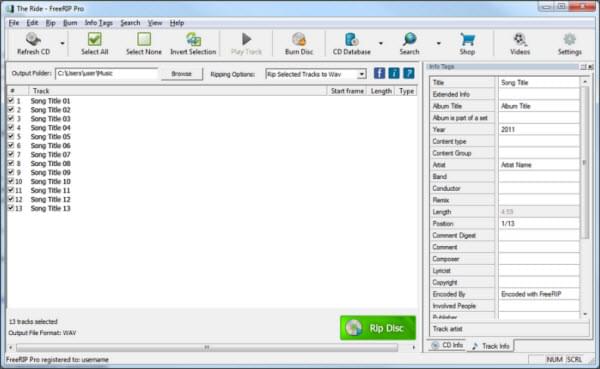
- Install the latest version of FreeRIP MP3 converter according to your PC OS.
- Insert the Audio CD of your choice.
- Run the program.
- Select tracks that needs to be converted.
- Click “Rip” button and wait for the process to complete.
Once you have saved the CDA files in your preferred MP3 format, it’s easy for you to transfer them to your portable audio player such as iPod, Creative Zen player, Zun, etc.
Part Four: Free Way-iTunes
iTunes is a popular media player and organizer made by Apple to meet the increasing demands of portable music. Aside from being a player and library, converting CDA files to MP3 is also possible with iTunes. No changes would be made into the software thus
allowing you to transform unrecognized files into playable formats without getting ripped. Yes, this service from iTunes is totally free.
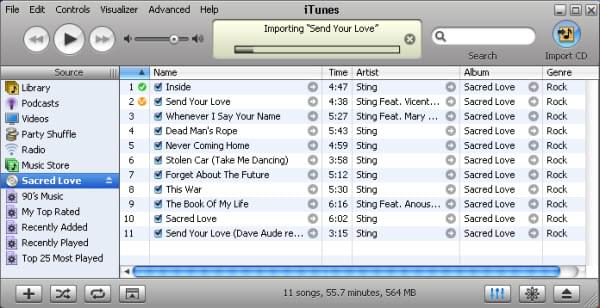
See below on how to convert CDA file to MP3 using iTunes:
- Insert CD to your computer disc drive.
- Click “Import CD” button.
- Add these files to your iTunes Library.
- Right click on the file and hit “Convert selection to MP3″.
Various methods are available if you want to convert CDA files to MP3. However, bear in mind that not all applications perform exactly the same. There are pitfalls and drawbacks you need to consider with each method.
With FreeRIP CD to MP3 Converter, being a freeware is a huge point but it is not for novice users. The interface is quite complicated and it would take a keen knowledge to discover all its features. Also, it is a sole CD ripper, no other functions available.
Using iTunes on the other hand is practical since you don’t need to install additional programs. Though, the availability of output formats are very much limited. Functions are equally restricted since you can only
convert CDA file to MP3 with no editing options. Streaming Audio Recorder might require a bit of premium but it is loaded with tons of practical benefits. It is an all-in-one media tool since you can do recording, editing, burning, copying,
converting, playing, downloading and more. With this application, you would never need another program for all your audio desires.
' cx='32' cy='32' r='32' /%3E%3Ctext x='50%25' y='55%25' dominant-baseline='middle' text-anchor='middle' fill='%23FFF' %3EA%3C/text%3E%3C/svg%3E)
