I copied SSSTARS.SCR from the SYSTEM32 directory on my windows XP machine to a flash drive. I then moved the flash drive to my Windows 8.1 machine and copied SSSTARS.SCR file to the SYSTEM32 directory. After that the STARFIELD screen saver shows up when you change your screensaver in Windows 8.1 machine. You can select it, set the number of stars and set the speed just like in windows XP. I did just that and it works perfectly.
Can I have the "good old" Starfield Screen saver in my Win 7 machine. Is it possible to copy files from Win XP and drop them in Win 7?
Original Title: Starfield Screen Saver
Hello;
I would like to have the "good old" Starfield Screen saver in my Win 7 machine. Is it possible to copy files from Win XP and drop them in Win 7? If so:
- Which file(s) would I copy (location) from XP?
- Where would they go (location) in Win7?
Any suggestions would be appreciated.
Would be even better if MS made this "forgotten" screen saver available as a download.
Thanks,
Barry
Windows for home | Previous Windows versions | Accessibility
Locked Question. This question was migrated from the Microsoft Support Community. You can vote on whether it's helpful, but you can't add comments or replies or follow the question.
8 answers
Sort by: Most helpful
-
Anonymous
2014-04-27T22:01:33+00:00 -
Anonymous
2015-01-13T19:51:33+00:00 It worked for you this time for you, or appears to have worked, but I would not recommend that you continue the practise of moving system files across different operating systems. One day, you will get burned badly.. :-)
I don't think there's much harm here...they are just screen saver files, not critical system files. At worst they will crash and not work. They are a lot more safe that some of the installers in the links provided earlier. The first link is flagged for malware and the second site is the softonic which is notorious for unsafe downloads and installers bloated with forced shareware.
I would share links for downloading a collection of the scr files from windows xp, but I'm not sure if that is ok to do or not. If you google enough you'll find them, or you can get them yourself off an xp machine. Here is a list of the filenames to help you with your search:
scrnsave.scr
ss3dfo.scr
ssbezier.scr
ssflwbox.scr
ssmarque.scr
ssmypics.scr
ssmyst.scr
sspipes.scr
ssstars.scr
sstext3d.scr
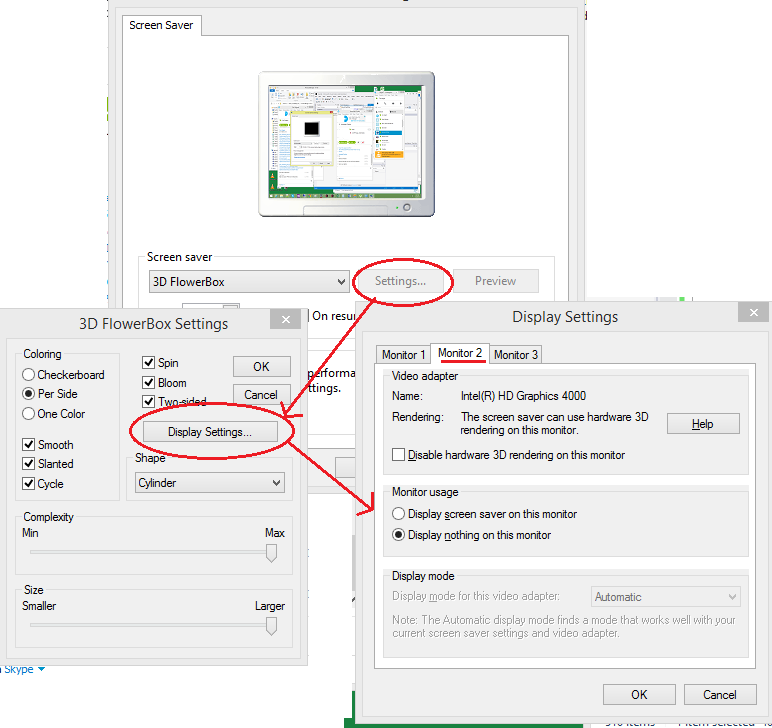
I will note that some of the screen savers appeared "glitchy" and would blink on the screen. To adjust for those I had to disable the screen saver display for additional monitors.
-
Anonymous
2014-04-28T23:16:31+00:00 Thank you very much. It worked for me too.
Copied from Windows xp machine to Winows 7 machine.
-
Anonymous
2016-03-01T03:54:09+00:00 Pretty sure i copied the file over out of curiosity and it worked..
-
Anonymous
2014-03-20T16:28:20+00:00 Windows XP screensavers will not work in 7 unless they are ported over, and so far there has been little or no interest in doing so..
Not the original starfield screensaver but you might like it..
http://www.windows7download.com/win7-lightspeed-screen-saver/jsjnpbpo.html
Some here too maybe but you should be careful when downloading stuff like this. There is a tendency for junk to sneak in with it..
