Share via

BSOD BCODE 124 - Please help

Anonymous
2014-05-18T21:59:37+00:00

Hey guys, I've been having this BSOD error for awhile now and I haven't done anything about it because in the past it has only occurred probably like once every week so I've been ignoring it, but now it's gotten to the point where it occurs frequently like once every 5-10 minutes or even less. I'd appreciate it a lot if anyone can please help me try to resolve this issue. I have the crash report along with some tests I have done to rule out the possibilities of what it could be. I have almost tried everything to fix it, but have failed and can't really afford a new computer at the moment.

I'll start off with posting my computer specs:

OS: Windows 7 Ultimate 64-bit

Motherboard: Gigabyte Z68A-D3H-B3

Processor: Intel Core i5-2500k 3.3GHz

Ram: G.Skill Ripjaw X Series 8 GB DDR3

Video Card: NVIDIA GeForce GTX 760

Here are two of the crash reports I was able to save:

Problem signature:

Problem Event Name: BlueScreen

OS Version: 6.1.7601.2.1.0.256.1

Locale ID: 1033

Additional information about the problem:

BCCode: 124

BCP1: 0000000000000000

BCP2: FFFFFA8007F54028

BCP3: 00000000BE000000

BCP4: 0000000000800400

OS Version: 6_1_7601

Service Pack: 1_0

Product: 256_1

Problem signature:

Problem Event Name:    BlueScreen

OS Version: 6.1.7601.2.1.0.256.1

Locale ID: 1033

Additional information about the problem:

BCCode: 1e

BCP1: FFFFFFFFC000001D

BCP2: FFFFF800030EBF53

BCP3: 0000000000000002

BCP4: 0000000077C3E800

OS Version: 6_1_7601

Service Pack: 1_0

Product: 256_1
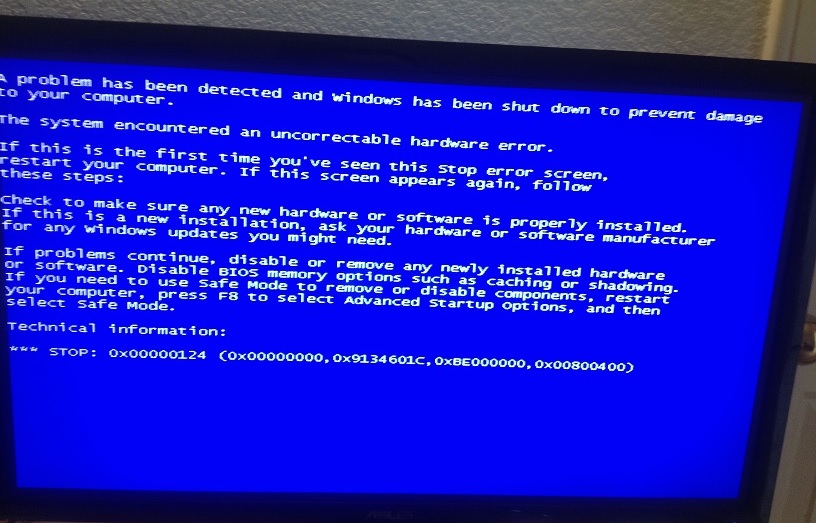
If I remember correctly, these BSOD errors started occurring ever since I put in my new video card, but I have tried several attempts to fix this issue and to narrow down what the possibilities it could be.

  1. I have reformatted my computer cleaning up my SSD.
  2. I have made sure my video card drivers are completely up to date.
  3. I have also took out my video card and put in a different one to test and the BSOD still occurs.
  4. I have done the same with my ram replacing it with new ones but the error still happens.
  5. The same goes for my hard drives, I have a brand new one that I replaced my SSD with and installed windows on that hard drive, but the BSOD still occurs. I am currently using a SSD with Windows 7 installed on it and another hard drive with just important files that I have on it.

6.  I have checked my hard drives for hard disk and memory errors.

Thank you for your time and consideration, I really hope someone can help me resolve this issue.

Windows for home | Previous Windows versions | Devices and drivers

Locked Question. This question was migrated from the Microsoft Support Community. You can vote on whether it's helpful, but you can't add comments or replies or follow the question.

0 comments No comments

25 answers

Sort by: Most helpful
  1. Anonymous
    2014-05-20T02:33:35+00:00

    Rob I think there is a lot of miscommunication here. I did copy the minidump files to my documents folder. I then went on both SkyDrive and mediafire to upload them, but when I was uploading them there was an  error that popped up, which said this..

    Not once did I use the Command Windows to upload them. I was showing Greg that I was having problems with the System File Checker, but that issue is now resolved.

    I can't upload the minidump files in order to show you because this error is preventing me from doing it. Do you know any way to change the file administration appropriately in order for me to upload them?

    Was this answer helpful?

    0 comments No comments
  2. Anonymous
    2014-05-20T02:20:48+00:00

    Copy the minidump files to your documents folder. Then upload then to the MediaFire and

    post the link to them here. Best to ZIP them all together if you can.

    And you don't upload them using the Command Windows. If you want to use the OneDrive

    go there and use Upload Files to your Public Folder. Post the link to it here.

    Rob - SpiritX

    Was this answer helpful?

    0 comments No comments
  3. Anonymous
    2014-05-20T02:01:37+00:00

    This is a bit frustrating because it won't let me upload the files. There are administration restrictions for some reason. This isn't hard to upload files, it's like putting an attachment in an e-mail. When I try to upload the minidump files it won't let me go through with it on either SkyDrive or mediafire. Am I able to try to e-mail you the files somehow (this might not even work)? I have followed all the directions on how to upload these files but for some reason there are administration problems not letting me like in the image I posted before.

    Was this answer helpful?

    0 comments No comments
  4. Anonymous
    2014-05-20T01:47:54+00:00

    Hi,

    No that is just a Shortcut and not the actual files.

    Here is my OneDrive as an example - notice those are the actual files I uploaded and not

    Shortcuts.

    https://onedrive.live.com/?cid=9AC481C015DAEE85&id=9AC481C015DAEE85%21125

    Rob - SpiritX

    Was this answer helpful?

    0 comments No comments
  5. Anonymous
    2014-05-20T01:35:01+00:00

    K I think I got the files onto mediafire. Here is the link shared.

    http://www.mediafire.com/view/idjg6cajk2bjjo2/Minidump.URL

    Was this answer helpful?

    0 comments No comments
