Microsoft 365 and Office | Excel | For business | Windows
A family of Microsoft spreadsheet software with tools for analyzing, charting, and communicating data

This browser is no longer supported.
Upgrade to Microsoft Edge to take advantage of the latest features, security updates, and technical support.
' cx='32' cy='32' r='32' /%3E%3Ctext x='50%25' y='55%25' dominant-baseline='middle' text-anchor='middle' fill='%23FFF' %3EAA%3C/text%3E%3C/svg%3E)
Dear Tech Team,
I tried using excel short cut for unhiding coloumn , but the short cut doesnt work
could you help me to solve this problem
for addition information that may be has effect on the excel shortcut i used hp pavillion gaming , windows 10, ms office 365, amd ryzen 5
Thank you
A family of Microsoft spreadsheet software with tools for analyzing, charting, and communicating data
Answer accepted by question author

Does shortcut for other options like Unhide Rows work?
How did you unhide?
Firstly, please make sure to select two colums side by the hiding column or select the whole worksheet.
For example, if you hide column D, you need to select both column C and column E, or you could select the whole worksheet.
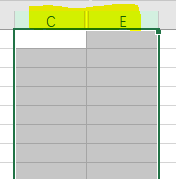
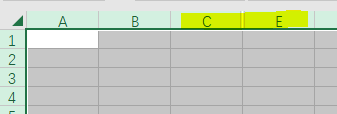
If you have operated as above, and the shortcut still doesn't work, it may be related to the conflict with system buttons.
Please try the following method to check this issue.
Go to Settings > Time & Language > Language > Spelling, typing, & keyboard settings > Advanced keyboard settings > Input language hot keys, seclect Between input languages, click Change Key Sequence.
In Switch Keyboard Layout, select Not Assigned, OK.
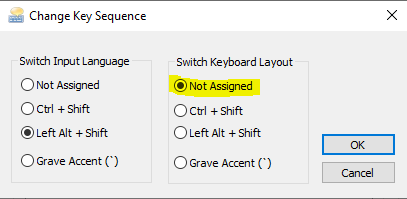
Open Excel, check if shortcut for unhiding coloumn ( Ctrl + Shift + ) ) works.
Similarly, after resetting the above settings back, the shortcut keys should always take effect in the worksheet.
Any updates, please let me know.
If an Answer is helpful, please click "Accept Answer" and upvote it.
Note: Please follow the steps in our documentation to enable e-mail notifications if you want to receive the related email notification for this thread.
' cx='32' cy='32' r='32' /%3E%3Ctext x='50%25' y='55%25' dominant-baseline='middle' text-anchor='middle' fill='%23FFF' %3EVG%3C/text%3E%3C/svg%3E)
First time in my life I'm gonna comment on a post like those, because it actually gave me the answer I was looking for.
Many thanks!
' cx='32' cy='32' r='32' /%3E%3Ctext x='50%25' y='55%25' dominant-baseline='middle' text-anchor='middle' fill='%23FFF' %3EOD%3C/text%3E%3C/svg%3E)
The secret was in "Switch Input Language" should remain on LEFT ALT + SHIFT.
Ok it works , the solution so helpfull thank you teams
' cx='32' cy='32' r='32' /%3E%3Ctext x='50%25' y='55%25' dominant-baseline='middle' text-anchor='middle' fill='%23FFF' %3EJR%3C/text%3E%3C/svg%3E)
This solution didn't work for me. CTRL+0 shortcut is still doing "outside border" instead of "hide column"
' cx='32' cy='32' r='32' /%3E%3Ctext x='50%25' y='55%25' dominant-baseline='middle' text-anchor='middle' fill='%23FFF' %3EAF%3C/text%3E%3C/svg%3E)