Share via

BitLocker Automatic lock is not working

Anonymous
2014-08-06T14:56:02+00:00

I turned on BitLocker to one of my partitions. I wanted an Auto Lock option, for which I tweaked the registry. The following is the code, which I actually found in the EightForums.

**** Windows Registry Editor Version 5.00 ****

; Created by: Shawn Brink

; http://www.eightforums.com

; Tutorial: http://www.eightforums.com/tutorials/21325-lock-drive-add-context-menu-bitlocker-drives.html

[HKEY_CLASSES_ROOT\Drive\shell\lock-bde]

"AppliesTo"="System.Volume.BitLockerProtection:=1 OR System.Volume.BitLockerProtection:=3 OR System.Volume.BitLockerProtection:=5 NOT C:"

@="Lock Drive..."

"HasLUAShield"=""

"MultiSelectModel"="Single"

[HKEY_CLASSES_ROOT\Drive\shell\lock-bde\command]

*@=hex(2):77,00,73,00,63,00,72,00,69,00,70,00,74,00,2e,00,65,00,78,00,65,00,20,*

*00,6c,00,6f,00,63,00,6b,00,2d,00,62,00,64,00,65,00,2e,00,76,00,62,00,73,00,*

20,00,25,00,31,00,00,00

I added the above code to the registry. You can see the screen shot below.
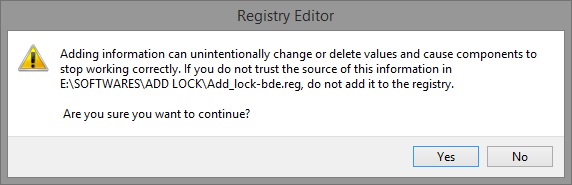
And, I also pasted a .vbs file with the following code in the System32 folder.

' Created by: Shawn Brink

' http://www.eightforums.com

' Tutorial: http://www.eightforums.com/tutorials/21325-lock-drive-add-context-menu-bitlocker-drives.html

Drive = ""

Last = Wscript.Arguments.Count - 1

For n = 0 To Last

Drive = Drive & " " & Wscript.Arguments.Item(n)

Next

Drive = Replace(Drive,":",":")

CreateObject("Shell.Application").ShellExecute "manage-bde.exe", "-lock -forcedismount " & Drive, "", "runas", 0

Then, I got a LockDrive option in the right-click menu which helped me to lock the drive without rebooting. (As shown in the following screenshot).
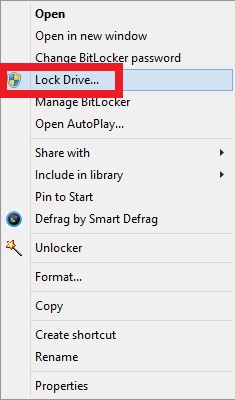
The option worked properly for a few days and now, when I click on "LockDrive", it is not working**.**

How to repair this tweak and make the "LockDrive" option in the right-click menu work properly?

I am running Windows 8.1 Pro x64**.**

Windows for home | Previous Windows versions | Windows update

Locked Question. This question was migrated from the Microsoft Support Community. You can vote on whether it's helpful, but you can't add comments or replies or follow the question.

0 comments No comments

5 answers

Sort by: Most helpful
  1. Anonymous
    2014-08-12T13:46:35+00:00

    Hi,

    Thank you for your response.

    It is not recommended to tweak the registry keys as this may cause the computer to no boot situation.

    We have dedicated support team for Bit Locker issues. I would have you post your query in TechNet forums for better assistance on this issue.

    http://social.technet.microsoft.com/Forums/windows/en-US/home?category=w8itpro

    Hope it helps.

    Was this answer helpful?

    0 comments No comments
  2. Anonymous
    2014-08-09T12:12:09+00:00

    Hi,

    Better than altering the registry settings, I would suggest you to perform system restore to the date on which these changes are not made.

    • Press ‘Windows Key + R key
    • In the run window type ‘rstrui.exe’ and click on OK
    • Click on next in the System Restore windows
    • Now choose the restore point of your choice, and try to restore your computer back to earlier state.

    System Restore **disclaimer:**When you use System Restore to restore the computer to a previous state, programs and updates that you installed are removed.

    Keep us posted on the status of the issue.

    I don't want to use System Restore. I want to delete and re-add the registry key. How to do this?

    Was this answer helpful?

    0 comments No comments
  3. Anonymous
    2014-08-08T08:53:05+00:00

    Hi,

    Better than altering the registry settings, I would suggest you to perform system restore to the date on which these changes are not made.

    • Press ‘Windows Key + R key
    • In the run window type ‘rstrui.exe’ and click on OK
    • Click on next in the System Restore windows
    • Now choose the restore point of your choice, and try to restore your computer back to earlier state.

    System Restore **disclaimer:**When you use System Restore to restore the computer to a previous state, programs and updates that you installed are removed.

    Keep us posted on the status of the issue.

    Was this answer helpful?

    0 comments No comments
  4. Anonymous
    2014-08-07T11:32:47+00:00

    Hi,

    Thank you for posting your query in Microsoft Community. From the post, I understand that you have changed the registry settings to get the auto lock option. Microsoft will not support alerting or changing the registry settings.

    However, you may contact the MSDN support and check if they can help you with the issue.

    http://social.msdn.microsoft.com/forums/windowsapps/en-us/home?category=windowsapps

    Hope the information provided is helpful.

    Can I delete the added registry value? If yes, how?

    Was this answer helpful?

    0 comments No comments
  5. Anonymous
    2014-08-07T05:56:34+00:00

    Hi,

    Thank you for posting your query in Microsoft Community. From the post, I understand that you have changed the registry settings to get the auto lock option. Microsoft will not support alerting or changing the registry settings.

    However, you may contact the MSDN support and check if they can help you with the issue.

    http://social.msdn.microsoft.com/forums/windowsapps/en-us/home?category=windowsapps

    Hope the information provided is helpful.

    Was this answer helpful?

    0 comments No comments
