Windows for business | Windows Server | Storage high availability | Clustering and high availability

This browser is no longer supported.
Upgrade to Microsoft Edge to take advantage of the latest features, security updates, and technical support.
' cx='32' cy='32' r='32' /%3E%3Ctext x='50%25' y='55%25' dominant-baseline='middle' text-anchor='middle' fill='%23FFF' %3ELC%3C/text%3E%3C/svg%3E)
Hi guys,
I recently patched 2-nodes S2D failover cluster.
As it should be done I paused one of the nodes, evicted VMs and restarted the node.
When it was back online the job on the background started (which is what it should be.
However, it ended up with the virtual disk transited into "No Redundancy" operational status.
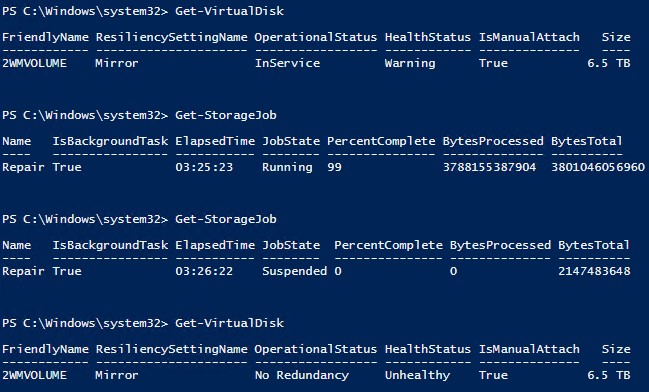
I run Get-PhysicalDisk and all physical disks were healthy.
The same I got in iDRAC Storage \ Physical Disks.
I tried to perform the steps described here https://learn.microsoft.com/en-us/windows-server/storage/storage-spaces/troubleshooting-storage-spaces
It didn't help.
The I came across this article http://kreelbits.blogspot.com/2018/04/s2d-recovering-detached-virtual-disk.html
Unfortunately, following it didn't give any results either.
Finally, I read this article http://kreelbits.blogspot.com/2018/05/the-case-against-2-node-s2d-solutions.html
I run Get-Physical | Get-StorageReliabilityCounter and got this.

Eventually I had to evacuate all VMs to another spare host, reset physical disks, replace those disks with ReadErrorsUncrorrected and rebuild S2D.
Now that it is the past I just have a question why S2D storage is susceptible to the errors marked as ReadErrorsUncorrected in Get-Physical | Get-StorageReliabilityCounter cmdlet output?
Answer accepted by question author

Hi,
Thank you for your posting!
And as I said before, "When you see values other than 0 under ReadErrorsUncorrected, it does not necessarily mean that your physical disk fails. " In other words, although it should be 0 theoretically, the numbers themselves are not so important. But the rate of increase could be a good indicator that a drive should be replaced. If the one disk with 500 has been in service longer and is slowly and steadily reporting errors, that would be less concerning than if it suddenly went from 0 to 500 over the past couple of days IMO. Here is an article that may be helpful for you to better understand this value:
https://www.backblaze.com/blog/what-smart-stats-indicate-hard-drive-failures/
Please note: Information posted in the given link is hosted by a third party. Microsoft does not guarantee the accuracy and effectiveness of information.
In addition, if you want to get better undertanding of the rate to error, with PowerShell, you may only can judge the rate of error based on duration. PowerShell is not enough, and you may have to install some third-party tools to run some tests and compare the results.
Thank you for your support! Could you help "Accept Answer" so other people who have the same confusion with your can find their solutions more quickly.
Best regards
Joan
--------------------------------------------------------------------------------------------------------------------
If the Answer is helpful, please click "Accept Answer" and upvote it.
Note: Please follow the steps in our documentation to enable e-mail notifications if you want to receive the related email notification for this thread.
Hi @JiayaoZhu ,
Thanks for your reply.
My question, however, was why S2D storage is susceptible to those errors while disks themselves are healthy.
The question may sound rhetorical if I put it differently for S2D storage should all physical disks have 0 ReadErrorsUncorrected?
Hi,
Thank you for your posting!
Firstly, I suppose that your confusion can be stated as: what are the differences between Get-PhysicalDisk and Get-PhysicalDisk | Get-StorageReliabilityCounter, more importantly, why the errors that cannot be detected by Get-PhysicalDisk, can be detected by Get-PhysicalDisk | Get-StorageReliabilityCounter?
The differences between these two commands:
1) Get-PhysicalDisk | Get-StorageReliabilityCounter: this command passes the information got from Get-PhysicalDisk to Get-StorageReliabilityCounter using the pipeline operator. It provides more powerful information about your physical disks, more specifically, the cmdlet that gets the reliability counters for the specified disk, including the device temperature, errors, wear, and length of time the device has been in use.
2) When you see values other than 0 under ReadErrorsUncorrected, it does not necessarily mean that your physical disk fails. However, you do need to keep alarmed when the value keeps booming. When you encounter this booming, changing your physical disks can be one of the most appropriate ways to deal with your issue, especially when you have tried other solutions.
More information about the commands and how to use them can be seen from:
https://learn.microsoft.com/en-us/powershell/module/storage/get-storagereliabilitycounter?view=windowsserver2019-ps
(Please note: Information posted in the given link is hosted by a third party. Microsoft does not guarantee the accuracy and effectiveness of information.)
Thank you for your time!
Best regards
Joan
If the Answer is helpful, please click "Accept Answer" and upvote it.
Note: Please follow the steps in our documentation to enable e-mail notifications if you want to receive the related email notification for this thread.