Microsoft 365 and Office | SharePoint Server | For business
A family of Microsoft on-premises document management and storage systems.

This browser is no longer supported.
Upgrade to Microsoft Edge to take advantage of the latest features, security updates, and technical support.
Hello,
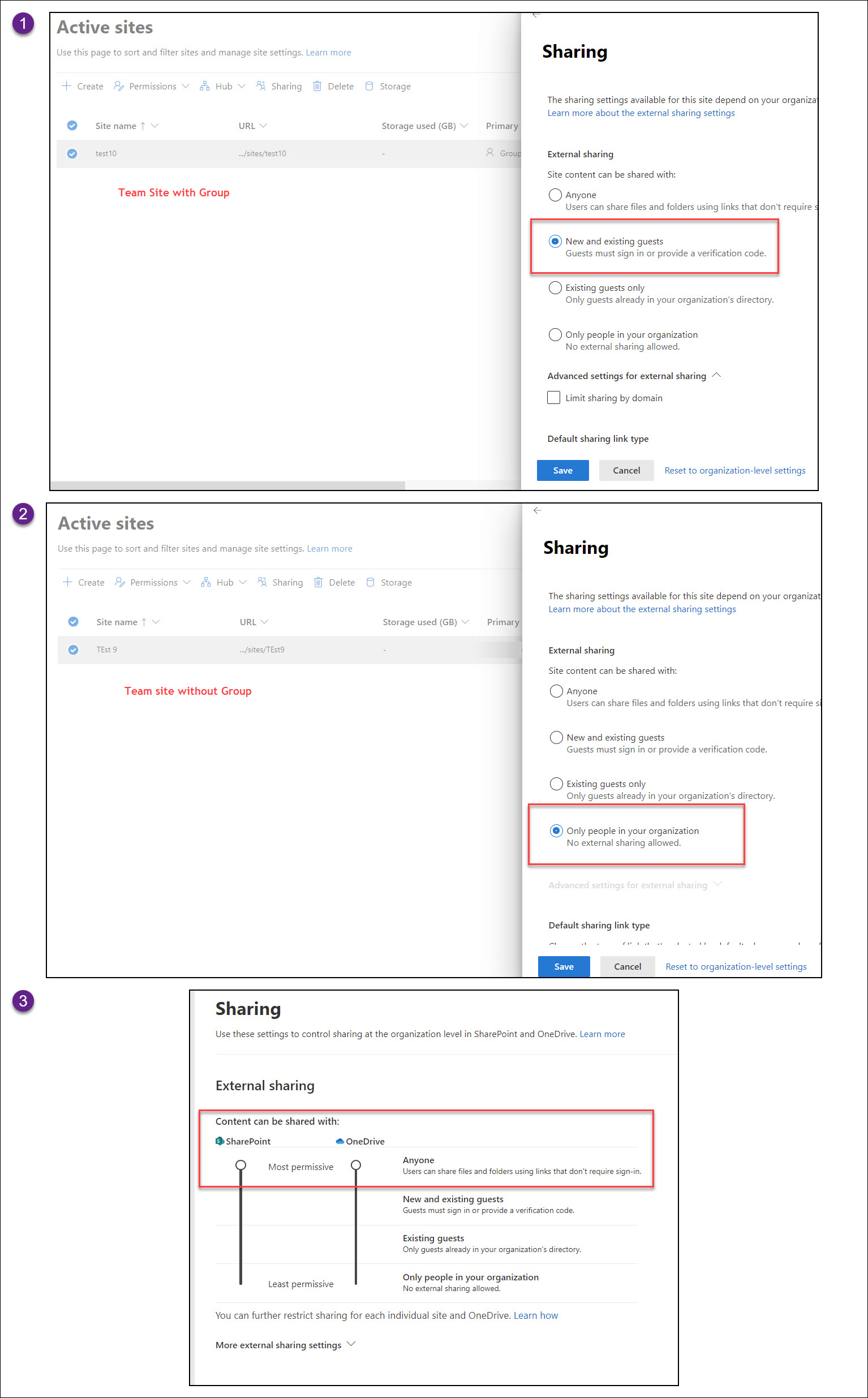
I want to set the SharePoint "External Sharing" default to "Only people in your organization" when we create a Teamsite. And I've set to most permissive settings and tried to create 2 Team sites one with group and one without group but the behavior is different. Can you please advise why ?
Site without group: Showing correctly "Only people in your org"
Site with group: showing as "New and existing guests"
Basically when you create a site either way the ext sharing must set to "Only people in your organization"
PFA for reference
A family of Microsoft on-premises document management and storage systems.
A group of Microsoft Products and technologies used for sharing and managing content, knowledge, and applications.
Answer accepted by question author

Hi @SR VSP ,
I could also reproduce this scenario in my tenant, the External Sharing was set to "New and existing guests" when creating a Team Site with group. As far as I know, It is by default in SharePoint Online and currently there is not any kind of workaround to change the default option form "New and existing guests" to "Only people in your organization".
I found a user voice which has the same requirement as you: Set the external sharing for team site when creating team sites. You can upvote it there. It is a place for customers provide feedback about Microsoft SharePoint products. What's more, if a feedback is high voted there by other customers, it will be promising that Microsoft Product Team will take it into consideration when designing the next version in the future.
If an Answer is helpful, please click "Accept Answer" and upvote it.
Note: Please follow the steps in our documentation to enable e-mail notifications if you want to receive the related email notification for this thread.
Is there any update?I am willing to hear from you.
If you think my suggestion is helpful, you could mark it as an answer. It will help others who meet the similar question in this forum. Also others will directly see the answer.
' cx='32' cy='32' r='32' /%3E%3Ctext x='50%25' y='55%25' dominant-baseline='middle' text-anchor='middle' fill='%23FFF' %3EAB%3C/text%3E%3C/svg%3E)
Hi,
In our tenant, External Sharing is set to "New and existing guests" in the SharePoint Admin Center.
We've noticed that when users in our organization create new SharePoint sites or Teams channels, it triggers the "External sharing settings changed." alert policy in the Microsoft Defender.
Is this expected behavior? Why this trigger, even when the overall tenant settings haven't been changed?