Original Title: .Net Framework showing error
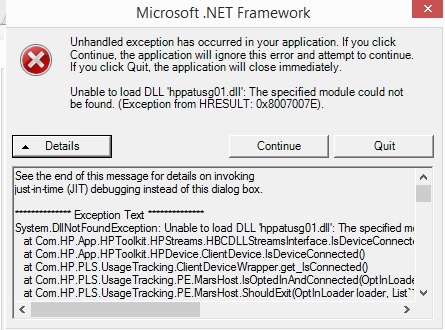
when i click in details showing the following message:
See the end of this message for details on invoking
just-in-time (JIT) debugging instead of this dialog box.
************** Exception Text **************
System.DllNotFoundException: Unable to load DLL 'hppatusg01.dll': The specified module could not be found. (Exception from HRESULT: 0x8007007E)
at Com.HP.App.HPToolkit.HPStreams.HBCDLLStreamsInterface.IsDeviceConnected(String pPortName)
at Com.HP.App.HPToolkit.HPDevice.ClientDevice.IsDeviceConnected()
at Com.HP.PLS.UsageTracking.ClientDeviceWrapper.get_IsConnected()
at Com.HP.PLS.UsageTracking.PE.MarsHost.IsOptedInAndConnected(OptInLoader loader, List`1 proxies)
at Com.HP.PLS.UsageTracking.PE.MarsHost.ShouldExit(OptInLoader loader, List`1 proxies)
at Com.HP.PLS.UsageTracking.PE.MarsHost.ShouldExit()
at Com.HP.PLS.UsageTracking.PE.App.OnMainTimer(Object sender, EventArgs e)
at System.Windows.Forms.Timer.OnTick(EventArgs e)
at System.Windows.Forms.Timer.TimerNativeWindow.WndProc(Message& m)
at System.Windows.Forms.NativeWindow.Callback(IntPtr hWnd, Int32 msg, IntPtr wparam, IntPtr lparam)
************** Loaded Assemblies **************
mscorlib
Assembly Version: 2.0.0.0
Win32 Version: 2.0.50727.8009 (FX35W81RTMGDR.050727-8000)
CodeBase: file:///C:/Windows/Microsoft.NET/Framework/v2.0.50727/mscorlib.dll
hppusg
Assembly Version: 1.1.0.1
Win32 Version: 1.1.0.1
CodeBase: file:///C:/Program%20Files%20(x86)/HP/HP%20UT/bin/hppusg.exe
Microsoft.VisualBasic
Assembly Version: 8.0.0.0
Win32 Version: 8.0.50727.8007 (FX35W81RTMGDR.050727-8000)
CodeBase: file:///C:/WINDOWS/assembly/GAC_MSIL/Microsoft.VisualBasic/8.0.0.0__b03f5f7f11d50a3a/Microsoft.VisualBasic.dll
System
Assembly Version: 2.0.0.0
Win32 Version: 2.0.50727.7905 (win9rel.050727-7900)
CodeBase: file:///C:/WINDOWS/assembly/GAC_MSIL/System/2.0.0.0__b77a5c561934e089/System.dll
HPTools
Assembly Version: 5.1.0.1
Win32 Version: 5.1.0.1
CodeBase: file:///C:/Program%20Files%20(x86)/HP/HP%20UT/bin/HPTools.DLL
System.Windows.Forms
Assembly Version: 2.0.0.0
Win32 Version: 2.0.50727.8008 (FX35W81RTMGDR.050727-8000)
CodeBase: file:///C:/WINDOWS/assembly/GAC_MSIL/System.Windows.Forms/2.0.0.0__b77a5c561934e089/System.Windows.Forms.dll
System.Drawing
Assembly Version: 2.0.0.0
Win32 Version: 2.0.50727.8007 (FX35W81RTMGDR.050727-8000)
CodeBase: file:///C:/WINDOWS/assembly/GAC_MSIL/System.Drawing/2.0.0.0__b03f5f7f11d50a3a/System.Drawing.dll
System.Runtime.Remoting
Assembly Version: 2.0.0.0
Win32 Version: 2.0.50727.8003 (FX35W81RTMGDR.050727-8000)
CodeBase: file:///C:/WINDOWS/assembly/GAC_MSIL/System.Runtime.Remoting/2.0.0.0__b77a5c561934e089/System.Runtime.Remoting.dll
System.Configuration
Assembly Version: 2.0.0.0
Win32 Version: 2.0.50727.8007 (FX35W81RTMGDR.050727-8000)
CodeBase: file:///C:/WINDOWS/assembly/GAC_MSIL/System.Configuration/2.0.0.0__b03f5f7f11d50a3a/System.Configuration.dll
System.Xml
Assembly Version: 2.0.0.0
Win32 Version: 2.0.50727.8009 (FX35W81RTMGDR.050727-8000)
CodeBase: file:///C:/WINDOWS/assembly/GAC_MSIL/System.Xml/2.0.0.0__b77a5c561934e089/System.Xml.dll
HPUsageTracking
Assembly Version: 1.1.0.1
Win32 Version: 1.1.0.1
CodeBase: file:///C:/Program%20Files%20(x86)/HP/HP%20UT/bin/HPUsageTracking.DLL
interop.hpqusg
Assembly Version: 130.0.287.0
Win32 Version: 130.0.287.0
CodeBase: file:///C:/Program%20Files%20(x86)/HP/HP%20UT/bin/interop.hpqusg.DLL
HPToolkit
Assembly Version: 5.1.0.1
Win32 Version: 5.1.0.1
CodeBase: file:///C:/Program%20Files%20(x86)/HP/HP%20UT/bin/HPToolkit.DLL
emrbkddy
Assembly Version: 5.1.0.1
Win32 Version: 2.0.50727.7905 (win9rel.050727-7900)
CodeBase: file:///C:/WINDOWS/assembly/GAC_MSIL/System/2.0.0.0__b77a5c561934e089/System.dll
Enumeration
Assembly Version: 5.1.0.1
Win32 Version: 5.1.0.1
CodeBase: file:///C:/Program%20Files%20(x86)/HP/HP%20UT/bin/Enumeration.DLL
System.Runtime.Serialization.Formatters.Soap
Assembly Version: 2.0.0.0
Win32 Version: 2.0.50727.8008 (FX35W81RTMGDR.050727-8000)
CodeBase: file:///C:/WINDOWS/assembly/GAC_MSIL/System.Runtime.Serialization.Formatters.Soap/2.0.0.0__b03f5f7f11d50a3a/System.Runtime.Serialization.Formatters.Soap.dll
5hmdtihz
Assembly Version: 5.1.0.1
Win32 Version: 2.0.50727.7905 (win9rel.050727-7900)
CodeBase: file:///C:/WINDOWS/assembly/GAC_MSIL/System/2.0.0.0__b77a5c561934e089/System.dll
cewthxxf
Assembly Version: 5.1.0.1
Win32 Version: 2.0.50727.7905 (win9rel.050727-7900)
CodeBase: file:///C:/WINDOWS/assembly/GAC_MSIL/System/2.0.0.0__b77a5c561934e089/System.dll
HPStreamsInterface
Assembly Version: 5.1.0.1
Win32 Version: 5.1.0.1
CodeBase: file:///C:/Program%20Files%20(x86)/HP/HP%20UT/bin/HPStreamsInterface.DLL
************** JIT Debugging **************
To enable just-in-time (JIT) debugging, the .config file for this
application or computer (machine.config) must have the
jitDebugging value set in the system.windows.forms section.
The application must also be compiled with debugging
enabled.
For example:
<configuration>
<system.windows.forms jitDebugging="true" />
</configuration>
When JIT debugging is enabled, any unhandled exception
will be sent to the JIT debugger registered on the computer
rather than be handled by this dialog box.
please help me to solve the error...
' cx='32' cy='32' r='32' /%3E%3Ctext x='50%25' y='55%25' dominant-baseline='middle' text-anchor='middle' fill='%23FFF' %3EA%3C/text%3E%3C/svg%3E)
