Switch to Firefox and use AdBlock Plus, with its companion add-on, the Element Hiding Helper. When I first saw that annoying banner at the bottom of the page, I selected it for blocking with EHH and I haven't seen it since. It took less than 10 seconds.
I also used EHH to block the Facebook, Twitter and Skype links in the "Service Stripe". This is my page:
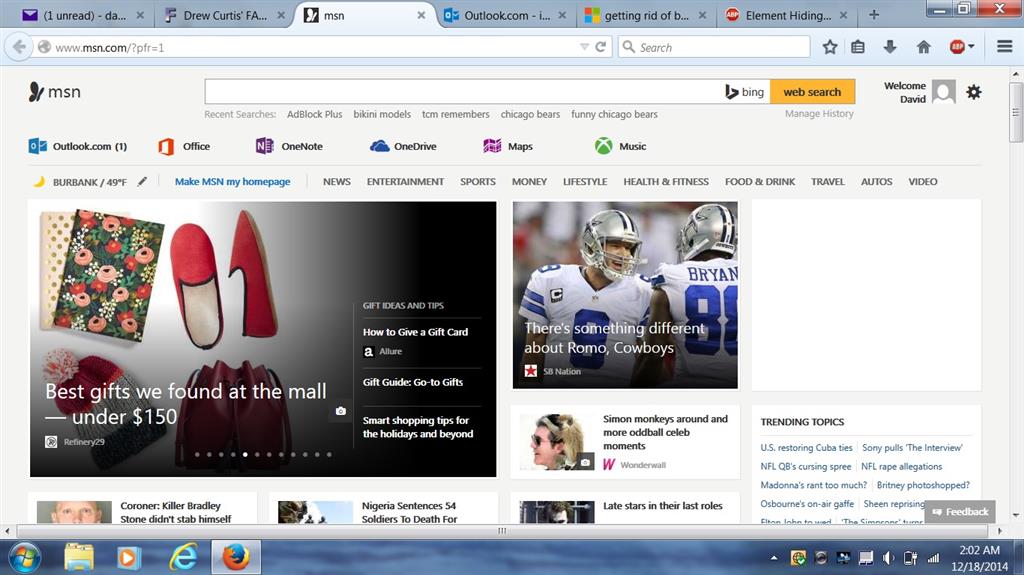
Notice there is no banner along the bottom and no links to those unwanted sites in the service stripe. Keep in mind that the filters take about 10 seconds to kick in when you first open your browser, but thereafter will continue to block unwanted content
as long as your browser remains open.
Blocking these elements requires BOTH ABP and EHH, which can both be found in the Mozilla Firefox add-ons menu once you install Firefox. Should you want to stick with IE,
here is the link to ABP ... and
here is the link to EHH.
I can't vouch for how well they work with IE, but they work great with Firefox.
' cx='32' cy='32' r='32' /%3E%3Ctext x='50%25' y='55%25' dominant-baseline='middle' text-anchor='middle' fill='%23FFF' %3EA%3C/text%3E%3C/svg%3E)
