Hi,
First of all: I should mention these things:
- I have enabled the streaming media in Windows Media Player installed on the Windows 7 with my HP laptop.
- I set up and organized my media libraries in Windows Media Player.
- I selected the option 'Automatically allow devices to play my media.
- I installed a player client software('AnDLNA') on the Android mobile phone to play the Digital Media included in Windows Media Player on my HP laptop.
- All digital media are played well on the Android mobile while HP laptop hosting digital media is powered and connected to the wireless router.
- My HP laptop was connected to the same wireless router.
- Another Android mobile phone was also connected to the same wireless router.
- While the Android mobile was connected to the Wireless router, and my HP laptop was connected as well, I
was normally searching on Google using my Windows 7 with the HP laptop. However,
once the android mobile phone got disconnected, I began facing this error below. The error showed to me with searching on Google with all browsers.
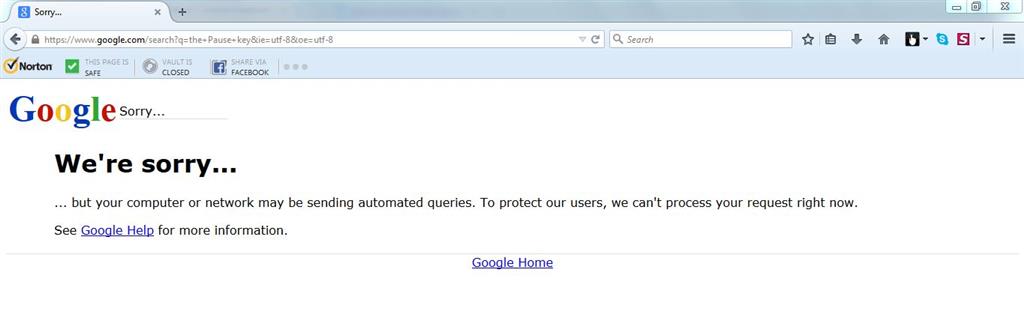
'your computer or network may be sending automated queries'
There is no CAPTCHA (a squiggly word with a box below it), asking me to continue using Google, type the squiggly word into the box.
This error page most likely shows me without a CAPTCHA (a squiggly word with a box below it).
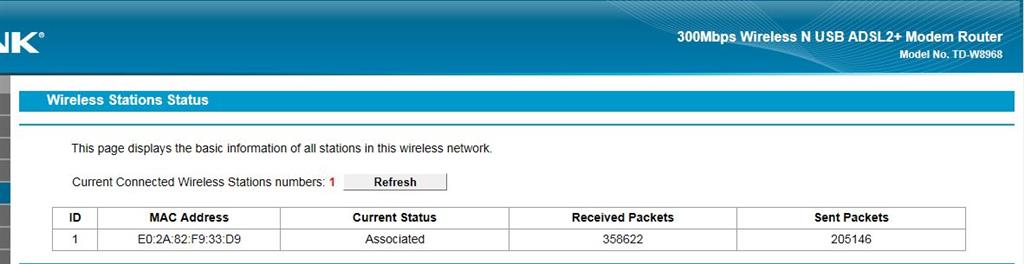
This screen shot shows that my HP laptop was only connected to the Wireless router:
I have realized that the problem might be caused by the Android mobile, especially once it got disconnected wirelessly, I faced the error above.
Thus, to solve the error message shown to me on searching on Google once the Android got disconnected, I had to
disconnect my wireless HP laptop, and then reconnected it again to the same wireless router. Then, I got searching normally on Google.
I did these steps below again, to only be quite sure that while the Android mobile was connected, I would be searching normally on Google, however, once Android got disconnected, I would be facing the error::::::
First: I have connected the Android mobile again to the same router, and then playing the some digitel media on the Android via Player client called 'AnDLNA'
Second: I have researched on Google using my HP laptop, and I didn't face any error while the Android was connected.
Third: I disconnected the Android mobile, my HP laptop as well. Then, I redisconnected my HP laptop to the wireless router, then I tried searching again on Google, then I searched normally on Google.
According to the details above, my questions are:
First: Why was I searching normally on Google using my HP laptop while Android was connected, however, once it got disconnected, I faced that error?
Finally: Why have I had to disconnect my HP laptop and reconnect it again to solve that error showing me once Android disconnected?
Moreover,(This is not necessary since I think that I got the solution)
- I have read in the Google help, these information below, bu all of them were not helpful at all since I
- I am connected to my own wireless router, on a home network.
- I have scanned my laptop with Malware and nothing were detected.
- I rested my router, but it didn't help me.
Troubleshoot if you don’t see a CAPTCHA
If you don't see a CAPTCHA, try these steps in order:
Check for malware on your computer. Malware is malicious software that can be installed on your computer without your knowledge. Some malware can cause Google to show this message. Learn how to detect and remove malware.
Contact your network administrator. If you share a Wi-Fi network with others, like at a school or business, another computer in your network may be sending automated searches to Google. Your network administrator or IT professional may be able to locate
and stop the source of the automated traffic.
Reset your modem or router. If you don’t have a network administrator, try resetting your modem or router to see if that fixes the issue.
If the problem keeps happening, or you don’t share a network with others, contact us. We’ll follow up if we need more information, or if we have something to report back.
Once the automated searches have stopped, you should be able to search normally on Google.
' cx='32' cy='32' r='32' /%3E%3Ctext x='50%25' y='55%25' dominant-baseline='middle' text-anchor='middle' fill='%23FFF' %3EA%3C/text%3E%3C/svg%3E)
