Share via

How do I fix the "Audio Service is not running" error?

Anonymous
2015-03-17T14:27:21+00:00

I've got a somewhat older HP Pavilion Elite desktop computer, which I have Windows 8.1 Pro installed on. This morning when I tried to log into it, it refused to respond to anything at all. The mouse did nothing; pressing any key on the keyboard resulted in nothing. Finally I decided the only thing left to me was to do a hard shut down.

Once it came back up I was able to log in, but all is not right with this machine. The speaker icon in the system tray in desktop mode has a red "X" on it. Passing my mouse over it I get the error message, "The Audio Service is not running". I searched online for how to resolve this problem (apparently it happens quite frequently) and the first few responses was to either reinstall the audio drivers or go to the manufacturer's website download them and install them. Not knowing what the manufacturer is I got into Device Manager to see what it says. Device Manager is convinced that everything is fine; the drivers are working perfectly. But I'm seeing the error in the system tray. But Device Manager is convinced that everything is fine; the drivers are working perfectly. But I'm seeing the error in the system tray. But Device Manager is convinced that everything is fine; the drivers are working perfectly. But I'm seeing the error in the system tray. But Device Manager is convinced that everything is fine; the drivers are working perfectly. But I'm seeing the error in the system tray. But Device Manager is convinced that everything is fine; the drivers are working perfectly. But I'm seeing the error in the system tray. But Device Manager is convinced that everything is fine; the drivers are working perfectly. But I'm seeing the error in the system tray. But Device Manager is convinced that everything is fine; the drivers are working perfectly. But I'm seeing the error in the system tray. But Device Manager is convinced that everything is fine; the drivers are working perfectly. But I'm seeing the error in the system tray. But Device Manager is convinced that everything is fine; the drivers are working perfectly. But I'm seeing the error in the system tray. But Device Manager is convinced that everything is fine; the drivers are working perfectly. But I'm seeing the error in the system tray. But Device Manager is convinced that everything is fine; the drivers are working perfectly. But I'm seeing the error in the system tray. But Device Manager is convinced that everything is fine; the drivers are working perfectly. But I'm seeing the error in the system tray. But Device Manager is convinced that everything is fine; the drivers are working perfectly. But I'm seeing the error in the system tray. But Device Manager is convinced that everything is fine; the drivers are working perfectly. But I'm seeing the error in the system tray. But Device Manager is convinced that everything is fine; the drivers are working perfectly. But I'm seeing the error in the system tray. But Device Manager is convinced that everything is fine; the drivers are working perfectly. But I'm seeing the error in the system tray. But Device Manager is convinced that everything is fine; the drivers are working perfectly. But I'm seeing the error in the system tray. But Device Manager is convinced that everything is fine; the drivers are working perfectly. But I'm seeing the error in the system tray. But Device Manager is convinced that everything is fine; the drivers are working perfectly. But I'm seeing the error in the system tray. But Device Manager is convinced that everything is fine; the drivers are working perfectly. But I'm seeing the error in the system tray. But Device Manager is convinced that everything is fine; the drivers are working perfectly. But I'm seeing the error in the system tray. But Device Manager is convinced that everything is fine; the drivers are working perfectly. But I'm seeing the error in the system tray. But Device Manager is convinced that everything is fine; the drivers are working perfectly.

And on and on and on and on it goes. I cannot deal with this schizophrenic behavior that Windows is giving me. What makes it a lot worse is I cannot afford to replace anything at this time. So how do I fix this problem? BTW, the manufacturer is Realtech.

Windows for home | Previous Windows versions | Devices and drivers

Locked Question. This question was migrated from the Microsoft Support Community. You can vote on whether it's helpful, but you can't add comments or replies or follow the question.

0 comments No comments

Answer accepted by question author

Anonymous
2015-03-17T21:21:26+00:00

Try this:

  1. Go to the Start screen, pull up the Charms, and tap/click on Search
  2. Type services.msc. Open the result.
  3. Scroll down and find Windows Audio
  4. Right-click the service, and select Properties. Check the drop-down list to check the Startup type. It should be Automatic.
  5. Start the service if it's not already started.
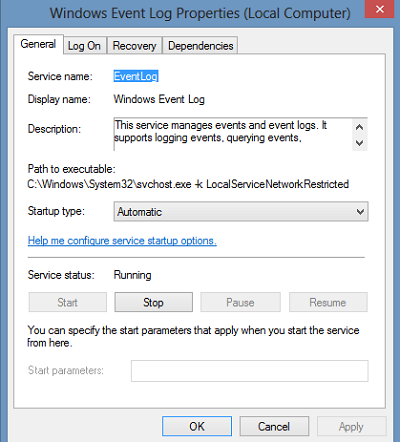
 

Hope this helped, let us know what happens.

Was this answer helpful?

7 people found this answer helpful.
0 comments No comments

2 additional answers

Sort by: Most helpful
  1. Anonymous
    2016-03-11T00:38:06+00:00
    1. Start the service if it's not already started.


    Hope this helped, let us know what happens.

    Mi service Status Reads "Stopping" But it doesn't stop nor restart :( , None of the buttons below the Service status info work, and in the task-bar the audio icon reads "The Audio Service is not Running"

    This happens every time i plug in a usb headphone (logitek g933), but at first it works just fine, and stops after a while, the drivers are up to date and i have the controler program installed.

    This only started about a week after i had reset the pc because the first time i used it i installed and uninstalled the drivers for the headphones and that somehow broke the sound service just like now, except that now the sound works for a while when i just restart the computer

    What should i do? reset it again and then install the drivers again too?

    Here's a screen shot 

    Windows 10 BTW

    Was this answer helpful?

    1 person found this answer helpful.
    0 comments No comments
  2. Anonymous
    2016-03-11T00:35:49+00:00
    1. Start the service if it's not already started.


    Hope this helped, let us know what happens.

    Mi service Status Reads "Stopping" But it doesn't stop nor restart :( , None of the buttons below the Service status info work, and in the task-bar the audio icon reads "The Audio Service is not Running"

    This happens every time i plug in a usb headphone (logitek g933), but at first it works just fine, and stops after a while, the drivers are up to date and i have the controler program installed.

    This only started about a week after i had reset the pc because the first time i used it i installed and uninstalled the drivers for the headphones and that somehow broke the sound service just like now, except that now the sound works for a while when i just restart the computer

    What should i do? reset it again and then install the drivers again too?

    Was this answer helpful?

    0 comments No comments
