Today, I just got the Blue Screen of Death IRQL_NOT_LESS_OR_EQUAL caused by that dreaded ntoskrnl.exe. It's only happened once, but I had to restart again because my internet connection stopped working. I then downloaded BlueScreenView and here's what I
got:
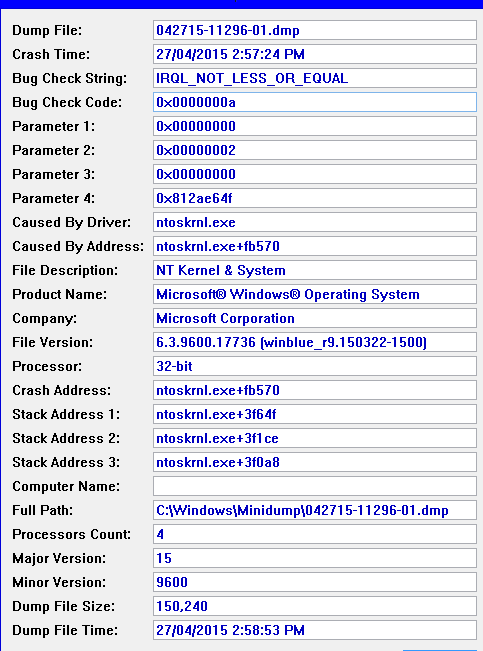
Crash Information
Here's what it said: (Windows XP display)
A problem has been detected and Windows has been shut down to prevent damage
to your computer.
The problem seems to be caused by the following file: ntoskrnl.exe
IRQL_NOT_LESS_OR_EQUAL
If this is the first time you've seen this stop error screen,
restart your computer. If this screen appears again, follow
these steps:
Check to make sure any new hardware or software is properly installed.
If this is a new installation, ask your hardware or software manufacturer
for any Windows updates you might need.
If problems continue, disable or remove any newly installed hardware
or software. Disable BIOS memory options such as caching or shadowing.
If you need to use safe mode to remove or disable components, restart
your computer, press F8 to select Advanced Startup Options, and then
select Safe Mode.
Technical Information:
*** STOP: 0x0000000a (0x00000000, 0x00000002, 0x00000000, 0x812ae64f)
*** ntoskrnl.exe - Address 0x8136a570 base at 0x8126f000 DateStamp 0x550f4146
The crash happened when I was running Classic Shell and I had ticked the box "Disable taskbar transparency." Might that have caused the issue?
' cx='32' cy='32' r='32' /%3E%3Ctext x='50%25' y='55%25' dominant-baseline='middle' text-anchor='middle' fill='%23FFF' %3EA%3C/text%3E%3C/svg%3E)
