Share via

Task scheduler - Condition on time of day

Benjamin J 21 Reputation points
2021-05-04T11:46:14.723+00:00

I want to set a task to run on log on, but only if the time lies in a predefined range, e.g. between 08:00 and 20:00.

Is there a way to do this with task scheduler?

If not, what would be the recommended alternative? Interpose a powershell script and check the time in that?

Background:
I want to set the sound output device (using NirCmd) depending on the time.
The task is triggered at 08:00 and that works, but if I log on at e.g. 09:00, I want it to trigger also then.

Windows for business | Windows Client for IT Pros | User experience | Other
0 comments No comments

Answer accepted by question author

  1. Reza-Ameri 45,811 Reputation points Volunteer Moderator
    2021-05-04T14:47:31.62+00:00

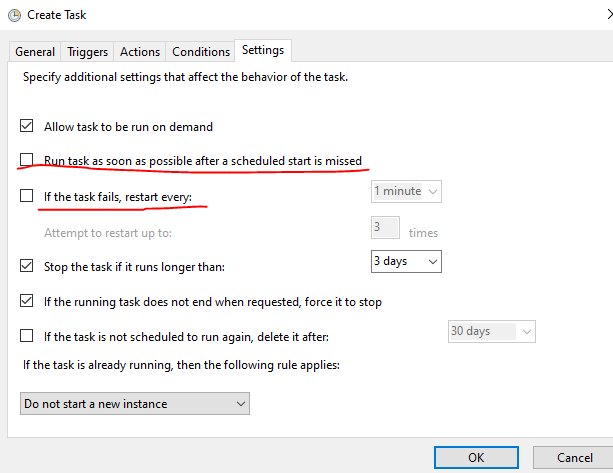
    If you right click on the task and click on Properties then in this menu go to Settings and check the box **Run task as soon as possible after a scheduled start is missed ** and it will perform the task as soon as you start your system and the time have been missed.

    1 person found this answer helpful.

2 additional answers

Sort by: Most helpful
  1. Carl Fan 6,896 Reputation points
    2021-05-05T09:37:19.45+00:00

    Hi,
    Open Task Scheduler.
    Create task
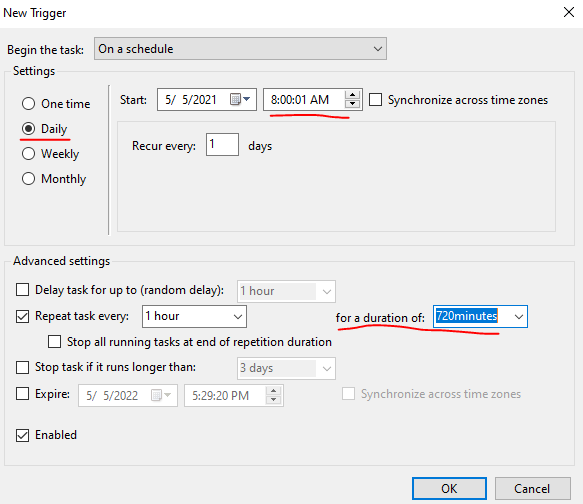
    Triggers tab
    New ...
    Use the following settings
    You don't need to stick with the pre-defined times - you can type into these fields any value you wish.
    93932-capture2.png

    In "for a duration of" you could enter the amount of minutes you want it to run for.
    Also you could select the options under Settings below:
    93952-capture3.png

    Hope this helps and please help to accept as Answer if the response is useful.
    Best Regards,
    Carl

    1 person found this answer helpful.

  2. Ian Watkinson 0 Reputation points
    2025-07-10T08:42:31.14+00:00

    Hey Carl, that starts it at 0800 for example, but how does it stop it later on?

    0 comments No comments

Your answer

Answers can be marked as 'Accepted' by the question author and 'Recommended' by moderators, which helps users know the answer solved the author's problem.