Share via

How to get default Start Menu programs/recent-program-list in Windows 7 Ultimate 64-Bit?

Anonymous
2015-02-12T09:05:25+00:00

How do I get those default programs listed when you click on Start button (single click) (Not in "All Programs") on your left hand side. I actually didnt want those recent items to get saved everytime I opened something so I accidently unticked those Both options in Privacy in Start Menu Properties(one was to save recent programs and second was to save recent items), and what I got was blank white left side in Start Menu with a single click. (All Programs is fine). Now I want that default/factory-built Start Menu programs. How do I get that? I dont want to pin programs manually. I only want that second option in Privacy in Start menu properties unticked so as to get rid of recent items getting saved. I want recent programs to show up in start menu which I am able to see as soon as I use any program but what I want is those factory default programs in Start Menu. I have tried start menu>properties>customize>use-default-settings but that didnt work. Have googled almost many things but didnt work. I dont want to format and reinstall Win7 as I have just installed Win7 recently. I hope my question is clear in detail to be understood. If someone could please help on this, I would really appreciate!!! Thanks.

Windows for home | Previous Windows versions | Accessibility

Locked Question. This question was migrated from the Microsoft Support Community. You can vote on whether it's helpful, but you can't add comments or replies or follow the question.

0 comments No comments

2 answers

Sort by: Most helpful
  1. Anonymous
    2015-02-12T09:25:13+00:00

    You can either enable or disable the recent programs list from Taskbar and Startmenu Propteries, but when you disable those, the list gets cleared automatically. Again if you enable them, the programs originally present will not be restored (the default programs in your case). This is because, after enabling recent programs, no programs have been opened by you.

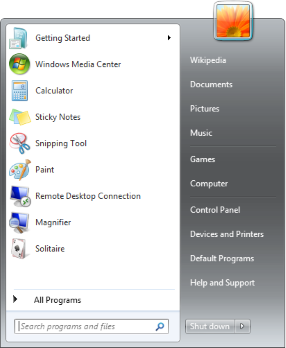
    One thing I can suggest is, for the default programs like Calculator, you right click on each program and click on Pin to start menu. This will make the program present in the start menu, with recent programs being disabled. Again, those default programs will not be restored. You can find a list of default programs in the following image, which you can manually search and pint to start menu:
    Was this answer helpful?

    1 person found this answer helpful.
    0 comments No comments
  2. Anonymous
    2015-02-12T10:39:06+00:00

    ohk Balaji, thanks for your kind response. ohhhh so its not possible to restore. No worries I will pin my preferred programs there then. I guess I will do it manually. thanks anywayz.

    Was this answer helpful?

    0 comments No comments
